JSP 쇼핑몰 만들기
54. 게시판 - 전체글보기 이해
카운터링의 알고리즘은 대부분 같아서 모르면 외우자.
먼저 가정을 해야한다.
총 게시글이 184개가 있다고 가정해보자.
처음 게시글을 열었다고 가정을 해보자.
int pageSize = 10;
현재 pageNum를 기준으로 넘어온다.
처음에 pageNum null인데 1이라는 기본값을 주기로 약속했다.
int count = 0; //전체글의 개수를 저장하는 변수
int currentPage = Integer.parseInt(pageNum); 즉= 1
currentPage는 pageNum를 파싱한것임.
count = 184개
int startRow = (currentPage -1) * pageSize + 1;
// 1-1 * 10 + 1 = 1
int endRow = currentPage * pageSize;
//10 * 1 = 10
-> 110 1120 21~30이런식으로 가게된다.
int number = 0; //페이지 넘버링변수
number = count - (currentPage - 1) * pageSize;
// 184 - (1 - 1) * 10 첫게시글은 184이다.
지금 우리는 총게시글이 12개니 12번부터~쭉내려가게된다.
페이지 카운터링 소스를 보자.
int pageCount = count / pageSize + (count % pageSize == 0 ? 0 : 1);
pageCount를 전체글을 10으로 나눈다. 184 % 10 하면 글4개가 남는것이다.
그래서 나머지가 있으면 1을 더해주면 19페이지가 된다.
int startPage = 1; 시작페이지 1
if (currentPage % 10 != 0){
startPage = (int) (currentPage / 10) * 10 + 1;
} else{
startPage = ((int) (currentPage / 10) -1 ) * 10 + 1;
}
현재 currentPage 1이다. 0 * 10 +1 하고
currentPage가 10단위면 (1 - 1) *10 + 1페이지이다.
시작페이지는 1페이지 / 11 / 21 ...의 등차수열로 가게된다.
int pageBlock = 10; //카운터링 처리 숫자
int endPage = startPage + pageBlock -1 ; 즉 = 10
endpage는 시작페이지 + 우리가 보여줄 페이지개수 -1 해주면된다.
10 20 30...
if (endPage > pageCount) {
endPage = pageCount;
}
endPage가 pageCount보다 커지면 마지막페이지를 pageCount로 해주기(마지막글의 페이지)
if (startPage > 10){
%>
<a href="BoardList.jsp?pageNum=<%= startPage - 10%>">[이전]</a>
<%
}
//페이징 처리
for(int i = startPage; i <= endPage; i++){
%>
<a href="BoardList.jsp?pageNum=<%= i %>">[<%=i %>]</a>
<%
}
//다음이라는 링크를 만들건지 파악
if (endPage < pageCount){
%>
<a href="BoardList.jsp?pageNum=<%= startPage+10 %>">[다음]</a>
<%
}
}
%>
startPage가 10보다 크면 [이전] 버튼 출력하고 버튼누르면 -10한 값으로 가기
즉 21페이지면 11페이지로 가짐
그리고 반복문으로
1~엔드페이지까지 주르륵 만들어줌
그리고 endPage가 pageCount보다 작으면 [다음] 버튼 출력해줌
그리고 누르면 11페이지에서 21페이지로 가진다.
내가 작성한 것의 경우 pageCount가 2이다.
1페이지의 경우 endPage 10인데
endPage > pageCount가이니 endPage=pageCount가 되고 다음 버튼도 없다.
반복도 2번만해서 [1] [2]가 된다.
개발자가 된다면 게시판은 매우 기본적인 것이다.
55. 쇼핑몰 - 개발 요구사항 정리
간단한 쇼핑몰의 요구사항을 정의해보자.
db와 연동 구조 이해하기
쇼핑몰의 구조
개인 렌터카 예약서비스
top
sm렌트카
예약하기 예약확인 자유게시판 이벤트 고객센터 로그인
center
bottom
Rentmain에는 top과 bottom은그래로고 center만 바뀌는 것을 만들 것이다.
소형 중형 대형 카테고리 구분하기
전체리스트 보여주고 개별적을 선택하면 예약하기 등등
본인의 아이디패스워드로 예약됫는지 안됫는지 확인하는 예약확인 서비스 등등
이벤트 이벤트 안내하기
고객센터 위치 주소 등 표현
장바구니 기능 실제 구매하면 금액만 띄우기
자동자 정보 테이블 오더 컨펌 예약확인 테이블 만들어야한다.
55.1 페이지 준비
top center bottom rentcarmain준비하기
55.2 커넥션풀 준비
컨텍스트에 데이터 리소스사용하는 것을 설정해준다.
<Context docBase="JSP1" path="/JSP1" reloadable="true" source="org.eclipse.jst.jee.server:JSP1">
    <Resource name="jdbc/pool" auth="Container" type="javax.sql.DataSource"
    driverClassName="com.mysql.cj.jdbc.Driver" loginTimeout="10" maxWait="5000"
    username = "chun" password="1234" url="jdbc:mysql://localhost:3306/jspshop"
    />
</Context>
55.3 DAO클래스 만들어주기
db패키지에 DAO만들어주자.
public class RentcarDAO {

    Connection con;
    PreparedStatement psmt;
    ResultSet rs;

    //커넥션 풀을 이용한 데이터베이스 연결
    public void getCon() {

        try {
            Context initct = new InitialContext();
            Context envctx = (Context) initct.lookup("java:comp/env");
            DataSource ds = (DataSource) envctx.lookup("jdbc/pool");

            con = ds.getConnection();

        } catch (Exception e) {
            e.printStackTrace();
        }
    }

}
56 테이블 설정 & 빈클래스 작성
테이블에 해당하는 빈클래스를 만들어줘야한다.
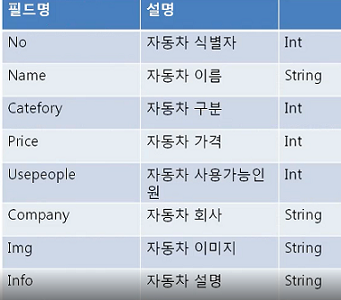
RENTCAR이니 미리 데이터가 들어가 있어야한다.
테이블에 맞는 빈 클래스도 만들어주어야한다.
public class CarListBean {
    private int no;
    private String name;
    private int category;
    private int price;
    private int usepeople;
    private String company;
    private String img;
    private String info;
    //getter setter들
}
57. Top ,Center, Bottom, RentcarMain
프로그램을 완성해보자.
57.1 Top
TOP은 사진 / 로그인 링크들이 모여잇는 TR두개만들자.
<!-- 세션을 이용한 로그인 처리 -->
<%
    String id = (String) session.getAttribute("id");
    //로그인이 되어 있지 않다면
    if (id == null){
        id = "GUEST";
    }

%>

<div align="center">
    <table>
        <tr height="70">
            <td colspan="4">
                <img src="img/RENT.png"  height="65"/>
            </td>
            <td width="200px" align="center">
                <%= id %> 님 반갑습니다.
            </td>
        </tr>

        <tr height="50">
            <td align="center" width="200" bgcolor="red">
                <font size="5"><a href="#">예약하기</a></font>
            </td>

            <td align="center" width="200" bgcolor="red">
                <font size="5"><a href="#"> 예약확인 </a></font>
            </td>

            <td align="center" width="200" bgcolor="red">
                <font size="5"><a href="#">자유게시판</a></font>
            </td>

            <td align="center" width="200" bgcolor="red">
                <font size="5"><a href="#">이벤트</a></font>
            </td>

            <td align="center" width="200" bgcolor="red">
                <font size="5"><a href="#">고객센터</a></font>
            </td>
        </tr>
    </table>
</div>
57.2 bottom
bottom은 그냥쓰기
<!--Bottom-->
<table>
    <tr height = "100">
        <td align = "center">
        <hr color="red" size="3"/>
        이용약관
        이메일무단수집거부
        개인정보처리방침
        영상정보처리기기 운영관리방침
        아이디어 정책
        Copyright. SAMSUNG ELECTRO-MECHANICS All rights reserved.
        삼성전기(주)대표이사 경계현사업자등록번호 124-81-00979
        경기도 수원시 영통구 매영로 150 (매탄동)
        </td>
    </tr>
</table>
3# 58. Top ,Center, Bottom, RentcarMain
Center 와 RentcarMain을 만들어보자.
58.1 Center
<div align="center">
    <table>
        <tr height = "500">
            <td align="center">
                <img src="img/Main.jpg" width="1000" alt="" />
            </td>
        </tr>
    </table>
</div>
58.2 RentcarMain
처음 실행시에는 center값이 넘어오지 않기에 null처리하고 Center.jsp를 넣어주자.
<%
    String center = request.getParameter("Center");
    //처음 실행시에는 center값이 넘어오지 않기에 null처리
    if (center == null){
        center = "Center.jsp";
    }
%>
<div align="center">
    <table>
        <!-- Top -->
        <tr height="140" align="center">
            <td align="center" width="1000px"><jsp:include page="Top.jsp"/></td>
        </tr>

        <!-- center -->
        <tr align="center">
            <td align="center" width="1000px"><jsp:include page="<%=center %>"/></td>
        </tr>

        <!-- bottom -->
        <tr height="140" align="center">
            <td align="center" width="1000px"><jsp:include page="Bottom.jsp"/></td>
        </tr>
    </table>
</div>
2023.03.28 후기
페이징 부분은 계속해서 사용하게 될 것이다. 잘 기억해두자.
'기초단계 > JSP&Servlet' 카테고리의 다른 글
| 2023.04.01 JSP (0) | 2023.04.02 |
|---|---|
| 2023.03.29 JSP (0) | 2023.03.29 |
| 2023.03.27 JSP (0) | 2023.03.27 |
| 2023.03.26 JSP (0) | 2023.03.26 |
| 2023.03.25 JSP (0) | 2023.03.26 |