63일차

테이블을 잘마드려다 보니 중복을 제거하는 등의 일을해서
여러 테이블이 만들어졌다
묶어서 조회하는 것이 join이다.

35. leet코드

35.1 문제 175

테이블 두개가 있다. 두개의 테이블을 JOIN하여 조회하기

CREATE TABLE Person (
    personId INT PRIMARY KEY,
    lastName VARCHAR(200),
    firstName VARCHAR(200)
);

CREATE TABLE Address (
    addressId INT PRIMARY KEY,
    personId INT, 
    city VARCHAR(200),
    state VARCHAR(200)
);

SELECT p.firstName, p.lastName, a.city, a.state 
FROM Person p LEFT 
JOIN Address a 
ON p.personId = a.personId;

35.2 leet코드 183

두개의 테이블이 있는데 키가 겹치지 않는 데이터를 추출하기
한번도 주문하지 않은 고객 조회하기

CREATE TABLE Customers (
    id INT PRIMARY KEY,
    name VARCHAR(200)
);

CREATE TABLE Orders (
    id INT PRIMARY KEY,
    customerId INT
);

SELECT name Customers 
FROM Customers c 
LEFT JOIN Orders o ON c.id = o.customerId 
WHERE customerId IS NULL ;

35.3 leet코드 181

self join 하나의 테이블을 두개의 테이블처럼 간주하고 join하는 것이다.
같은테이블이라 헷갈릴뿐이지 join하는 것은 똑같다.
다음의 테이블이 있을때 본인의 관리자보다 더 많이 번사람

CREATE TABLE Employee (
    id INT PRIMARY KEY,
    name VARCHAR(200),
    salary INT,
    managerId INT
);

SELECT e1.name Employee FROM Employee e1 
JOIN Employee e2 ON e1.managerId = e2.id 
WHERE e1.salary > e2.salary;

36 서브쿼리

위 문제를 join말고도 다른방법으로도 풀 수있다.

SELECT name Employee 
FROM Employee e1 
WHERE salay > 
(SELECT salay FROM Employee e2 WHERE e2.id = e1.managerId);

어떤 쿼리에 다른 쿼리가 포함되는 경우가 있다.
이런 경우를 서브 쿼리라고 한다.

책 430
서브쿼리는 항상 SELECT문이다.
그리고 항상 괄호 안에 있어야한다.
서브쿼리안의 세미콜론은 존재하지않는다.

서브쿼리는 4군데에 나올수 잇다.
1.WHERE절
2.열 들 중 하나
3.FROM절
4.HAVING 절

서브쿼리는 SELECT뿐만아니라 INSERT DELETE UPDATE와 함께 사용할 수 있다.

1번상품의 카테고리 이름이 무엇인가?

SELECT * FROM Products WHERE ProductID = 1; -- CategoryID 1번
SELECT CategoryName FROM Categories WHERE CategoryID = 1; -- CategoryID 1번의 이름
SELECT CategoryName FROM Categories WHERE CategoryID = (SELECT CategoryID FROM Products WHERE ProductID = 1); 
-- 조건에 CategoryID 1번인 것을 넣기

2번공급자의 나라 와 같은 나라에 사는 고객

SELECT Country FROM Suppliers WHERE SupplierID = 2; -- USA
SELECT * FROM Customers WHERE Country = 'USA';
SELECT * FROM Customers WHERE Country = (SELECT Country FROM Suppliers WHERE SupplierID = 2);

평균 가격보다 높은 가격의 상품들 조회

SELECT * FROM Products 
WHERE Price > (SELECT AVG(Price) FROM Products);

37 서브쿼리 - 2

여러 결과가 나오는 서브쿼리를 사용할때 사용하는 방법을 알아보자.
WHERE 절에 IN을 사용하면된다.

예제 1996-07-04에 주문한 상품명 조회

1.1996-07-04에 주문한 Orderid구하기

SELECT OrderID FROM Orders WHERE OrderDate = '1996-07-04'; 

2.오더가 있는 상품 id구하기

SELECT ProductID FROM OrderDetails 
WHERE OrderID IN (SELECT OrderID FROM Orders WHERE OrderDate = '1996-07-04'); -- 오더가 있는 상품 id구하기

3.상품 이름 구하기

SELECT ProductName FROM Products 
WHERE ProductID IN 
(SELECT ProductID FROM OrderDetails WHERE OrderID IN (SELECT OrderID FROM Orders WHERE OrderDate = '1996-07-04'));

서브쿼리와 JOIN 중 더 맞는 것을 사용하는 것이 좋다.
보통 JOIN이 더빠르다 JOIN이 안되면 서브쿼리를 사용해보자.

38 연습

leet183번 서브쿼리로 풀어보기
훨씬 간단한 문제가 되었다.

SELECT name FROM Customers WHERE id NOT IN (SELECT customerId FROM Orders);

w3schools 데이터베이스
서브쿼리 사용, 주문한적 없는 고객들 조회

SELECT CustomerID FROM Orders; -- 주문한 고객들 조회

SELECT * FROM Customers 
WHERE CustomerID NOT IN 
(SELECT CustomerID FROM Orders); -- NOT IN 주문한 고객들 = 주문안한 고객

39 서브쿼리 - 3

SELECT절에 특정컬럼으로 서브쿼리를 사용할 수 있다.

카테고리id와 상품명을 출력하는데 대신 카테고리 이름이 조회되게 하기

SELECT * FROM Products;
SELECT ProductName, CategoryID FROM Products;
SELECT ProductName, (SELECT CategoryName FROM Categories c WHERE c.CategoryId = p.CategoryId) CategoryName FROM Products p;

연습 상품명, 상품을 공급하는 공급자 명
join과 서브쿼리을 둘다 사용할 수 있다.

SELECT ProductName, 
(SELECT SupplierName FROM Suppliers s WHERE s.SupplierID = p.SupplierID) SupplierName 
FROM Products p;

SELECT ProductName, SupplierName 
FROM Products p 
JOIN Suppliers s ON s.SupplierID = p.SupplierID;

연습 leetcode 175번
firstName, lastName, city, state 조회하기 서브쿼리로 작성해보기

SELECT firstName, lastName, 
(SELECT city FROM Address a WHERE p.personId = a.personId) city, 
(SELECT state FROM Address a WHERE p.personId = a.personId) state 
FROM Person p;

40. 서브쿼리 - 4

FROM절에 서브쿼리를 사용할 수 있다.
SELECT절의 결과에서 또 다른 것을 조회할때 사용한다.
FROM절에 서브쿼리를 사용할때는 별칭을 무조건 붙여줘야한다.
하나의 테이블로 조회할 수 있는데 FROM절에 사용하기 위해 쓸데없는 쿼리가 되었다.

SELECT LastName, FirstName FROM 
(SELECT LastName, FirstName FROM Employees) emp 
WHERE LastName >= 'd' AND LastName < 'e';

고객별 소비 금액을 서브쿼리의 평균 구하기
소비금액 구한 전체가 서브쿼리 그자체가 된다.

SELECT AVG(소비금액) FROM(SELECT c.CustomerID, c.CustomerName, SUM(p.Price * d.Quantity) 소비금액
FROM Orders o JOIN OrderDetails d ON o.OrderID = d.OrderID 
JOIN Customers c ON o.CustomerID = c.CustomerID
JOIN Products p ON d.ProductID = p.ProductID 
GROUP BY c.CustomerID) t1;

연습문제
(직원별 매출액) 평균
직원별 매출액을 구하고 그것의 평균을 내엇다.

SELECT AVG(sum) AVG FROM (SELECT SUM(Quantity * Price) sum FROM Orders o 
JOIN OrderDetails d ON o.OrderID = d.OrderID
JOIN Products p ON p.ProductID = d.ProductID
JOIN Employees e ON e.EmployeeID = o.EmployeeID
GROUP BY e.EmployeeID) st;

카테고리별 평균 상품가격조회(평균상품가격이 30달러 이상인것만)
서브쿼리와 join둘다 사용할 수 있다.

SELECT CategoryID, average FROM 
(SELECT CategoryId, AVG(Price) average FROM Products GROUP BY CategoryID) t1 
WHERE average >= 30.00;

SELECT c.CategoryID, AVG(Price) average FROM Categories c 
JOIN Products p ON c.CategoryID = p.CategoryID 
GROUP BY c.CategoryID HAVING average > 30.00;

41. method = RequestMethod

@RequestMapping어노테이션에 method를 지정해주면 get방식에만 일하게 된다.
POST방식으로 바뀌면 메소드는 일하지 않는다
특정방식의 request에만 일하게 할 수 있다.

@RequestMapping(path = "link1", method = RequestMethod.GET)
    public void method1() {
        System.out.println("/sub25/link1에서 메소드 일함");
    }
}

@RequestMapping(path = "link1", method = RequestMethod.POST)
public void method1() {
    System.out.println("/sub25/link1에서 메소드 일함");
}

42 @GetMapping, @PostMapping

path = "link2", method = RequestMethod.GET이렇게 쓰는것이 너무 길어서 새로 어노테이션이 나왔다.
@GetMapping이 위 역할을 한다.

@GetMapping("link2")
public void method2() {
    System.out.println("/sub25/link2 GET에서 메소드 일함");
}

같은 방식으로 @PostMapping어노테이션을 사용하면 포스트 방식의 일을 처리한다.
@RequestMapping(path = "link3", method = RequestMethod.POST)

@PostMapping("link3")
public void method3() {
    System.out.println("/sub25/link3에서 메소드 일함");
}

43 요청경로에 변수담기

요청 코드의 일부분을 변수를 담아서 사용할 수 있다.
링크에{변수} 넣고 아규먼트에 @PathVariable어노테이션을 달아주면 요청경로에 이 변수가 들어가게 된다.
이런것을 Path Map이라고 한다.

@GetMapping("link4/{var1}")
public void method4(@PathVariable("var1") String p1) {
    System.out.println("var1: " + p1);
}

다음 메소드에서 /sub25/link5/abc/55로 요청하면
id에 abc 나이에 55가 들어가게 된다.

@GetMapping("link5/{id}/{age}")
public void method5(@PathVariable("id") String id,
        @PathVariable("age") int age) {
    System.out.println(id + ", " + age);
}

중간중간 섞어서도 사용할 수 있다.
경로의 일부분을 값인 것처럼 사용할 수 있다.

// /sub25/link6/id/3/name/son
@GetMapping("link6/id/{var1}/name/{var2}")
public void method6(@PathVariable("var1") String id,
        @PathVariable("var2") String name) {
    System.out.println(id + ", " + name);
}

44. redirect

반환타입을 String으로하면 해당주소의 jsp를 찾으려고 한다.
redirect를 하는방법을 알아보자.
기존의 방법처럼 Servlet api를 사용해서 response.sendRedirect할 수도 있다.
스프링을 활용하면 redirect: prefix를 사용하면된다.

결론적으로 그냥 주소를 적으면 forward String 리턴타입으로 prefix를 붙이면 redirect를 할 수 있다.

@GetMapping("link8")
public String method8() {
    return "redirect:/sub25/link7";
}

45. RedirectAttributes

포워드할때는 Model을 통해서 값을 전달했엇는데
redirect에서는 값을 어떻게 전달할까
redirect는 다른 곳으로 가라는 요청이기때문에 Model에 담을 수 없다.

RedirectAttributes객체를 사용해서 값을 넘길 수 있다.
이 객체의 addFlashAttribute메소드를 사용하면 redirect에 데이터를 담아 보낼 수 있다.
JSP에선 EL로 꺼내서 사용할 수 있다.

@GetMapping("link11")
public String method11(RedirectAttributes rttr) {
    rttr.addFlashAttribute("attr1", "redirect attribute!");
    return "redirect:/sub25/link10";
}

두번째 타입이 Object타입이기때문에 아무 객체나 넣을 수 있다.

@GetMapping("link12")
public String method12(RedirectAttributes rttr) {
    rttr.addFlashAttribute("list", List.of("java", "spring"));
    return "redirect:/sub25/link13";
}

@GetMapping("link13")
public void method13() {
}

46 RedirectAttributes - 2

RedirectAttributes객체에 addFlashAttribute메소드를 사용했었다.
addFlashAttribute메소드는 redirect되는 곳에 model attribute를 만들어서 보내는 것이다.

RedirectAttributes객체의 addAttribute메소드는 쿼리스트링으로 붙어서 간다.

@GetMapping("link14")
public String method14(RedirectAttributes rttr) {
// 목적지의 Model Attribute로 넣기
//rttr.addFlashAttribute(null, rttr);

//쿼리 스트링으로 붙어서
rttr.addAttribute("address", "seoul");
return "redirect:/sub25/link15";
// /sub25/link15?address=seoul

}

@RequestParam을 활용해서 값을 꺼내서 사용할 수 있다.

@GetMapping("link15")
public String method15(RedirectAttributes rttr) {
    rttr.addAttribute("email", "123456@email.com");
    rttr.addAttribute("location", "seoul");
    return "redirect:/sub25/link16";
}

@GetMapping("link16")
public void method16(String email, String location) {
    System.out.println("email: " + email);
    System.out.println("location: " + location);
}

결론적으로 RedirectAttributes객체를 잘 활용하면
model에 붙여서 값을 보내거나 requestparam으로 값을 보낼 수 있다.
이 값을 받아와서 잘 활용하면된다.

47 @Autowired

Spring에 관련된 이야기이다.
스프링 프로젝트를 실행하면 메인메소드가 하나 있다.
프로젝트명Application
메인메소드에서
SpringApplication의 run메소드가 실행된다.
이게 실행되면 스프링과 관련된 객체들이 생성된다.

이것들을 Spring Bean이라하고 스프링이 관리하는 객체들이다.

어떤게 스프링이 관리하는 객체들이나면
우리가 제공하거나 스프링이 필요해서 만들어 낼 수 있다.

우리가 객체를 직접 만든다면 객체를 만들고
필요한 값을 setter로 프로퍼티에 직접 할당했다.

그런데 스프링은 어떤 객체가 필요하다고 설정파일을 제공하면된다.
예전에는 XML로 주었는데 현재는 자바파일로 제공한다.
설정파일이 어딘가 있어야한다.

지금의 설정파일은 프로젝트명Application의 하위패키지나 같은패키지에 두면된다
보통 config 패키지를 만들어서 설정을 둔다.

설정파일이라는 것을 알려주기 위해 @Configuration어노테이션을 사용한다.
여기에 스프링이 관리하는 객체를 리턴하는 것을 만들어줘야한다.

스프링이 이 메소드를 사용해서 @Bean어노테이션이 붙은 객체를 만든다.
이것을 스프링 빈 (스프링이 관리하는 객체)이고 빈 이름 = 메소드 이름과 같다.

이 객체들을 ApplcationContext객체에 담아 둔다.
ApplcationContext객체에 우리가 설정해 놓았던 객체가 들어있다.
ApplcationContext객체의 getBean메소드를 사용하면 객체를 만들어내는데 이때 객체는 하나만 만들어준다

@Configuration
public class MyConfig1 {
    @Bean
    public Object bean1() {
        return new Object();
    }

    @Bean
    public Employee employee() {
        return new Employee();
    }
}

@SpringBootApplication
public class Boot2023Application {

    public static void main(String[] args) {
        //Spring Bean : 스프링이 관리하는 객체들
        ApplicationContext context = SpringApplication.run(Boot2023Application.class, args);
        Object o = context.getBean("bean1");
        System.out.println(o);

        Object o2 = context.getBean("employee");
        System.out.println(o2);
    }
}

객체를 주입하는 방법은 set메소드로 하거나 생성자로 주입할 수 있다.
얘를 스프링이 관리하는 Bean을 만드는데 사용하는 클래스라면 설정파일에 추가해줘야한다.

ComponentA는 ComponentB에 의존하고 있다.
스프링이 만든 bean객체를 심어줘야한다.

스프링이 만든 객체는 bean2 bean3모두 있는 것이다.

main에서 bean2만들때 bean3객체를 만들어서 넣엇다.
그러면 main에서만든 bean3객체와 미리 만들어놓은 bean3객체가 같냐? 같다.

결론적으로는 여러번 사용한다해도 스프링 bean객체는 하나만 만들어진다.

@Bean
public ComponentA bean2() {
    ComponentA o = new ComponentA(bean3());
    return o;
}

@Bean
public ComponentB bean3() {
    return new ComponentB();
}

@Bean
public ComponentC bean4() {
    ComponentC o = new ComponentC();
    o.setComp(bean3());
    return o;
}

public static void main(String[] args) {
    ApplicationContext context = SpringApplication.run(Boot2023Application.class, args);
    Object o4 = context.getBean("bean2");
    Object o5 = context.getBean("bean3");

    System.out.println(o4); //ComponentA@3f4dd429
    System.out.println(o5); //ComponentB@2ea1de51

    ComponentA c1 = (ComponentA) o4;
    System.out.println(c1.getComp()); // ComponentB@2ea1de51

    ComponentC c3 = (ComponentC) context.getBean("bean4");
    System.out.println(c3.getComp());  // ComponentB@2ea1de51
}

결론적으로 스프링 Bean객체를 만들어내서 다른 객체의 필드로 사용할 수 있다.
그런데 만들어 내는 것은 스프링에서 미리 만들어서 컨테이너에 담게 된다.
그래서 여러번 사용하더라도 같은 객체를 참조하게 된다.

48 @Autowired - 2

설정파일에 @Bean으로 객체를 만들어두면 스프링이 설정파일을 보고 객체를 만든다.
그런데 이것조차 하기가 불편하다.

클래스를 만들고 @Component어노테이션을 만들면
스프링이 이 어노테이션이 붙은 클래스를 보고 Spring Bean으로 만들어준다.
Spring Bean의 이름은 클래스 이름의 lowerCamelCase로 지어진다.
@Configuration 파일에 메소드를 만든 상태를 주게 된다.

@Component
public class ComponentD {
}

ComponentD c4 = (ComponentD) context.getBean("componentD");
System.out.println(c4); //.ComponentD@3dc98b0e

그런데 만약 다른 클래스를 필드로 필요로 한다면 @Autowired어노테이션으로
Spring bean으로 만들어둔 것을 자동으로 할당해준다.
자동으로 Injection해준다. DI해준다.

그러면 이전에 만들어놓은 객체와 같은 객체가 된다.

@Component
public class ComponentE {
    @Autowired
    private ComponentD comp;

    public ComponentD getComp() {
        return comp;
    }
}

ComponentE c5 = (ComponentE) context.getBean("componentE");
System.out.println(c5.getComp()); // .ComponentD@3dc98b0e

우리가 만든 컨트롤러에 @Controller라고 붙엿엇다.
@Component를 붙이고 @Autowired로 mapper를 주입한 것이다.
Mapper는 마이바티스가 bean을 만들어 둔 것이고
이것을 사용한 것이다.

결론은 우리는 @Autowired어노테이션을 활용해서 객체를 DI하고
business logic만 잘 작성하면 된다는 것이다.

@Controller
@RequestMapping("sub23")
public class Controller23 {

    @Autowired
    private Mapper04 mapper;
}

간단한 프로젝트만들기

간단한 프로젝트 만들기
회원제 게시판 만들기
쿼리는 다배웟다? 마이바티스에서 복잡한 쿼리 작성은 나중에...

게시물작성 댓글 사진 회원가입 로그인 검색
좋아요
지금배운것만으론 하기 힘듦

게시물 테이블, 댓글 테이블, 파일테이블, 회원테이블, 좋아요테이블 등등
정규화

일단은 기본적인 게시글 테이블만 만들어볼예정이다.

5월말정도까지 간단한 CRUD게시판
6월에 팀프로젝트
7월에는 팀프로젝트 - 기업과제

다 배운게 아니라서 프로젝트 만들고 배우면서 왓다갓다하면서 만들 것이다.

mybaits, mariadb, spring web, lombok, devtools를 기본적으로 사용하고
나중에 스프링 시큐리티 추가예정이다.

필요한 테이블을 일단 만들것이다.
게시물을 만드는 Board DB를 만들것이다.

테이블명 : UpperCamelCase
컬럼명 : lowerCamelCase

Board 테이블 title(제목), body(본문), inserted(작성일), writer(작성자)
기본키로 id를 새로 넣어준다.

CREATE TABLE Board (
    id INT PRIMARY KEY AUTO_INCREMENT,
    title VARCHAR(50) NOT NULL,
    body VARCHAR(1000) NOT NULL,
    writer VARCHAR(20),
    inserted DATETIME DEFAULT NOW()
);

프로젝트 datasource를 위해 application.properties에 작성하는데
연결정보를 숨기기위해 외부설정파일 custom.properties에 작성하고 연결해준다.

spring.config.import=custom.properties

또한 보안을위해 gitignore에 추가해서 커밋안되게 하자.
src/main/resources/custom.properties

2023.04.25

갑자기 프로젝트를 시작하게 되엇다. 간단한 CRUD게시판이다.
오늘은 세팅만했다 드디어 프로젝트를 들어간다니 두렵고 한편으로는 설렌다.
도움이 되서 팀에서도 민폐를 끼치지 않고 진행하고 싶다.

'국비 > SpringBoot' 카테고리의 다른 글

2023.04.24 62일차 SpringBoot  (0) 2023.04.24
2023.04.21 61일차 SpringBoot  (0) 2023.04.24
2023.04.20 60일차 SpringBoot  (0) 2023.04.20
2023.04.19 59일차 SpringBoot  (1) 2023.04.19
2023.04.18 58일차 SpringBoot  (0) 2023.04.18

62일차

29.20 마이바티스 update - 2

직원 조회 및 수정 코드 작성하기
먼저 조회를 해서 정보를 얻어온 후 수정을 해야한다.

@Select("SELECT EmployeeId,lastName, firstName, Birthdate birth, Photo, Notes "
        + "FROM Employees WHERE EmployeeId = #{id}")
Employee sql6(int id);

@RequestMapping("link7")
public void method(int id, Model model) {
    Employee employee = mapper.sql6(id);
    model.addAttribute("employee", employee);
}

@Update("UPDATE Employees SET "
        + "lastName = #{lastName}, "
        + "firstName = #{firstName}, "
        + "birthdate = #{birth}, "
        + "photo = #{photo}, "
        + "notes = #{notes} "
        + "WHERE employeeId = #{employeeId}")
int sql7(Employee employee);

@RequestMapping("link8")
public void method(Employee employee) {
    int cnt = mapper.sql7(employee);
    System.out.println(cnt + "개 행 수정됨");
}

30 졍규화(normalization)

테이블을 어떻게 하면 잘 만들 수 있는가를 배워보자.
테이블을 설계하는 방법, 정규화
이상하지 않고 보통의 테이블로 만드는 방법

정규화는 여러 과정을 거치게 된다.

1.첫번째 정규화 1NF (first noraml form)
2.두번째 정규화 2NF (second noraml form)
3.세번째 정규화 3NF (third noraml form)

1정규형->2정규형->3정규형의 순서로 가야한다.
이전을 만족해야 한다.

30.1 첫번째 정규화(제1 정규형)

제 1정규화를 만족하려면 다음의 조건들이 필요하다 책 215쪽

30.1.1 열은 원자적 값만을 포함한다.

원자적이란 하나의 레코드에 특정컬럼이 하나의 값만 가지는 것을 말한다.

30.1.2 같은 데이터가 여러열에 반복되지 말아야한다.

전화번호가 여러개라고 전화번호 컬럼이 늘어나는것 또한 원자적이지 않다.
여러 컬럼에 같은 데이터가 있으면 안된다.

결론적으로 테이블을 나눠야한다. 이것이 제 1정규형이다.

데이터를 항상 쪼개야하느냐? 그것은 아니고 주관적이다.
예를들어 배달원이 주소하는것은 어느동 어느아파트 등등 전체 주소를 하나의 원자로 볼 수 있다.
그런데 주소를 부동산 업자가 본다면 특정 거리에 거리번호 동별 구별로 나눌 필요가 있다.
항상 쪼개야하는 것은 아니다라는 것을 알아두자.
데이터의 목적에 따라서 판단해서 나눠야 한다.

30.1.3 각 행은 유일무이한 식별자인 기본키를 가져야한다.

책 216쪽~217쪽
기본키는 각 레코드를 식별하는데 사용한다.
다른 레코드와 구분하는 열이다.
두 개 이상의 컬럼을 묶어서 합성키로 기본키를 만들 수 있다.

1.기본키는 NULL이 될 수없다.
2.기본키는 레코드가 삽입될때 값이 있어야한다.
3.기본키는 간결해야 한다.
4.기본키의 값은 변경불가하다.
->기본키를 위한 열을 새로 만들기

주민등록번호와 같은 유일하게 할당되는 것을 기본키로 만들면된다.
그런데 주민등록번호 변경할 수도 있다.
이런 문제로 주관적인 입장이지만 주민등록번호를 기본키로 사용하는 것은 좋지않다.

그래서 이런 이유로 데이터에서 기본키를 찾는게 어려운 일이 될 수 있다.

결론적으로 가장 좋은 기본키는 의미없는 기본키를 위한 열을 새로 만드는 것이다.

테이블에 이미 존재하는 것을 기본키로 사용하는것을 natural key라고 한다.
새로만들어 내는 키를 synthetic key라고 한다.
실제 일할땐 회사의 방침에 따라 작성하면 된다.

예제) 학생명 전화번호 테이블
기본키를 할 열이 없으니 기본키를 위한 열을 새로 만들어줘야한다.

CREATE TABLE Student (
    Id INT PRIMARY KEY AUTO_INCREMENT,
    Name VARCHAR(50),
    Phone VARCHAR(50)
);

그런데 전화번호를 여러개 가지고 잇을 수 있으니 분리를 해줘야한다.
StudentId와 Phone를 합쳐서 기본키로 만들 수 있는데
전화번호가 바뀔수 잇으니 기본키를 해칠 수 있다. 그래서 따로 또 만들어주면 좋다.

CREATE TABLE Student (
    Id INT PRIMARY KEY AUTO_INCREMENT,
    Name VARCHAR(50)
);

CREATE TABLE StudentPhone (
    Id INT PRIMARY KEY AUTO_INCREMENT,
    StudentId INT,
    Phone VARCHAR(50)
);

주관적인 것이 포함되어잇으니 알아서 판단을 해야한다.

예제) 교재 정보를 저장할 테이블 작성하기
책이름, 출판사, 발행일, 저자, 가격, 책소개 + 기본키로 id

CREATE TABLE Book (
    Id INT PRIMARY KEY AUTO_INCREMENT,
    Title VARCHAR(50),
    Writer VARCHAR(50),
    Publisher VARCHAR(50),
    Published DATE,
    Price INT
    Info VARCHAR(100)    
);

저자가 여러명인 것을 고려하여 다시 짜면 더 나눌수도 있다.

CREATE TABLE Book (
    Id INT PRIMARY KEY AUTO_INCREMENT,
    Title VARCHAR(50),
    Publisher VARCHAR(50),
    Published DATE,
    Price INT
    Info VARCHAR(100)
);

CREATE TABLE BookWriter (
    Id INT PRIMARY KEY AUTO_INCREMENT,
    BookId INT,
    Writer VARCHAR(50)
);

만들어진 테이블이 계속 가지는 않는다.
만들어 놓고 수정해나가는 것이 좋다.

30.2 두번째 정규화(제2 정규형)

369페이지
1.1NF(제1정규형)여야한다.
2.부분적 함수 의존이 없다.

기본키를 복합키로 만들엇을 경우 어떤 컬럼이 복합키 컬럼들 중 일부에 종속될때 부분적 함수의존이 있다고한다.
종속된다는 것은 복합키 중 하나가 바뀌면 그 종속된 컬럼이 바뀌는것을 말한다.
키가 아닌 컬럼이 키의 일부분에 종속된 경우를 말한다.

결론은 특정 컬럼이 변경될때 다른 컬럼이 변경되면 부분적 함수 의존이라고 한다.
복합키가 없으면 자동으로 2NF이다.
그래서 새로운 열을 만들어서 AUTO_INCREMENT id를 만드는 이유이다.

AUTO_INCREMENT을 추가하면 부분적 함수의존이 없어지기 때문에 문제해결할 수 있다.

30.3 세번째 정규화(제3 정규형)

1.2NF(제2정규형)이어야한다.
2.이행적 종속이 없어야한다

부분적 함수의존과 이행적 종속은 거의 비슷한 말이다.
전자는 키의 일부분에 의존하는 것이고 후자는 키가 아닌 컬럼에 의존하는 것이다.

키 컬럼이 아닌 컬럼끼리 의존하고 있는 것이 이행적 종속이다.
그럼 이 컬럼들을 다른 테이블로 분리하는 것이 좋다.

31 외래키(foreign-key), 참조키

정규형과정을 거치면 여러 테이블로 나뉘게 된다. 여기서 사용하는 것이 외래키이다.

학생명 전화번호(여러개가능)한 테이블을 만들어보자.
StudentPhone테이블의 StudentId컬럼이 Student의 Id컬럼을 참조하게 된다.

CREATE TABLE Student (
    Id INT PRIMARY KEY AUTO_INCREMENT,
    Name VARCHAR(50)
);

CREATE TABLE StudentPhone (
    Id INT PRIMARY KEY AUTO_INCREMENT,
    StudentId INT,
    Phone VARCHAR(50),
    -- foreign key (외래키 참조키)
    FOREIGN KEY (StudentId) REFERENCES Student(Id)
);

데이터 입력

INSERT INTO Student (Name) VALUES ('손흥민');
INSERT INTO Student (Name) VALUES ('박지성');

INSERT INTO StudentPhone (StudentId, Phone) VALUES (1, '010-9999-8888');
INSERT INTO StudentPhone (StudentId, Phone) VALUES (2, '010-8888-9999');
INSERT INTO StudentPhone (StudentId, Phone) VALUES (3, '010-8888-9999'); -- fail

다른테이블의 id를 참조하기 때문에 참조키하는 키가 없는 데이터를 넣으려하면 안들어간다.
그런데 NULL값은 들어갈 수 있게 된다.
그래서 주의해서 NOT NULL키워드를 통해서 데이터에 문제가 안생기게 해주는 것이 좋다.

만약 StudentPhone가 참조하고 있는데 Student를 지우고자 한다면 에러가 발생한다.
외래키 제약사항 있는 테이블의 데이터를 먼저 지워야한다.
현실에서는 지우는 일이 거의 없고 지웟다는 표시만 한다.

DELETE FROM StudentPhone WHERE StudentId = 2;
DELETE FROM Student WHERE Id = 2;

32 테이블 관계

여러 테이블의 조합되있는 것을 어떻게 가져오는가?
외래키와 기본키를 기준으로 데이터를 조합할 수 있다.
먼저 관계를 맺어주자
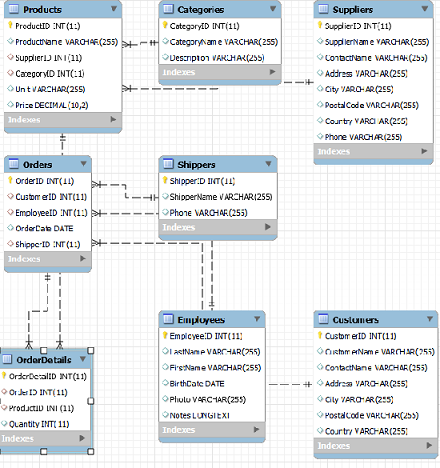
삼지창이 있는 테이블이 일자로 되있는 것을 참조하고 있는 것이라고 생각하면된다.


한쪽의 ID가 한쪽에 여러개 나올 수 있다면 1대 다 관계이다.
프로젝트 만들때 관계를 보려면 이렇게 설정하면된다.
DATABASE - REVERSE ENGINEER로 관계확인

만약 물건을 조회하고 그 물건의 카테고리를 알고 싶을 때 두개로 나눠서 sql을 작성하면 비효율적이다.

SELECT * FROM Products WHERE ProductId = 1;
SELECT * FROM Categories WHERE CategoryId = 1;

join을 사용해서 데이터를 합쳐서 볼 수 있다.

SELECT * FROM Products JOIN Categories ON Products.CategoryId = Categories.CategoryId
WHERE Products.ProductId = 1;

JOIN의 종류는 inner Join(교집합) / Left Join(교집합+왼쪽의 차집합) / Right Join(교집합+오른쪽차집합)이 있다.

33. CATESIAN PRODUCT (곱집합) 카테시안 곱

SELECT COUNT(*) FROM Products; -- 77
SELECT COUNT(*) FROM Categories; -- 8

SELECT COUNT(*) FROM Products JOIN Categories; -- 616

조건을 부여하지 않으면 Products레코드개수 * Categories레코드개수 616개로 합쳐진다.
Categories레코드가 Products의 레코드에 각각 매칭이 되기 때문이다.
여기서부터 걸러내기 위해 JOIN을 시작하면된다.

기본적인 작성은 왼쪽 테이블에 오른쪽 테이블에 매칭되어서 보여준다.
우리가 관심있는 것은 같은 categoryId만 보기를 원한다.
ON을 사용해서 조인조건을 추가하면된다.

SELECT * FROM Products P JOIN Categories C ON P.CategoryID = C.CategoryID;

상품 테이블이 77개가 있기 때문에 77개의 레코드가 조회된다.
레코드는 조인조건이 없다면 왼쪽에 오른쪽 테이블이 나온다.
조인 후 컬럼 수는 왼쪽 테이블 컬럼 수 + 오른쪽 테이블 컬럼 수이다.

관심있는 컬럼만 보기 위해서는 SELECT절에 보고싶은 컬럼을 지정해주면된다.

SELECT ProductName, CategoryName FROM Products P JOIN Categories C ON P.CategoryID = C.CategoryID;

연습
상품명, 그 상품을 공급하는 공급자명조회하기 Products의 SupplierID가 Suppliers 테이블의 SupplierID 참조하고 있음
서로 다른 테이블인데 중복된 컬럼명이 있으면 헷갈릴 수 있으니 테이블에 별명을 붙여서 사용하자.

SELECT P.ProductName, S.SupplierName FROM Products P JOIN Suppliers S ON P.SupplierID = S.SupplierID;

34. JOIN

34.1 INNER JOIN

교집합만 조회하는 것이다.
그냥 JOIN을 쓰면 INNER JOIN이된다.

SELECT * FROM TableA A INNER JOIN TableB B ON A.Num1 = B.Num2; 

34.2 LEFT JOIN / RIGHT JOIN

LEFT(OUTER) JOIN이라고 하며 INNERJOIN + 왼쪽테이블의 값을 표시하는 것이다.

SELECT * FROM TableA A LEFT JOIN TableB B ON A.Num1 = B.Num2;  

RIGHT JOIN은 INNERJOIN + 오른쪽의 테이블 값 모두 조회한다.

연습
주문보기
INNERJOIN은 양쪽에 데이터가 다잇어야해서 공통적인 값만 나온다.
RIGHT JOIN을 하면 모든 손님에서 주문을 보는데 주문한적이 없는 고객이 있어서 더 많다.

SELECT * FROM Orders o JOIN Customers c ON o.CustomerID = c.CustomerID; -- 830
SELECT * FROM Orders o RIGHT JOIN Customers c ON o.CustomerID = c.CustomerID; -- 832

연습
주문을 처리한적 없는 직원 조회하기

SELECT * FROM Employees e LEFT JOIN Orders o ON e.EmployeeID = o.EmployeeID WHERE o.OrderID IS NULL;

34.3 두개 이상의 테이블 JOIN하기

예를들어 order를 보면 고객 id 직원 id 배달원id 가 있다.
이 것들을 모두 모아 보고싶다면 여러개를 JOIN하면된다.
JOIN ON을 연속해서 작성하면된다.

SELECT * FROM Products p JOIN Categories c ON p.CategoryID = c.CategoryID JOIN Suppliers s ON p.SupplierID = s.SupplierID;

예)1번 상품의 상품명, 카테고리명 공급자명

SELECT p.ProductName, c.CategoryName, s.SupplierName 
FROM Products p 
JOIN Categories c ON p.CategoryID = c.CategoryID 
JOIN Suppliers s ON p.SupplierID = s.SupplierID 
WHERE p.ProductID = 1;

예제 1996-07-04에 주문한 상품 명 조회

SELECT ProductName FROM Orders o 
JOIN OrderDetails d ON o.OrderID = d.OrderID 
JOIN Products p ON d.ProductID = p.ProductID 
WHERE o.OrderDate = '1996-07-04';

예제2 1996-07-04의 매출조회

SELECT SUM(p.Price * d.Quantity) 매출 
FROM Orders o 
JOIN OrderDetails d ON o.OrderID = d.OrderID 
JOIN Products p ON d.ProductID = p.ProductID 
WHERE o.OrderDate = '1996-07-04';

예제3 일별 매출 조회 (날짜순으로 결과 조회)

SELECT OrderDate, SUM(p.Price * d.Quantity) 매출 
FROM Orders o JOIN OrderDetails d ON o.OrderID = d.OrderID
JOIN Products p ON d.ProductID = p.ProductID 
GROUP BY OrderDate;

예제4 직원별 처리금액

SELECT e.EmployeeID, concat(e.lastName, ' ', e.firstName ) 이름, SUM(p.Price * d.Quantity) 처리금액
FROM Orders o JOIN OrderDetails d ON o.OrderID = d.OrderID
JOIN Products p ON d.ProductID = p.ProductID
JOIN Employees e ON o.EmployeeID = e.EmployeeID 
GROUP BY e.EmployeeID;

예제 5 상품별 판매금액

SELECT d.ProductID, p.ProductName, SUM(p.Price * d.Quantity) 매출 
FROM Orders o JOIN OrderDetails d ON o.OrderID = d.OrderID 
JOIN Products p ON d.ProductID = p.ProductID 
GROUP BY ProductID;

예제 6 고객별 소비 금액

SELECT c.CustomerID, c.CustomerName, SUM(p.Price * d.Quantity) 소비금액
FROM Orders o JOIN OrderDetails d ON o.OrderID = d.OrderID 
JOIN Customers c ON o.CustomerID = c.CustomerID
JOIN Products p ON d.ProductID = p.ProductID 
GROUP BY c.CustomerID;

2023.04.24

테이블 정규화
테이블 설계가 프로젝트의 기본이 된다. 잘 알아두어야한다.
JOIN은 관계형데이터베이스의 꽃이라고 할 수 있을 것 같다. 필요한 데이터를 조회하는 SQL들을 잘 알아두자.

'국비 > SpringBoot' 카테고리의 다른 글

2023.04.25 63일차 SpringBoot  (0) 2023.04.26
2023.04.21 61일차 SpringBoot  (0) 2023.04.24
2023.04.20 60일차 SpringBoot  (0) 2023.04.20
2023.04.19 59일차 SpringBoot  (1) 2023.04.19
2023.04.18 58일차 SpringBoot  (0) 2023.04.18

61일차 마이바티스

서버에서 요청을 받고 일하는데 DB에 SQL을 날리는 일을한다.
JDBC로 하기에 핵심로직 말고 지루한 코드들을 지워주는것이 마이바티스이다.
마이바티스가 연결설정 ResultSet으로 얻어온 값 bean에담기 등등 알아서해준다.
view에게 건네주기만 하면된다.

SELECT 하나의 행의 하나의 컬럼, 하나의 행에 여러 컬럼가져올때 BEAN사용 등을 배웟다.

29.9 여러행의 결과 얻기

여러행 결과를 얻어올때 while문으로 탐색해서 list에 담아서 사용햇엇다.
똑같이 리턴타입을 특정 아이템을 element를 가지는 list로 받으면된다.

SELECT CustomerName FROM Customers이 쿼리를 사용하고싶다.
String들이 리턴되니 List<String> list에 담아서 사용하면된다.

@Select("SELECT CustomerName FROM Customers")
List<String> sql1();

@RequestMapping("link1")
public void method1() {
    //String sql = "SELECT CustomerName FROM Customers";

    List<String> list = mapper.sql1();
    System.out.println(list);
    list.forEach(System.out::println);
}

연습
경로 : /sub21/link2 요청시 직원의 lastName 조회하는 메소드 작성하기

@Select("SELECT lastName FROM Employees")
List<String> sql2();

@RequestMapping("link2")
public void method2() {
    List<String> list = mapper.sql2();
    list.forEach(System.out::println);
}

29.10 여러 레코드 + 여러 컬럼

여러 레코드 + 하나의 컬럼은 했는데
여러 레코드와 여러 컬럼을 조회하는 메소드를 작성해보자.
javabean을 활용해서 만들어야한다.
조회할 컬럼들의 DTO를 만들어서 조회해야한다.

@Select("SELECT lastName, firstName FROM Employees")
List<Dto07> sql3();

@Data
public class Dto07 {
    private String lastName;
    private String firstName;
}

@RequestMapping("link3")
public void method3() {
    List<Dto07> names = mapper.sql3();
    names.forEach(System.out::println);
}

연습
모든 상품의 이름, 가격을 조회해서 콘솔에 출력하기

@Data
public class Dto08 {
    private String productName;
    private double price;
}

@Select("SELECT productName, price FROM Products")
List<Dto08> sql4();

@RequestMapping("link4")
public void method4() {
    List<Dto08> products = mapper.sql4();
    products.forEach(System.out::println);
}

29.11 여러 레코드 + 여러 컬럼 - 2

request파라미터로 받아서 특정카테고리의 상품 조회하기

@Select("SELECT productName FROM Products WHERE CategoryId = #{cid}")
List<String> sql5(int cid);

@RequestMapping("link5")
public void method5(int cid) {
    List<String> list = mapper.sql5(cid);
    list.forEach(System.out::println);
}

연습
/sub21/link6?country= 각 나라의 고객의 이름(customerName) 조회하기

@Select("SELECT customerName FROM Customers WHERE country = #{country}")
List<String> sql6(String country);

@RequestMapping("link6")
public void method6(String country) {
    List<String> list = mapper.sql6(country);
    list.forEach(System.out::println);
}

연습
/sub21/link7?cid 각 카테고리별 상품이름과 가격 조회하기

@Select("SELECT productName, price FROM Products WHERE categoryId = #{cid}")
List<Dto08> sql7(int cid);

@RequestMapping("link7")
public void method7(int cid) {
    List<Dto08> list = mapper.sql7(cid);
    list.forEach(System.out::println);
}

29.12 마이바티스 insert

insert쿼리를 sql에 작성하고 싶다.
마이바티스를 이용해서 insert를 실행하고 싶다면 @Insert어노테이션을 사용하면된다.
메소드 아규먼트에 맞게 파라미터를 #{}으로 넣어주면된다.

insert쿼리는 테이블 형식의 데이터를 반환하는게 아니라 영향을 미친 레코드의 개수를 리턴받는다.
그래서 마이바티스 매핑하는 메소드도 int타입을 반환받으면된다.

@Insert("INSERT INTO MyTable34(Col1, Col2) VALUES (#{val1}, #{val2})")
int sql1(int val1, String val2);

@RequestMapping("link1")
public void method1() {
    int cnt1 = mapper.sql1(77, "java");
    int cnt2 = mapper.sql1(88, "spring");
    int cnt3 = mapper.sql1(99, "css");

    System.out.println(cnt1);
    System.out.println(cnt2);
    System.out.println(cnt3);
}

연습
MyTable35 Col1 Col2에 값 두가지 삽입하는 코드 작성하기

@Insert("INSERT INTO MyTable35 VALUES(#{v1}, #{v2})")
int sql2(Double v1, String v2);

@RequestMapping("link2")
public void method2() {
    int cnt = mapper.sql2(99.99, "korean");
    System.out.println(cnt);
}

29.13 마이바티스 insert - 2

/sub22/link3?val1=98.98&val2=송태섭
request파라미터로 값을 받고 insert하기

@RequestMapping("link3")
public void method3(Double val1, String val2) {
    int cnt = mapper.sql2(val1, val2);
    System.out.println(cnt);
}

29.14 마이바티스 insert -3

여러개의 컬럼이 있다면 하나씩 넣을 수도 있지만 너무 많다면 javabean을 사용해야한다.
#{}에 dto.property를 넣어주면된다.
첫번째 propertt가 첫번째 컬럼 두번째 property가 두번째 컬럼 세번째 property가 세번째 컬럼에 들어가게 된다.
dto가 하나라면 dto.property말고 그냥 property를 넣어줘야한다.

@Data
public class Dto09 {
    private int prop1;
    private String prop2;
    private double prop3;
}

@Insert("INSERT INTO MyTable36(Col1, Col2, Col3) VALUES(#{prop1}, #{prop2}, #{prop3})")
int sql3(Dto09 dto);

@RequestMapping("link4")
public void method4() {
    Dto09 dto = new Dto09();
    dto.setProp1(300);
    dto.setProp2("hello mybatis");
    dto.setProp3(33.33);
    int cnt = mapper.sql3(dto);
    System.out.println(cnt);
}

연습
INSERT INTO MyTable37(Age, Name, Score) VALUES (#{age}, #{name}, #{score}
sql에 맞게 테이블과 코드 작성하기

CREATE TABLE MyTable37(
    Age INT, 
    Name VARCHAR(15), 
    Score DEC(5,2)
); 

@Insert("INSERT INTO MyTable37(Age, Name, Score) "
        + "VALUES (#{age}, #{name}, #{score})")
int sql4(Dto10 dto);

@Data
public class Dto10 {
    private int age;
    private String name;
    private double score;
}

@RequestMapping("link5")
public void method5() {
    Dto10 dto = new Dto10();
    dto.setAge(26);
    dto.setName("park");
    dto.setScore(100.00);
    int cnt = mapper.sql4(dto);
    System.out.println(cnt + "행이 입력되었습니다.");
}

29.14 마이바티스 insert -4

사용자에게 modelAttribute로 받아서 사용하기
requestparam이 modelAttribute의 프로퍼티로 알아서 매핑되고 바인딩된다.
/sub22/link6?age=77&name=park&score=88.88

@RequestMapping("link6")
public void method6(Dto10 dto) {
    int cnt = mapper.sql4(dto);
    System.out.println(cnt + "행이 입력되었습니다.");
}

연습
modelAttribute로 MyTable36에 값 삽입하는 코드 작성하기
요청링크 : /sub22/link7?prop1=10&prop2=son&prop3=10.00

@RequestMapping("link7")
public void method7(Dto09 dto) {
    int cnt = mapper.sql3(dto);
    System.out.println(cnt + "행이 입력되었습니다.");
}

29.15 마이바티스 insert -5

여러개의 Dto로 파라미터를 받을 수 있다.
dto9가 가진것은 prop1 prop2 prop3 / dto10이가진것은 age name score이다.
dto10 age에 dto9의 prop1을 넣는다고 해보자.
파라미터가 여러개라면 파라미터명.프로퍼티명으로 넣어야한다.

@Insert("INSERT INTO MyTable37(Age, Name, Score) "
        + "VALUES (#{dto9.prop1},#{dto10.name},#{dto10.score})")
int sql5(Dto09 dto9, Dto10 dto10);

@RequestMapping("link8")
public void method8(Dto09 dto9, Dto10 dto10) {
    int cnt = mapper.sql5(dto9, dto10);
    System.out.println(cnt + "행이 입력되었습니다.");
}

@RequestMapping("link8")
public void method8() {
    Dto09 dto9 = new Dto09();
    Dto10 dto10 = new Dto10();
    dto9.setProp1(10);
    dto10.setName("son");
    dto10.setScore(10.00);
    int cnt = mapper.sql5(dto9, dto10);
    System.out.println(cnt + "행이 입력되었습니다.");
}

연습
다음테이블에 Dto09 Dto10을 사용해서 값을 넣어보자.
dto1.prop1 -> Col1 dto2.age -> Col2 dto1.prop2 -> Col3
dto2.name -> Col4 dto1.prop3 -> Col5 dto2.score -> Col6

CREATE TABLE MyTable38(
    Col1 INT, 
    Col2 INT, 
    Col3 VARCHAR(200),
    Col4 VARCHAR(200),
    Col5 DEC(10,3),
    Col6 DEC(10,3)
); 

@Insert("INSERT INTO MyTable38(Col1, Col2, Col3, Col4, Col5, Col6) "
        + "VALUES (#{dto1.prop1},#{dto2.age},#{dto1.prop2},#{dto2.name},#{dto1.prop3},#{dto2.score})")
int sql6(Dto09 dto1, Dto10 dto12);

@RequestMapping("link9")
public void method9() {
    Dto09 dto1 = new Dto09();
    Dto10 dto2 = new Dto10();
    dto1.setProp1(10);
    dto1.setProp2("son");
    dto1.setProp3(10.00);
    dto2.setAge(20);
    dto2.setName("park");
    dto2.setScore(20.00);
    int cnt = mapper.sql6(dto1, dto2);
    System.out.println(cnt + "행이 입력되었습니다.");
}

29.16 마이바티스 insert -6

여러개의 dto의 값을 request param으로 받아보자.
다음의 경로로 요청하게 되면 각 property에 맞게 매핑된다.
/sub22/link10?prop1=7&prop2=lunch&prop3=3.14&age=8&name=song&score=3.14

@RequestMapping("link10")
public void method9(Dto09 p1, Dto10 p2) {
    int cnt = mapper.sql6(p1, p2);
    System.out.println(cnt + "행이 입력되었습니다.");
}

29.17 auto increase

default값이 있거나 자동증가하는 컬럼이 있다면 값을 넣을 필요가 없엇다.
기본키컬럼의 속성으로 값이 자동증가하는 AUTO_INCREMENT제약사항을 추가할 수 있다.
모든컬럼에 값을 넣을 수 있지만 자동증가 컬럼에는 값을 안넣어도 된다.

CREATE TABLE MyTable39 (
    Col1 INT PRIMARY KEY AUTO_INCREMENT,
    Col2 VARCHAR(300),
    Col3 INT
);

@Data
public class Dto11 {
    private int prop1;
    private String prop2;
    private int prop3;
}

@Insert("INSERT INTO MyTable39(Col2, Col3) "
        + "VALUES (#{prop2},#{prop3})")
int sql7(Dto11 dtO);

// /sub22/link11?prop2=mybatis&prop3=321
@RequestMapping("link11")
public void mehtod11(Dto11 dto) {
    int cnt = mapper.sql7(dto);
    System.out.println(cnt + "행 입력 완료!!");
}

마이바티스에서 generate key된 키를 가져오고 싶다면
@Options 어노테이션을 사용하면된다.
useGeneratedKeys value를 true로해주면 마이바티스로 증가한 키를 가져올 수 잇다.
마이바티스가 증가하는 컬럼을 알아서 찾지만 어떤 property에 세팅할 것인지는 keyProperty를 이용해서 지정해줘야한다.

@Insert("""
        INSERT INTO MyTable39 (Col2, Col3)
        VALUES (#{prop2}, #{prop3})
        """)
@Options(useGeneratedKeys = true, keyProperty = "prop1")
int sql7(Dto11 dto);

// /sub22/link11?prop2=mybatis&prop3=321
@RequestMapping("link11")
@ResponseBody
public String mehtod11(Dto11 dto) {
    System.out.println("prop1:" + dto.getProp1());
    int cnt = mapper.sql7(dto);
    System.out.println(cnt + "행 입력 완료!!");
    System.out.println("prop1:" + dto.getProp1());

    return dto.getProp1() + "번째 데이터 입력완료";
}

연습
sub22/link12?age=40&name=son&score=9.9
요청시 MyTable40에 데이터 추가되도록 코드 작성
컨트롤러메소드, 매퍼 메소드, 자바빈
자바빈의 id 프로퍼티에 자동증가컬럼값 받을 수 있게 만들기

@Data
public class Dto12 {
    private int id;
    private int age;
    private String name;
    private double score;
}

@Insert("INSERT INTO MyTable40 (age, name, score) "
        + "VALUES (#{age}, #{name}, #{score})")
@Options(useGeneratedKeys = true, keyProperty = "id")
int sql8(Dto12 dto);

@RequestMapping("link12")
public void method12(Dto12 dto) {
    int cnt = mapper.sql8(dto);
    System.out.println(cnt + "개 행 입력");
    System.out.println(dto.getId() + "번 데이터 입력됨");
}

Clinet -> controller -> mapper -> DB
DB -> mapper -> controller -> model -> view -> Clinet
이 흐름으로 이어진다.

서버와 DB는 별개의 프로그램이다. DB에 일시키는 것을 MAPPER 에게 일시키는 것이다.
나중에는 controller와 mapper사이에 Service가 들어가게 된다.
mapper가 DAO 대신하는 역할인가??
mapper를 repositrory라고 하는 곳도잇고 dao라고 persistence라고 하는 곳도 있다.
흐름만 생각해두자.
마이바티스를 사용하면 mapper라고 하는 것 같다.

29.18 마이바티스 delete

@Delete("DELETE FROM MyTable40")
int sql1();

@RequestMapping("link1")
public void method1() {
    int cnt = mapper.sql1();
    System.out.println(cnt + "개 행 삭제됨");
}

조건을 지정하지 않으면 테이블의 모든 내용이 삭제되니 WHERE로 조건을 지정해줘야한다.

@Delete("DELETE FROM MyTable39 WHERE Col1 = #{id}")
int sql2(Integer id);

@RequestMapping("link2")
public void method2(Integer id) {
    int cnt = mapper.sql2(id);
    System.out.println(cnt + "개 행 삭제됨");
}

연습
/sub23/link3?key=7 경로로 요청시 고객삭제하기

@Delete("DELETE FROM Customers WHERE CustomerID = #{id}")
int sql3(Integer id);

@RequestMapping("link3")
public void method3(Integer key) {
    int cnt = mapper.sql3(key);
    System.out.println(cnt + "개 삭제됨");
}

29.19 마이바티스 update

@Update("UPDATE MyTable39 SET Col2 = '수정된 값', Col3 = 99999")
int sql1();

@RequestMapping("link1")
public void method1( ) {
    int cnt = mapper.sql1();
    System.out.println(cnt + "개 행 수정됨");
}

수정을 하기 위해서는 view에서 데이터를 받아서 해야한다.

@Update("UPDATE Customers SET"
        + "CustomerName = #{name}, "
        + "ContactName = #{contactName}, "
        + "Address = #{address}, "
        + "City = #{city}, "
        + "PostalCode = #{postalCode}, "
        + "Country = #{country} "
        + "WHERE CustomerId = #{id} ")
int sql4(Customer customer);

@RequestMapping("link5")
public void method(Customer customer) {
    int cnt = mapper.sql4(customer);
    System.out.println(cnt + "개 행 수정됨");
}

<h1>${customer.id }번 고객 수정</h1>
<div>
    <form action="/sub24/link5" method="post">
        <input type="hidden" name="id" value="${customer.id }" />
        이름 <input type="text" name="name" value="${customer.name }" /> <br />
        고객명 <input type="text" 
            name="contactName" value="${customer.contactName }" /> <br />
        주소 <input type="text" name="address" value="${customer.address }"/> <br />
        도시 <input type="text" name="city" value="${customer.city }"/> <br />
        국가 <input type="text" name="country" value="${customer.country }" /> <br />
        우편번호 <input type="text" name="postalCode" value="${customer.postalCode }" /> <br />
        <input type="submit" value="수정" />
    </form>
</div>

2023.04.21

마이바티스도 회사마다 사용방법이 다르다 안쓸수도 잇고
큰틀에서 이해만 해야한다.
마이바티스도 버전에따라서 사용방법이 조금씩 다르다.
큰흐름에서 이해만 하자.

'국비 > SpringBoot' 카테고리의 다른 글

2023.04.25 63일차 SpringBoot  (0) 2023.04.26
2023.04.24 62일차 SpringBoot  (0) 2023.04.24
2023.04.20 60일차 SpringBoot  (0) 2023.04.20
2023.04.19 59일차 SpringBoot  (1) 2023.04.19
2023.04.18 58일차 SpringBoot  (0) 2023.04.18

60일차

DB에 테이블을 만들때 타입, 제약사항등을 추가할 수있엇다.

28 데이터타입 JDBC

DB의 자료형은 엄격하진 않다.
INTEGER형식이면 알아서 변환되서 들어가고
String에 숫자를 넣으면 알아서 문자열로 변경되어 들어가게 된다.

28.1 INT, VARCHAR

CREATE TABLE MyTable30(
    Col1 INT,
    Col2 VARCHAR(30)
);

INSERT INTO MyTable30 (Col1, Col2) VALUES(30, 'java'); -- ok
INSERT INTO MyTable30 (Col1) VALUES('33'); -- ok
INSERT INTO MyTable30 (Col1) VALUES('Three'); -- fail
INSERT INTO MyTable30 (Col2) VALUES(77); -- ok string으로 변경후 들어감

JDBC에서 PreparedStatement에 매핑을 할때 setter가 완전히 일치할 필요는 없다.
하지만 맞춰서 넣어주는게 좋으니 확인하고 넣어주자.

@RequestMapping("link2")
public void method2() throws Exception {
    String sql = "INSERT INTO MyTable30 (Col1, Col2) VALUES (?,?)";

    try (Connection con = DriverManager.getConnection(url, dbId, pwd);
            PreparedStatement pstmt = con.prepareStatement(sql);) {

        //pstmt.setInt(1, 99);
        //pstmt.setString(2, "hello");
        pstmt.setString(1, "888");
        pstmt.setInt(2, 12345);
        int cnt = pstmt.executeUpdate();
        System.out.println(cnt + "개 행이 입력됨");
    }
}

28.2 DATE

DATE YYYY-MM-DD
DATETIME YYYY-MM-DD HH:mm:SS
JDBC에서 DATE값을 세팅할때 setString으로 해도된다.
DATE는 setDate는 Date.valueOf()메소드로 포장한값을 넣어줄수 있고
DATETIME은 setTimestamp로 Timestamp.valueOf()포장한값을 넣어줄수 있다.

@RequestMapping("link3")
public void method3() throws Exception {
    String sql = "INSERT INTO MyTable31 (Col1, Col2) VALUES (?,?)";

    try (Connection con = DriverManager.getConnection(url, dbId, pwd);
            PreparedStatement pstmt = con.prepareStatement(sql);) {
        //pstmt.setString(1, "1923-03-01");
        //pstmt.setString(2, "1811-11-12 23:50:49");
        pstmt.setDate(1, Date.valueOf("2023-03-01"));
        pstmt.setTimestamp(2, Timestamp.valueOf("2000-01-01 22:22:11"));
        int cnt = pstmt.executeUpdate();
        System.out.println(cnt + "개 행이 입력됨");
    }
}

28.3 연습

경로 /sub19/link5 MyTable32에 새 레코드 추가하는 메소드 작성하기

@RequestMapping("link5")
public void method4() throws Exception {
    String sql = "INSERT INTO MyTable32 VALUES (?,?,?,?,?)";

    try (Connection con = DriverManager.getConnection(url, dbId, pwd);
            PreparedStatement pstmt = con.prepareStatement(sql);) {
        pstmt.setString(1, "park");
        pstmt.setInt(2, 26);
        pstmt.setDouble(3, 123.45);
        pstmt.setDate(4, Date.valueOf("1998-01-05"));
        pstmt.setTimestamp(5, Timestamp.valueOf("2023-04-20 09:42:59"));

        int cnt = pstmt.executeUpdate();
        System.out.println(cnt + "개 행이 입력됨");
    }
}

28.4 form + JDBC

사용자로부터 폼을 사용해서 RequestParam을 받아서 JDBC값을 넣어보자
input 박스를 date로 만들면 연월일 datetime-local로 하면 연월일시분초까지 가능하다
파라미터는 결국 String으로 받아오니 requestparam은 String으로 받아오면된다.

@RequestMapping("link7")
public void method7(String name, String age, String price, String birth, String inserted) throws Exception {
    String sql = "INSERT INTO MyTable32 VALUES (?,?,?,?,?)";

    try (Connection con = DriverManager.getConnection(url, dbId, pwd);
            PreparedStatement pstmt = con.prepareStatement(sql);) {
        pstmt.setString(1, name);
        pstmt.setString(2, age);
        pstmt.setString(3, price);
        pstmt.setString(4, birth);
        pstmt.setString(5, inserted);

        int cnt = pstmt.executeUpdate();
        System.out.println(cnt + "개 행이 입력됨");
    }
}

물론 그냥 String으로 넣어도되지만 타입을 맞춰서 넣어주는게 보기 좋으니 타입을 맞춰서 넣어주자.
Date는 LocalDate datetime-locald은 LocalDateTime으로 받아주자.
setter는 setDate setTimestamp으로 받기

@RequestMapping("link8")
public void method8(String name, int age, double price, LocalDate birth, LocalDateTime inserted) throws Exception {
    String sql = "INSERT INTO MyTable32 VALUES (?,?,?,?,?)";

    try (Connection con = DriverManager.getConnection(url, dbId, pwd);
            PreparedStatement pstmt = con.prepareStatement(sql);) {
        pstmt.setString(1, name);
        pstmt.setInt(2, age);
        pstmt.setDouble(3, price);
        pstmt.setDate(4, Date.valueOf(birth));
        pstmt.setTimestamp(5, Timestamp.valueOf(inserted));

        int cnt = pstmt.executeUpdate();
        System.out.println(cnt + "개 행이 입력됨");
    }
}

28.5 form + JDBC - 2

다음 테이블에 값을 넣는 form과 JDBC를 만들어보자
method9 : form이 있는 view로 포워드
method10 : 전송된 데이터를 MyTable33에 추가
연습을 위해 DTO를 만들어서 처리했다.

CREATE TABLE MyTable33(
    Title VARCHAR(30),
    Published DATE,
    Price INT,
    Updated DATETIME,
    Weight DEC(10,3)
);

<h1>MyTable33</h1>
<form action="/sub19/link10" method="post">
    제목 : <input type="text" name="title"/> <br />
    출판 : <input type="date" name="published"/> <br />
    가격 : <input type="number" name="price" /> <br />
    수정 : <input type="datetime-local" name="updated"/> <br />
    무게 : <input type="text" name="weight"/> <br />
    <input type="submit" value="전송" />
</form>

@Data
public class MyTable33 {
    private String title;
    private LocalDate published;
    private int price;
    private LocalDateTime updated;
    private double weight;
}

@RequestMapping("link10")
public void method10(MyTable33 myTable33) throws Exception {
    String sql = "INSERT INTO MyTable33 VALUES (?,?,?,?,?)";

    try (Connection con = DriverManager.getConnection(url, dbId, pwd);
            PreparedStatement pstmt = con.prepareStatement(sql);) {
        pstmt.setString(1, myTable33.getTitle());
        pstmt.setDate(2, Date.valueOf(myTable33.getPublished()));
        pstmt.setInt(3, myTable33.getPrice());
        pstmt.setTimestamp(4, Timestamp.valueOf(myTable33.getUpdated()));
        pstmt.setDouble(5, myTable33.getWeight());
        int cnt = pstmt.executeUpdate();
        System.out.println(cnt + "개 행이 입력됨");
    }
}

28.6 데이터 읽기

모두 String타입으로 읽어오거나 각 타입에 맞게 읽어올 수 있다.

@RequestMapping("link11")
public void method11() throws Exception {
    String sql = "SELECT * FROM MyTable33";
    try (Connection con = DriverManager.getConnection(url, dbId, pwd);
            PreparedStatement pstmt = con.prepareStatement(sql);
            ResultSet rs = pstmt.executeQuery();) {
        if(rs.next()) {
            String title = rs.getString("title");
            String published = rs.getString("published");
            String price = rs.getString("price");
            String updated = rs.getString("updated");
            String weight = rs.getString("weight");

            System.out.println("제목:" + title);
            System.out.println("출판일:" + published);
            System.out.println("가격:" + price);
            System.out.println("수정일:" + updated);
            System.out.println("무게:" + weight);
        }
    }
}

@RequestMapping("link12")
public void method12() throws Exception {
    String sql = "SELECT * FROM MyTable33";
    try (Connection con = DriverManager.getConnection(url, dbId, pwd);
            PreparedStatement pstmt = con.prepareStatement(sql);
            ResultSet rs = pstmt.executeQuery();) {
        if (rs.next()) {
            String title = rs.getString("title");
            LocalDate published = rs.getDate("published").toLocalDate();
            int price = rs.getInt("price");
            LocalDateTime updated = rs.getTimestamp("updated").toLocalDateTime();
            double weight = rs.getDouble("weight");

            System.out.println("제목:" + title);
            System.out.println("출판일:" + published);
            System.out.println("가격:" + price);
            System.out.println("수정일:" + updated);
            System.out.println("무게:" + weight);
        }
    }
}

28.7 읽기 연습 - 1

MyTable32의 데이터 조회후 출력하는 14번 메소드 작성해보기

@Data
public class Dto05 {
    private String name;
    private int age;
    private double price;
    private LocalDate birth;
    private LocalDateTime inserted;
}

@RequestMapping("link14")
public void method14(Model model) throws Exception {
    // 1.request param수집가공

    // 2.bussiness logic(crud)
    String sql = "SELECT * FROM MyTable32";
    List<Dto05> list = new ArrayList<>();
    try (Connection con = DriverManager.getConnection(url, dbId, pwd);
            PreparedStatement pstmt = con.prepareStatement(sql);
            ResultSet rs = pstmt.executeQuery();) {
        while (rs.next()) {
            Dto05 o = new Dto05();
            String name = rs.getString("name");
            int age = rs.getInt("age");
            double price = rs.getDouble("price");
            LocalDate birth = rs.getDate("birth").toLocalDate();
            LocalDateTime inserted = rs.getTimestamp("inserted").toLocalDateTime();

            o.setName(name);
            o.setAge(age);
            o.setPrice(price);
            o.setBirth(birth);
            o.setInserted(inserted);
            list.add(o);
        }
    }
    // 3.add attribute
    model.addAttribute("memberList", list);
    // 4.forward/redirect
}

28.8 읽기 - 2

/sub19/link15 MyTable33에 있는 데이터들 jsp에서 보여주기

@Data
public class Dto06 {
    private String title;
    private LocalDate published;
    private int price;
    private LocalDateTime updated;
    private double weight;
}

// /sub19/link15 MyTable33에 있는 데이터들 jsp에서 보여주기
@RequestMapping("link15")
public void method15(Model model) throws Exception {
    String sql = "SELECT * FROM MyTable33";
    List<Dto06> list = new ArrayList<>();
    try (Connection con = DriverManager.getConnection(url, dbId, pwd);
            PreparedStatement pstmt = con.prepareStatement(sql);
            ResultSet rs = pstmt.executeQuery();) {
        while (rs.next()) {
            Dto06 dto06 = new Dto06();
            dto06.setTitle(rs.getString("title"));
            dto06.setPublished(rs.getDate("published").toLocalDate());
            dto06.setPrice(rs.getInt("price"));
            dto06.setUpdated(rs.getTimestamp("updated").toLocalDateTime());
            dto06.setWeight(rs.getDouble("weight"));
            list.add(dto06);
        }
    }
    model.addAttribute("bookList", list);
}

<div align="center">
    <h1>목록</h1>
    <table border="1">
        <thead>
            <tr align="center">
                <th width="50">제목</th>
                <th width="100">출판일</th>
                <th width="100">가격</th>
                <th width="200">수정일</th>
                <th width="50">무게</th>
            </tr>
        </thead>
        <tbody>
            <c:forEach items="${bookList}" var="book">
                <tr align="center">
                    <td>${book.title }</td>
                    <td>${book.published }</td>
                    <td>${book.price }</td>
                    <td>${book.updated }</td>
                    <td>${book.weight}</td>
                </tr>
            </c:forEach>
        </tbody>
    </table>
</div>

29 마이바티스

실행은 그냥 하고싶은데 각타입이 뭔지 확인하고 빈에 넣어주고 등등
이런 코드들이 너무 지루하다.
마이바티스는 쿼리만 작성하면된다.

마이바티스 라이브러리를 추가해줘야한다.
스프링 스타터팩에 있으니 그것을 이용하자.

<dependency>
    <groupId>org.mybatis.spring.boot</groupId>
    <artifactId>mybatis-spring-boot-starter</artifactId>
    <version>3.0.0</version>
</dependency>

마이바티스를 안쓰면 JPA, JDBC API, Spring에서 제공하는 JDBC등등을 사용한다.
spring.datasource.url에러 낫다는거
-> 스프링.properties와 custom에 가서 엔터만 치고 저장하기

마이바티스는 인터페이스를 만들어 놓으면 쿼리를 작성하면
쿼리기준으로 Connection, statementent, ResultSet, dto에 담는 것을 알아서 담아준다.

마이바티스에서 보통 매퍼라는 이름을 쓰고있어서 아무 이름도 괜찮지만
com.example.demo.mapper패키지를 생성하자.

학습중이니 단순한 이름으로 Mapper01인터페이스를 생성한다.
스프링부트가 마이바티스가 이것을 잘 찾아서 사용할 수 있도록
@Mapper어노테이션을 사용해서 마킹을 해야한다.

추상메소드를 만드는데 각 SQL과 관련한 @Select어노테이션을 붙이고 SQL문을 작성해주면된다.
이 쿼리문을 담고 알아서 잘 담아서 리턴해준다.
return타입을 가져오는 데이터 타입에 맞춰서 작성해줘야한다.

@Mapper
public interface Mapper01 {
    @Select("SELECT CustomerName FROM Customers WHERE CustomerID = 1")
    String method1();
}

컨트롤러에서는 이 인터페이스의 메소드를 사용하면된다.
컨트롤러는 굉장히 쉬워진다.
그런데 우리는 메소드를 사용해야해서 인터페이스를 구현해야한다.
그런데 이 구현 클래스를 마이바티스가 알아서 만들어준다.

Mapper01타입을 마이바티스가 알아서 구현해서 IoC에 넣어두었다.
이것을 꺼내서 사용하려면 DI를 해줘야하는데 이 DI는 @Autowired어노테이션을 사용해서 스프링이 알아서 해준다.
Mapper01를 구현한 객체이니 mapper의 메소드를 사용하는데 구현되어있다는게 보장되어 있으니 상관이없다.

@Controller
@RequestMapping("sub20")
public class Controller20 {

    @Autowired
    private Mapper01 mapper;

    @RequestMapping("link1")
    public void method1() {
        String name = mapper.method1();
        System.out.println(name);
    }
}

29.1 연습 - 1

Mapper01에 method3작성 1번 공급자의 공급자명 출력하기

@Mapper
public interface Mapper01 {
    @Select("SELECT SupplierName From Suppliers WHERE SupplierID = 1")
    String method3();
}

@Controller
@RequestMapping("sub20")
public class Controller20 {

    @Autowired
    private Mapper01 mapper;

    @RequestMapping("link2")
    public void method2(){
        System.out.println(mapper.method3());
    }
}

29.2 특정인원을 출력하기

?가 들어간 쿼리문 실행하는 방법을 알아보자.
쿼리에 들어간 값을 메소드가 받아야하니 메소드의 아규먼트로 넣어주면된다.
?대신 파라미터가들어가도록 #{}안에 파라미터의 이름과 같게 넣어줘야한다.
마이바티스가 쿼리문을 알아서 짜주게 되는 것이다.
컨트롤러에서는 파라미터 값을 주면서 메소드를 실행시키면된다.

@Select("SELECT CustomerName From Customers WHERE CustomerID = #{id}")
String method4(int id);

@RequestMapping("link3")
public void method3() {
    System.out.println(mapper.method4(3));
}

29.3 파라미터로 받아서 출력하기

파라미터로 받은 것을 넣어주면된다.

// /sub20/link4?ud=70
@RequestMapping("link4")
public void method4(@RequestParam("id") int customerId) {
    System.out.println(mapper.method4(customerId));
}

연습
/sub20/link5?id=2로 요청햇을때 2번직원의 lastName을 콘솔에 출력

@Select("SELECT lastName From Employees WHERE EmployeeID = #{employeeId}")
String method5(int employeeId);

// /sub20/link5?id=2
@RequestMapping("link5")
public void method5(@RequestParam("id") int employeeId) {
    String lastName = mapper.method5(employeeId);
    System.out.println(lastName);
}

29.4 다른타입 반환

String타입이 아니라 여러 데이터 타입을 받아보도록 하자.
각각의 데이터타입에 맞게 set햇던 것처럼 각각의 데이터타입에 맞는 리턴타입을 지정하면된다.

@Select("SELECT Price From MyTable33 LIMIT 1")
int method6();

@Select("SELECT Weight From MyTable33 LIMIT 1")
Double method7();

@Select("SELECT Published From MyTable33 LIMIT 1")
LocalDate method8();

@Select("SELECT updated From MyTable33 LIMIT 1")
LocalDateTime method9();

@RequestMapping("link6")
public void method6() {
    System.out.println(mapper.method6());
    // mapper01 에 method7작성 하나의 row의 weight컬럼의 값리턴

    Double weight = mapper.method7();
    System.out.println(weight);

    LocalDate published = mapper.method8();
    System.out.println(published);

    LocalDateTime updated = mapper.method9();
    System.out.println(updated);
}

29.5 javaBean

여러 컬럼을 추출해서 가져올 경우 여러 타입이 혼재해서 테이블로 가져오게된다.
여러개의 데이터를 담기 위해서는 javaBean을 사용해야한다.
컬럼명(대소문자 구분없이)과 매치되는 빈의 프로퍼티명이 있어야한다.
이 프로퍼티를 가진 dto가 필요하다.

마이바티스가 객체를 만들고 컬럼명과 매치되는 프로퍼티를 알아서 매핑해준다.

@Select("SELECT * From MyTable33 LIMIT 1")
Dto06 method10();

@RequestMapping("link7")
public void method7() {
    Dto06 res = mapper.method10();
    System.out.println(res);
}

29.6 javaBean - 2

32번테이블의 javabean을 사용해서 값을 가져와보자

@Select("SELECT * FROM MyTable32 LIMIT 1")
Dto05 method11();

@RequestMapping("link8")
public void method8() {
    Dto05 res = mapper.method11();
    System.out.println(res);
}

순서도 상관없다.
작성된 쿼리가 Dto에 없다면 넣지 않는다.
만약 한개를 조회하지 않았다면 dto의 프로퍼티가 null값이 될뿐이다.
만약 매핑할 프로퍼티와 테이블의 컬럼명을 다르게 했다면 두가지 선택이 있다.
1.dto클래스 수정하기
2.sql에 별칭을 붙여서 프로퍼티와 맞추기

@Select("SELECT CustomerID AS id, "
        + "CustomerName AS name, "
        + "contactName, "
        + "address, "
        + "city, "
        + "postalCode, "
        + "Country "
        + "From Customers WHERE customerId = 7")
Customer method12();

29.7 javaBean - 3

연습문제 별칭을 붙여 프로퍼티명과 SELECT결과의 컬럼명을 일치시키고 출력하기
-> 그런데 나는 애초에 Dto를 컬럼명과 같게 설정해두어서 그럴 필요가 없다. 알아만 두자

@Select("SELECT supplierId , "
        + "supplierName, "
        + "contactName, "
        + "address, "
        + "city, "
        + "postalCode, "
        + "phone "
        + "FROM Suppliers WHERE supplierId = 7")
Supplier method13();

@RequestMapping("link10")
public void method10() {
    Supplier res = mapper.method13();
    System.out.println(res);
}

29.8 javaBean - 4

Employee Dto를 완성하고 출력하기

@Data
public class Employee {
    private int employeeId;
    private String lastName;
    private String firstName;
    private LocalDate birth;
    private String Photo;
    private String Notes;
}

@Select("SELECT employeeId, LastName, FirstName, Birthdate birth, Photo, Notes "
        + "FROM Employees WHERE employeeId = 5")
Employee method14();

@RequestMapping("link11")
public void method11() {
    Employee res = mapper.method14();
    System.out.println(res);
}

2023.04.20

input 박스를 date로 만들면 연월일 datetime-local로 하면 연월일시분초까지 가능하다
스프링에서 받을때는 Date는 LocalDate datetime-locald은 LocalDateTime으로 받아주자.
set할땐 valueof로 변환

개뜬금없이 마이바티스 배운다. 사용법 자체는 쉬워보인다.

출력할때 sql타입으로 가져온후 toLocaldate메소드사용하자.
LocalDate published = rs.getDate("published").toLocalDate();
LocalDateTime updated = rs.getTimestamp("updated").toLocalDateTime();

'국비 > SpringBoot' 카테고리의 다른 글

2023.04.24 62일차 SpringBoot  (0) 2023.04.24
2023.04.21 61일차 SpringBoot  (0) 2023.04.24
2023.04.19 59일차 SpringBoot  (1) 2023.04.19
2023.04.18 58일차 SpringBoot  (0) 2023.04.18
2023.04.17 57일차 SpringBoot  (0) 2023.04.17

59일차

db의 데이터를 조작할 수 있다.

17. 트랜젝션

하나의 업무가 여러 insert update delete단위로 이루어질 수 있다.

//이체 5000원 (A -> B)
UPDATE Bank SET money = money - 5000
WHERE customerName = 'A';
UPDATE Bank SET money = money + 5000
WHERE customerName = 'B';

하나의 업무가 완전히 실행되어야 한다.
성공하면 commit; 실패하면 rollback;해야한다.

COMMIT : 트랜젝션완료
ROLLBACK : 트랜젝션 실패(트랜젝션 시작완료 이전으로 돌아가기)

자동 커밋 (autocommit)

SET autocommit = 0; -- 자동 커밋 비활성화(disable)
SET autocommit = 1; -- 자동 커밋 활성화 (enable)

이체시 오류(A->B)
UPDATE Bank SET money = money - 5000
WHERE customerName = 'A';

-> 오류 생겼다고 가정

ROLLBACK;

트렌잭션 중간에 오류가 생기면 ROLLBACK을 해야한다.

17.1 JDBC 트랜젝션

//트랜젝션 없이 실행
@RequestMapping("link1")
public void method1() {
    String sql1 = "UPDATE Bank SET money = money - 5000 "
            + "WHERE customerName = 'A'";
    String sql2 = "UPDATE Bank SET money = money + 5000 "
            + "WHERE customerName = 'B'";

    try {
        Connection con = DriverManager.getConnection(url, dbId, pwd);
        Statement stmt3 = con.createStatement();

        Statement stmt1 = con.createStatement();
        Statement stmt2 = con.createStatement();

        stmt1.executeUpdate(sql1);
        stmt2.executeUpdate(sql2);

        System.out.println("이체완료");

    } catch (Exception e) {
        e.printStackTrace();
    }
}

일부러 중간에 예외를 발생시키면 이체실패가 발생한다.
그러면 돈빼는 것만 처리되고 돈이 들어오는 처리가 발생하지않아 문제가 생긴다.
A계좌에서만 돈이빠지고 B는 처리를 받지 못하게 된다

stmt1.executeUpdate(sql1); // 성공
//exception 발생
int a = 3 / 0;
stmt2.executeUpdate(sql2); // 실패

17.2 JDBC 트랜젝션

커넥션의 con.setAutoCommit(false); 을 false로 하면 오토커밋이 비활성화된다.
이후 con.commit();하면 커밋이되고 예외발생시 con.rollback();하면 롤백이된다.

// 트랜젝션 설정 후 모두 실패
@RequestMapping("link4")
public void method4() throws Exception {
    String sql1 = "UPDATE Bank SET money = money - 5000 "
            + "WHERE customerName = 'A'";
    String sql2 = "UPDATE Bank SET money = money + 5000 "
            + "WHERE customerName = 'B'";

    Connection con = DriverManager.getConnection(url, dbId, pwd);

    try (con;
            Statement stmt1 = con.createStatement();
            Statement stmt2 = con.createStatement();) {
        con.setAutoCommit(false);

        stmt1.executeUpdate(sql1);

        //exception 발생
        int a = 3 / 0;

        stmt2.executeUpdate(sql2);

        con.commit();

        System.out.println("이체완료");

    } catch (Exception e) {
        System.out.println("이체실패");
        con.rollback();
        e.printStackTrace();
    }
}

18. create table

데이터를 설계할 수 있어야한다.
TABLE 이름의 작성규칙은 회사마다 다르다. 우리 과정에서는 UpperCamleCase
버전마다 대소문자 구분 규칙 등이 다 다르니 확인하고 사용해야한다.

CREATE TABLE 테이블이름 (
    -- 컬럼 정의
    -- 컬럼명 값의 TYPE, ...
    -- 컬럼명 작성 규칙(회사 규칙 따르기)
    -- 우리과정에서는 UpperCamelCase(대소문자 구분안함)
);

CREATE TABLE MyTable01 (
    Col1 INT,
    Col2 VARCHAR(255)
);

18.1 data -type

컬럼의 타입이 결정되면 타입에 맞는 값만 들어갈 수 있다.
크게보면 Numeric (수), Character(String) 문자형, 날짜시간으로 나뉜다.
DB마다 자료형의 용어가 조금씩 다르므로 알고 있자.

18.2 Character(String) 문자형

18.2.1 VARCHAR(길이)

VARCHAR(길이) 길이가 가변적인 문자열이다.
길이에 맞지않게 넣으면 DB에 따라서 실패하거나 잘라서 들어간다.
테이블이 다음과 같을 때 설정해보도록 하자.
메뉴얼대로는 65000자 정도 까지 가능하다.

CREATE TABLE MyTable02 (
    Col1 VARCHAR(3),
    Col2 VARCHAR(5)
);

INSERT INTO MyTable02 VALUES('abc', 'abcde');
INSERT INTO MyTable02 VALUES('ab', 'abcd'); -- 작으면 당연히 가능
INSERT INTO MyTable02 VALUES('abcd', 'abcdef'); -- fail

연습 MyTable03 3개의 컬럼
첫번째컬럼 Type : 문자열 10개까지 저장가능
두번째컬럼 Type : 문자열 100개까지 저장가능
세번째컬럼 Type : 문자열 1000개까지 저장가능

CREATE TABLE MyTable03 (
    NAME VARCHAR(10),
    TITLE VARCHAR(100),
    CONTENT VARCHAR(1000)
);

18.3 Numeric

Numeric (수)
크게 int 정수형과 decimal, dec 실수형이 있다.

18.3.1 int

int() 최대값 2147483647 / 최소값 -2147483648 4바이트 정수 integer

CREATE TABLE MyTable04 (
    Col1 INT
);

INSERT INTO MyTable04 VALUES (33); -- OK
INSERT INTO MyTable04 VALUES (3.14);  -- 소수점 이하 생략 후 3으로 들어감

연습 MyTable05 만들기 두개의 컬럼이 모두 정수 저장 가능

CREATE TABLE MyTable05 (
    Col1 INT,
    Col2 INT
);

18.3.2 DEC 실수형

DEC(총길이, 소수점이하길이)

CREATE TABLE MyTable06 (
    Col1 DEC(5,2),
    Col2 DEC(3,1)
);

INSERT INTO MyTable06 (Col1) VALUES (999.99); -- ok
INSERT INTO MyTable06 (Col1) VALUES (-999.99); -- ok
INSERT INTO MyTable06 (Col1) VALUES (1000.99); -- fail
INSERT INTO MyTable06 (Col1) VALUES (999.999); -- fail
INSERT INTO MyTable06 (Col1) VALUES (99.999); -- 100.00
INSERT INTO MyTable06 (Col1) VALUES (10.8888); -- 10.89

총 길이를 5자 넘으면 오류인데 소수점이 늘어나면 반올림 해버린다.

연습 MyTable07 만들기
두개 컬럼 (실수형) 총길이 소수점 이하 길이 직접 작성

CREATE TABLE MyTable07 (
    Col1 DEC(3, 2),
    Col2 DEC(5, 3)
);

18.4 날짜형

DATE 날짜 (YYYY-MM-DD)
DATETIME 날짜시간(YYYY-MM-DD hh:mm:ss)
1000-01-01~9999-12-31까지 작성가능하다.

CREATE TABLE MyTable08 (
    Col1 DATE,
    Col2 DATETIME
);

INSERT INTO MyTable08 (Col1) VALUES ('2023-04-19');
INSERT INTO MyTable08 (Col1) VALUES ('9999-12-31');
INSERT INTO MyTable08 (Col1) VALUES ('1000-01-01');

INSERT INTO MyTable08 (Col2) VALUES ('2023-04-19 11:41:30');
INSERT INTO MyTable08 (Col2) VALUES ('9999-12-31 23:59:59');
INSERT INTO MyTable08 (Col2) VALUES ('1000-01-01 00:00:00');

오늘 날짜 : NOW();

INSERT INTO MyTable08 (Col1, Col2) VALUES (now(), now());

예제 MyTable09 반 학생의 정보
학생이름, 성별, 생년월일, 기타정보, 시험성적
필요한정보의 크기나 타입을 결정해서 설계를 해야한다.

CREATE TABLE MyTable09 (
    Name VARCHAR(20),
    Gender VARCHAR(1),
    BirthDate DATE,
    Score DEC(3, 2),
    Extra VARCHAR(1000)
);

연습 내가 가지고 있는 교재 정보 저장 MyTable10
책제목 저자 출판사 발행날짜 가격 기타

CREATE TABLE MyTable10 (
    Title VARCHAR(50),
    Writer VARCHAR(20),
    Publisher VARCHAR(20),
    Published DATE,
    Price INT,
    Extra VARCHAR(100)
);

19 Database

테이블을 만들었는데 테이블들이 어디에 만들어지는가?
Database에 만들어진다.
DATABASE는 Schema라고도 한다. 테이블이 있는곳이다.

19.1 DB만들기

CREATE DATABASE db이름하면 database 만들어진다.

CREATE DATABASE mydb;
USE mydb; -- 사용

19.2 DB삭제

매우 많이 주의하기
아래의 테이블, 데이터 모두 날아가니 주의하기
DROP DATABASE 데이트베이스명

연습
mydb1 데이터베이스 만들기
mydb1에 새로운 테이블 만들기
mydb1 데이터베이스 삭제하기

CREATE DATABASE mydb1;
CREATE TABLE MyTable01(
    Title VARCHAR(10),
    Price INT
);
DROP DATABASE mydb1;

다른 DB의 테이블 선택
SELECT * FROM DB이름.테이블이름; 하면된다.

SELECT * FROM MyTable10; -- 현재 DB
SELECT * FROM w3schools.MyTable10 -- 다른 DB

20 테이블 지우기

DROP TABLE 테이블이름 하면 테이블이 삭제가 된다.
역시나 데이터를 지우는 행위이기 때문에 매우 주의해서 사용하자.

DROP TABLE MyTable01;
DROP TABLE MyTable02;
DROP TABLE MyTable03;

이와 유사한 명령어는 다음과 같다.
복구 불가능하기 때문에 매우 주의하자 왠만해선 사용하지말자
TRUNCATE : 테이블 유지 데이터 삭제

TRUNCATE TABLE MyTable04;

21 테이블 복사하기

구조를 보고 똑같이 배껴써도 되지만 불편하니 테이블 내용을 복사할 수 있다.

SHOW CREATE TABLE 테이블이름 : 테이블 생성 명령 보기
해당 테이블의 구조를 만들때 사용된 명령어가 나온다.

SHOW CREATE TABLE MyTable10;

다음과 같은 방법도 있다.
완번히 똑같진 않지만 컬럼과 타입이 들어가고 데이터도 같이 복사된다.
데이터 삭제 복사 등의 작업을 할때 임시테이블을 사용하고 싶다면 이것을 사용하면 될 것 같다.

CREATE TABLE 새테이블이름 AS SELECT * FROM 원본테이블이름;

22 테이블 수정

이미 만들어져 있는 테이블을 변경하고 싶을때 사용한다.
ALTER TABLE : 테이블을 변경한다.
컬럼추가, 컬럼명 변경 등등

ALTER TABLE 테이블이름
변경키워드 내용

22.1 컬럼 추가 ADD COLUMN

ALTER TABLE MyTable13
ADD COLUMN Col3 VARCHAR(10);

ALTER TABLE MyTable13
ADD COLUMN Col4 DEC(10,2);

MyTable13 5번째 컬럼추가하기

ALTER TABLE MyTable13
ADD COLUMN Col5 INT;

마지막 컬럼에 추가가 아니라 중간에 삽입할 수도 있다.
첫 번째 컬럼으로 추가 하기
ADD COLUMN 컬럼명 타입 FIRST

ALTER TABLE MyTable13
ADD COLUMN Col6 INT FIRST;

중간에 컬럼 추가하기
ADD COLUMN 컬럼명 타입 AFTER 기준컬럼명

ALTER TABLE MyTable13
ADD COLUMN Col8 INT AFTER Col7;

연습 문제
첫번째 컬럼으로 하나 추가
컬럼을 중간에 추가

ALTER TABLE MyTable13
ADD COLUMN Col9 INT FIRST;

ALTER TABLE MyTable13
ADD COLUMN Col10 INT AFTER Col9;

22.2 컬럼 삭제

ALTER TABLE 테이블이름 DROP COLUMN 컬럼명;
으로 컬럼을 삭제할 수 있다. 데이터가 삭제되기 때문에 주의하자!!

ALTER TABLE MyTable13
DROP COLUMN Col1;

ALTER TABLE MyTable13
DROP COLUMN Col2;

22.3 컬럼 변경

ALTER TABLE 테이블 이름 CHANGE COLUMN 원본컬럼 새컬럼 타입;
이것또한 위험하니 조심해서 사용해야한다.

ALTER TABLE MyTable13
CHANGE COLUMN Col3 Col13 VARCHAR(20); -- 위험!!

만약 데이터 타입이 맞지 않은 데이터가 들어 있는데 변경한다면 에러 발생하거나 데이터가 손실된다.

INSERT INTO MyTable13 (Col13) VALUES ('가나다라마바사');

ALTER TABLE MyTable13
CHANGE COLUMN Col13 Col3 VARCHAR(3); -- 에러

연습 Col10을 Col20 VARCHAR(20)으로 변경

ALTER TABLE MyTable13
CHANGE COLUMN Col10 Col20 VARCHAR(20);

22.4 컬럼 데이터 타입변경

컬럼명은 그대로두고 컬럼데이터 타입만 변경할 수 있다.
ALTER TABLE 테이블 이름 MODIFY COLUMN 컬럼 새타입;
만약 데이터 타입이 맞지 않은 데이터가 들어 있는데 변경한다면 에러 발생하거나 데이터가 손실된다.

ALTER TABLE MyTable13 
MODIFY COLUMN Col20 VARCHAR(40);

ALTER TABLE MyTable13 
MODIFY COLUMN Col13 VARCHAR(3); -- 에러, 위험

연습 아무 컬럼이나 타입 변경하기

ALTER TABLE MyTable13 
MODIFY COLUMN Col9 VARCHAR(20);

타입 변경 뿐만이 아니라 특정 위치로 변경할 수도 있다.

ALTER TABLE MyTable13 
MODIFY COLUMN Col8 VARCHAR(9) FIRST;

연습 MyTable13 의 아무 컬럼의 위치 변경하기

ALTER TABLE MyTable13
MODIFY COLUMN Col20 INT AFTER Col13;

23 default

DEFAULT 키워드로 기본값을 정할 수 있다.

CREATE TABLE MyTable14 (
    Col1 INT,
    Col2 INT DEFAULT 99
);

INSERT INTO MyTable14 (Col1, Col2) VALUES (100,200); -- 100 , 200
INSERT INTO MyTable14 (Col1) VALUES (100); -- 100, 99
INSERT INTO MyTable14 (Col2) VALUES (200); -- NULL, 200

연습 MyTable15 테이블에 3개 행 추가
Col1 Col2에 모두 값 넣기
Col2에만 값넣기
Col1에만 값 넣기

CREATE TABLE MyTable15 (
    Col1 VARCHAR(30),
    Col2 VARCHAR(30) DEFAULT '기본'
);

INSERT INTO MyTable15 (Col1, Col2) VALUES ('HI', 'HELLO'); -- HI, HELLO
INSERT INTO MyTable15 (Col2) VALUES ('GO HOME'); -- NULL, GO HOME
INSERT INTO MyTable15 (Col1) VALUES ('Surrender'); -- Surrender, 기본

24 NOT NULL

기본값 없이 NULL값으로 들어가는게 마음이 들지 않는다면 NULL이 아니게 지정할 수있다.
NOT NULL : NULL허용안함

CREATE TABLE MyTable17 (
    Col1 INT,
    Col2 INT NOT NULL
);

INSERT INTO MyTable17 (Col1, Col2) VALUES (100,200); -- OK
INSERT INTO MyTable17 (Col2) VALUES (200); -- OK
INSERT INTO MyTable17 (Col1) VALUES (100); -- fail

연습 MyTable18 두개 컬럼, VARCHAR(20) 두번째 컬럼만 NOT NULL 제약사항 적용

CREATE TABLE MyTable18 (
    Col1 VARCHAR(20),
    Col2 VARCHAR(20) NOT NULL
);

딱히 이유가 없다면 NOT NULL로 해주자.
DEFAULT와 NOT NULL은 다르다. 그냥 DEFAULT키워드만 사용하면 NULL허용하고 DEFAULT가 된다.
명시적으로 NULL값을 넣는것이 가능하기때문에 다른 속성이다.

CREATE TABLE MyTable19 (
    Col1 INT DEFAULT 0,
    Col2 INT NOT NULL
);

INSERT INTO MyTable19 (Col1, Col2) VALUES (100,200); -- OK
INSERT INTO MyTable19 (Col2) VALUES (200); -- OK
INSERT INTO MyTable19 (Col1) VALUES (100); -- fail
INSERT INTO MyTable19 (Col1, Col2) VALUES (NULL,200); -- OK

NOT NULL DEFAULT은 조합이 가능하다

CREATE TABLE MyTable19 (
    Col1 INT, -- NULL 허용 DEFAULT 없음
    Col2 INT NOT NULL, -- NULL 허용안함 DEFAULT없음
    Col3 INT DEFAULT 0, -- NULL 허용 DEFAULT 0
    Col4 INT NOT NULL DEFAULT 0 -- NULL 허용안함 DEFAULT 0
);

25 UNIQUE

그 컬럼의 값이 여러행에서 중복이 될 수 있는가 없는가의 키워드이다.
값을 중복허용하지 않는다.

CREATE TABLE MyTable21 (
    Col1 INT,
    Col2 INT UNIQUE
);

INSERT INTO MyTable21 (Col1, Col2) VALUES (1,1); -- ok
INSERT INTO MyTable21 (Col1, Col2) VALUES (2,2); -- ok
INSERT INTO MyTable21 (Col1, Col2) VALUES (2,3); -- ok
INSERT INTO MyTable21 (Col1, Col2) VALUES (4,3); -- fail

UNIQUE 컬럼으로 인해서 다르다는게 보장이 된다.
여러 행을 구분할 수 잇는 값을 KEY라고 한다.
구분하기 위해서 중복값이 포함되지 못하도록 하려면 UNIQUE제약사항을 붙여주자.
그런데 UNIQUE라고 해서 NULL을 허용안하는 것은 아니다.
NULL은 값이 없는 것이지 중복된 값이 아니다.

INSERT INTO MyTable22 (Ssn, Name) VALUES ('1', '정대만'); -- ok
INSERT INTO MyTable22 (Ssn, Name) VALUES ('1', '송태섭'); -- fail
INSERT INTO MyTable22 (Ssn, Name) VALUES (NULL, '채소연'); -- OK
INSERT INTO MyTable22 (Ssn, Name) VALUES (NULL, '강백호'); -- OK

26 PRIMARY KEY

NOT NULL + UNIQUE인 키를 PRIMARY KEY(기본키)라고 한다.

CREATE TABLE MyTable23(
    Col1 VARCHAR(20) NOT NULL UNIQUE DEFAULT ''
);

CREATE TABLE MyTable24(
    Col1 VARCHAR(20) PRIMARY KEY -- NOT NULL + UNIQUE
);

제약사항을 따로 지정할 수도 있다.

CREATE TABLE MyTable25(
    Col1 INT,
    PRIMARY KEY (Col1)
);

두 개의 컬럼을 조합해서 PRIMARY KEY로 지정할 수 있다.
조합해서 중복이 아니라면 같은 값이 들어갈 수도 있다.

CREATE TABLE MyTable26(
    Col1 INT,
    Col2 INT,
    PRIMARY KEY (Col1, Col2)
);

INSERT INTO MyTable26 (Col1, Col2) VALUES (1,1); -- OK
INSERT INTO MyTable26 (Col1, Col2) VALUES (2,2); -- OK
INSERT INTO MyTable26 (Col1, Col2) VALUES (1,2); -- OK

PRIMARY KEY 제약사항은 식별하는 유일한 값이어야 하기때문에 한테이블에 한개만 가능하다.

CREATE TABLE MyTable26(
    Col1 INT,
    Col2 INT,
    PRIMARY KEY (Col1),
    PRIMARY KEY (Col2)
); -- fail

27. 제약사항 (CONSTRAINTS)

DEFAULT, UNIQUE, NOT NULL, PRIMARY KEY
각 컬럼에 적절한 제약사항을 주고 싶다면 이런 제약사항들을 이용해야한다.
테이블을 만들때에만 제약사항을 줄 수 있는 것은 아니다.
원래 잇는 테이블에 ALTER TABLE를 통해 제약사항을 추가할 수 있다.

CREATE TABLE MyTable28 (
    Col1 INT,
    Col2 INT,
    Col3 INT,
    Col4 INT
);

ALTER TABLE MyTable28
MODIFY COLUMN Col1 INT UNIQUE;

ALTER TABLE MyTable28
MODIFY COLUMN Col2 INT NOT NULL;

ALTER TABLE MyTable28
MODIFY COLUMN Col3 INT DEFAULT 0; -- Col3에 default 0 제약사항 추가

ALTER TABLE MyTable28
MODIFY COLUMN Col4 INT NOT NULL UNIQUE DEFAULT 100; -- Col4에  not null unique defulat 100 제약사항 추가

PRIMARY KEY를 추가하려면 ALTER TABLE ADD PRIMARY KEY를 사용하면된다.

CREATE TABLE MyTable29 (
    Col1 INT,
    Col2 INT,
    Col3 INT
);

ALTER TABLE MyTable29
ADD PRIMARY KEY (Col1, Col2);

제약사항을 추가할 시 주의할점은 이미 제약사항을 어기고 있는 데이터가 있다면 제약사항 추가가 되지않는다.
이런 경우에는 데이터를 정리하고 추가해야한다.

2023.04.19

테이블 복사를 통해 임시테이블을 만들어서 테스트를 해보는 방법을 배웟다.
데이터 관리를 더 안전하게 할 수 있을 것 같다.

어떻게 하면 테이블을 잘만드는가 정규화 내일이어서 배울 것이다.
가장 중요한 부분인 것 같다 데이터를 설계하고 만드는 방법을 알아야한다.

'국비 > SpringBoot' 카테고리의 다른 글

2023.04.21 61일차 SpringBoot  (0) 2023.04.24
2023.04.20 60일차 SpringBoot  (0) 2023.04.20
2023.04.18 58일차 SpringBoot  (0) 2023.04.18
2023.04.17 57일차 SpringBoot  (0) 2023.04.17
2023.04.14 56일차 SpringBoot  (0) 2023.04.14

58일차 SpringBoot

insert update ddlete하는 방법에 대해서 배웠다.
서버에서 java로 sql을 시킨다.

16 jdbc

새 고객데이터를 추가하는 컨트롤러를 만들어보자.
select구문은 executeQuery()메소드를 실행시켜 ResultSet을 반환받았다.
insert구문은 ResultSet이 필요가 없다.
executeUpdate메소드를 사용하고 업데이트한 행수를 리턴받는다.

@RequestMapping("link1")
public void method1() {
    // 새 고객 데이터 추가하기
    String sql = "INSERT INTO Customers(customerId, customerName, city) "
            + "VALUES (92,'서태웅','부산')";

    try {
        Connection con = DriverManager.getConnection(url, dbId, pwd);
        PreparedStatement pstmt = con.prepareStatement(sql);
        int count = pstmt.executeUpdate();

        try (con; pstmt;) {
            System.out.println(count);
        }

    } catch (Exception e) {
        e.printStackTrace();
    }
}

/sub15/link2요청시 10번째 직원 추가하는 코드 작성해보기

@RequestMapping("link2")
public void method2() {
    String sql = "INSERT INTO Employees (EmployeeId, lastName, firstName) "
            + "VALUES(10, '백호', '강')";
    try {
        Connection con = DriverManager.getConnection(url, dbId, pwd);
        PreparedStatement pstmt = con.prepareStatement(sql);
        int count = pstmt.executeUpdate();

        try (con; pstmt;) {
            System.out.println(count);
        }

    } catch (Exception e) {
        e.printStackTrace();
    }
}

16.1 insert

EmployeeId를 직접 넣어주고 잇엇는데 직접 넣어주지 않아도된다.
자동으로 증가하는 컬럼이기 때문이다. 자동으로 증가하는 컬럼이 왜 필요한지는 나중에 테이블 만들때 알아보자.
DESC 테이블이름; 을 작성하면 테이블의 정보를 볼 수 있다.
컬럼명 - 타입 - NULL - KEY - Default - 기타값이 있는데
기타값에 auto increment가 있으면 자동으로 값이 증가한다.

새 공급자 데이터추가 (supplierID, supplierName, City)
자동증가 컬럼은 직접 값을 넣지 않고 추가하기

INSERT INTO Suppliers (SupplierName, City) VALUES ('son', 'london');

16.2 JDBC

사용자에게 값을 입력받아 넣기 위해서 SQL문에서 들어가야하는 부분을 ?로 바꾸면된다.
PreparedStatement를 이용해서 값을 세팅해주면된다.

//http://localhost:8080/sub15/link3?customerName=송태섭&city=부산&country=한국

@RequestMapping("link3")
public void method3(
        @RequestParam("customerName") String customerName,
        @RequestParam("city") String city,
        @RequestParam("country") String country) {

    String sql = "INSERT INTO Customers(customerName, city, Country) "
            + "VALUES (?, ?, ?)";

    try {
        Connection con = DriverManager.getConnection(url, dbId, pwd);
        PreparedStatement pstmt = con.prepareStatement(sql);
        pstmt.setString(1, customerName);
        pstmt.setString(2, city);
        pstmt.setString(3, country);
        int count = pstmt.executeUpdate();

        try (con; pstmt;) {
            System.out.println(count);
        }

    } catch (Exception e) {
        e.printStackTrace();
    }
}

16.3 JDBC - 2 연습

/sub15/link4>firstName=박지성&lastName=두개의 심장
직원정보 추가하기

@RequestMapping("link4")
public void method3(String firstName, String lastName) {
    String sql = "INSERT INTO Employees(firstName, lastName) "
            + "VALUES (?, ?)";

    try {
        Connection con = DriverManager.getConnection(url, dbId, pwd);
        PreparedStatement pstmt = con.prepareStatement(sql);
        pstmt.setString(1, firstName);
        pstmt.setString(2, lastName);

        try (con; pstmt;) {
            int count = pstmt.executeUpdate();
            System.out.println(count);
        }

    } catch (Exception e) {
        e.printStackTrace();
    }
}

16.4 form으로 추가하기

폼을 이용해서 파라미터를 받고 jdbc를 실행시켜보자.

@RequestMapping("link5")
public void method5() {
    // form이 있는 view로 포워드
    // view : /WEB-INF/vies/sub15/link5.jsp
}

<h1>새 직원 입력</h1>
<form action="/sub15/link6" method="post" >
    firstName : <input type="text" name="firstName"/> <br />
    lastName : <input type="text" name="lastName"/> <br />
    <input type="submit" value="전송" />
</form>

@RequestMapping("link6")
public void method6(String firstName, String lastName) {
    String sql = "INSERT INTO Employees(firstName, lastName) "
            + "VALUES (?, ?)";

    try {
        Connection con = DriverManager.getConnection(url, dbId, pwd);
        PreparedStatement pstmt = con.prepareStatement(sql);
        pstmt.setString(1, firstName);
        pstmt.setString(2, lastName);

        try (con; pstmt;) {
            int count = pstmt.executeUpdate();
            System.out.println(count);
        }

    } catch (Exception e) {
        e.printStackTrace();
    }
}

16.5 form연습 - 2

경로 : /sub15/link7 form이 있는 jsp로 포워드
경로 : /sub15/link8 3개 메소드 파라미터 활용해서 supplier테이블에 레코드추가하기

// 경로 : /sub15/link7 form이 있는 jsp로 포워드
@RequestMapping("link7")
public void method7() {
}

<h1>공급자 추가</h1>
<form action="/sub15/link8">
    공급자 이름 : <input type="text" name="name"/> <br />
    도시 : <input type="text" name="city"/> <br />
    나라 : <input type="text" name="country"/> <br />
    <input type="submit" value="전송" />
</form>

// 경로 : /sub15/link8 처리메소드
@RequestMapping("link8")
public void method8(String name, String city, String country) {
    // 3개 메소드 파라미터 활용해서 supplier테이블에 레코드추가
    String sql = "INSERT INTO Suppliers(SupplierName, City, Country) "
            + "VALUES (?, ?, ?)";

    try {
        Connection con = DriverManager.getConnection(url, dbId, pwd);
        PreparedStatement pstmt = con.prepareStatement(sql);
        pstmt.setString(1, name);
        pstmt.setString(2, city);
        pstmt.setString(3, country);

        try (con; pstmt;) {
            int count = pstmt.executeUpdate();
            System.out.println(count + "행이 추가되었습니다.");
        }

    } catch (Exception e) {
        e.printStackTrace();
    }
}

16.6 javaBean활용

@ModelAttribute을 사용하면 request가 알아서 dto클래스에 매핑된다.

@RequestMapping("link10")
public void method10(@ModelAttribute("customer") Customer customer) {

    String sql = "INSERT INTO Customers(customerName, contactName, address) "
            + "VALUES (?, ?, ?)";

    try {
        Connection con = DriverManager.getConnection(url, dbId, pwd);
        PreparedStatement pstmt = con.prepareStatement(sql);
        pstmt.setString(1, customer.getName());
        pstmt.setString(2, customer.getContactName());
        pstmt.setString(3, customer.getAddress());
        try (con; pstmt;) {
            int count = pstmt.executeUpdate();
            System.out.println(count + "행이 추가되었습니다.");
        }

    } catch (Exception e) {
        e.printStackTrace();
    }
}

16.7 javaBean활용 - 2

경로 : /sub15/link11 view로 포워드
경로 : /sub15/link12 supplier 테이블에 데이터 추가하기
Supplier dto(javabean)만들기

@Data
public class Supplier {
    private String supplierName;
    private String contactName;
    private String address;
    private String city;
    private String postalCode;
    private String country;
    private String phone;
}

<h1>새 공급자 등록</h1>
<form action="/sub15/link12" method="post">
    <!-- (input[name]+br)*7+input:s -->
    이름: <input type="text" name="supplierName" />
    <br />
    계약명: <input type="text" name="contactName" />
    <br />
    주소: <input type="text" name="address" />
    <br />
    도시: <input type="text" name="city" />
    <br />
    우편번호: <input type="text" name="postalCode" />
    <br />
    국가: <input type="text" name="country" />
    <br />
    전화번호: <input type="text" name="phone" />
    <br />
    <input type="submit" value="등록" />
</form>

// 경로 : /sub15/link12
@RequestMapping("link12")
public void method12(Supplier supplier) {
    String sql = "INSERT INTO Suppliers (supplierName, contactName, address, city, postalCode, country, phone) "
            + "VALUES(?,?,?,?,?,?,?)";

    try {
        Connection con = DriverManager.getConnection(url, dbId, pwd);
        PreparedStatement pstmt = con.prepareStatement(sql);
        pstmt.setString(1, supplier.getSupplierName());
        pstmt.setString(2, supplier.getContactName());
        pstmt.setString(3, supplier.ge ㅠtAddress());
        pstmt.setString(4, supplier.getCity());
        pstmt.setString(5, supplier.getPostalCode());
        pstmt.setString(6, supplier.getCountry());
        pstmt.setString(7, supplier.getPhone());

        try (con; pstmt;) {
            int count = pstmt.executeUpdate();
            System.out.println(count + "행이 업데이트되었습니다.");
        }
    } catch (Exception e) {
        e.printStackTrace();
    }
}

16.8 자동으로 증가하는 값 읽어오기

데이터를 입력할때 자동으로 증가하는 값을 활용하기 위해 읽을 필요가 있다.
몇번째에 들어가는지 등을 확인하고 싶어서 사용하는 것이다.
서버에 여러사람이 접속하기 때문에 그냥 마지막값을 읽어오면 꼬일 수가 있다.
입력할때 늘어나는 값을 바로 알아내고 싶다.

값을 안넣었지만 알고 싶다.
오버로딩된 prepareStatement(sql, int autogeneratekey)메소드를 사용하면된다.
autogeneratekey는 statement에 상수로 RETURN_GENERATED_KEYS로 정의되어있다.
이걸 이용해서 generate된 컬럼 값을 얻을 수 있다.

DB마다 작성하는 코드가 달라지기 때문에 사용할때 느낌만 보자.

getGeneratedKeys()메소드로 가져올 수 있다. ResultSet 타입을 리턴한다.
따라서 next를 호출해서 커서를 옮기고 값을 받아와야한다.

@RequestMapping("link12")
public void method12(Supplier supplier) {
    String sql = "INSERT INTO Suppliers (supplierName, contactName, address, city, postalCode, country, phone) "
            + "VALUES(?,?,?,?,?,?,?)";
    try {
        Connection con = DriverManager.getConnection(url, dbId, pwd);
        PreparedStatement pstmt = con.prepareStatement(sql, Statement.RETURN_GENERATED_KEYS);
        pstmt.setString(1, supplier.getSupplierName());
        pstmt.setString(2, supplier.getContactName());
        pstmt.setString(3, supplier.getAddress());
        pstmt.setString(4, supplier.getCity());
        pstmt.setString(5, supplier.getPostalCode());
        pstmt.setString(6, supplier.getCountry());
        pstmt.setString(7, supplier.getPhone());
        int count = pstmt.executeUpdate();

        // 자동생성된 컬럼(키)값 얻기
        ResultSet key = pstmt.getGeneratedKeys();

        int keyValue = 0;
        try (con; pstmt; key;) {
            if (key.next()) {
                keyValue = key.getInt(1);
            }
            System.out.println(count + "행이 업데이트되었습니다.");
            System.out.println(keyValue);
        }
    } catch (Exception e) {
        e.printStackTrace();
    }
}

16.9 DELETE

DELETE쿼리를 JDBC로 실행해보자
자동 증가하는 컬럼은 중복되지 않는 값을 가지고 있으니 이 값을 가지고 처리하자.

@RequestMapping("link1")
public void method1(int id) {
    String sql = "DELETE FROM Suppliers WHERE SupplierID = ?";
    try {
        Connection con = DriverManager.getConnection(url, dbId, pwd);
        PreparedStatement pstmt = con.prepareStatement(sql, Statement.RETURN_GENERATED_KEYS);
        pstmt.setInt(1, id);
        try (con; pstmt;){
            int count = pstmt.executeUpdate();
            System.out.println(count + "개의 행 삭제");
        }
    } catch (Exception e) {
        e.printStackTrace();
    }
}

16.10 DELETE - 2

/sub16/link2?id= 요청시 CustomerId기준으로 고객테이블의 데이터 삭제

@RequestMapping("link2")
public void method2(int id) {
    String sql = "DELETE FROM Customers WHERE CustomerID = ?";
    try {
        Connection con = DriverManager.getConnection(url, dbId, pwd);
        PreparedStatement pstmt = con.prepareStatement(sql, Statement.RETURN_GENERATED_KEYS);
        pstmt.setInt(1, id);
        try (con; pstmt;){
            int count = pstmt.executeUpdate();
            System.out.println(count + "개의 행 삭제");
        }
    } catch (Exception e) {
        e.printStackTrace();
    }
}

16.11 UPDATE

UPDATE쿼리를 JDBC로 실행해보자
자동 증가하는 컬럼은 중복되지 않는 값을 가지고 있으니 이 값을 가지고 처리하자.

// /sub17/link1?id=35&name=서태웅
@RequestMapping("link1")
public void method1(int id, String name) {
    String sql = "UPDATE Suppliers SET SupplierName = ? WHERE SupplierId = ?";
    try {
        Connection con = DriverManager.getConnection(url, dbId, pwd);
        PreparedStatement pstmt = con.prepareStatement(sql, Statement.RETURN_GENERATED_KEYS);
        pstmt.setString(1, name);
        pstmt.setInt(2, id);
        try (con; pstmt;){
            int count = pstmt.executeUpdate();
            System.out.println(count + "개의 행 업데이트");
        }
    } catch (Exception e) {
        e.printStackTrace();
    }
}

16.12 UPDATE -2

/sub17/link2?id=35&address=seoul로 요청시 업데이트하는 메소드 메소드

@RequestMapping("link2")
public void method2(int id, String address) {
    String sql = "UPDATE Suppliers SET address = ? WHERE SupplierId = ?";
    try {
        Connection con = DriverManager.getConnection(url, dbId, pwd);
        PreparedStatement pstmt = con.prepareStatement(sql);
        pstmt.setString(1, address);
        pstmt.setInt(2, id);
        try (con; pstmt;){
            int count = pstmt.executeUpdate();
            System.out.println(count + "개의 행 업데이트");
        }
    } catch (Exception e) {
        e.printStackTrace();
    }
}

여기서 의문점은 update를 특정 컬럼마다 만들어줘야하느냐? 아니다.
일단 sql에는 테이블의 컬럼을 다 작성한다.
원래 가지고 있는 값을 조회하고 넣어준다. 조회수 수정하는 방향으로 작성한다.
마이바티스 쓰면 이런거 안쓴다.

@RequestMapping("link4")
public void method4(int id, Model model) {

    String sql = "SELECT * FROM Suppliers WHERE SupplierId = ?";

    Supplier supplier = null;

    try {
        Connection con = DriverManager.getConnection(url, dbId, pwd);
        PreparedStatement pstmt = con.prepareStatement(sql);
        pstmt.setInt(1, id);
        ResultSet rs = pstmt.executeQuery();
        try (con; pstmt; rs;) {
            if (rs.next()) {
                supplier = new Supplier();
                supplier.setSupplierId(rs.getInt("supplierId"));
                supplier.setSupplierName(rs.getString("supplierName"));
                supplier.setContactName(rs.getString("contactName"));
                supplier.setAddress(rs.getString("address"));
                supplier.setCity(rs.getString("city"));
                supplier.setPostalCode(rs.getString("postalCode"));
                supplier.setCountry(rs.getString("country"));
                supplier.setPhone(rs.getString("phone"));
            }
        }
    } catch (Exception e) {
        e.printStackTrace();
    }
    model.addAttribute("supplier", supplier);
    System.out.println(supplier.getSupplierName());
    System.out.println(supplier.getContactName());
}

<h1>${supplier.supplierId }번 공급자 수정</h1>
<form action="/sub17/link3" method="post">
    <!-- (input[name][value]+br)*7+input:s -->
    <input type="text" name="supplierName" value="${supplier.supplierName}" />
    <br />
    <input type="text" name="contactName" value="${supplier.contactName }" />
    <br />
    <input type="text" name="address" value="${supplier.address }" />
    <br />
    <input type="text" name="city" value="${supplier.city }" />
    <br />
    <input type="text" name="postalCode" value="${supplier.postalCode }" />
    <br />
    <input type="text" name="country" value="${supplier.country }" />
    <br />
    <input type="text" name="phone" value="${supplier.phone }" />
    <br />
    <input type="hidden" name="id" value="${supplier.supplierId }" />
    <input type="submit" value="수정" />
</form>

@RequestMapping("link3")
public void method3(int id, Supplier supplier) {
    String sql = "UPDATE Suppliers SET "
            + "SupplierName = ?, "
            + "ContactName = ?, "
            + "Address = ?, "
            + "City = ?,"
            + "PostalCode = ?,"
            + "Country = ?, "
            + "Phone = ? "
            + "WHERE SupplierId = ?";
    try {
        Connection con = DriverManager.getConnection(url, dbId, pwd);
        PreparedStatement pstmt = con.prepareStatement(sql);
        pstmt.setString(1, supplier.getSupplierName());
        pstmt.setString(2, supplier.getContactName());
        pstmt.setString(3, supplier.getAddress());
        pstmt.setString(4, supplier.getCity());
        pstmt.setString(5, supplier.getPostalCode());
        pstmt.setString(6, supplier.getCountry());
        pstmt.setString(7, supplier.getPhone());
        pstmt.setInt(8, id);

        try (con; pstmt;) {
            int count = pstmt.executeUpdate();
            System.out.println(count + "개의 행 업데이트");
        }
    } catch (Exception e) {
        e.printStackTrace();
    }
}

16.12 UPDATE -3

Customers 테이블 수정하는 코드를 작성해보자.
1.Customer dto 작성하기
2.메소드 5, 6 작성해서 조회하고 수정하기

@Data
public class Customer {
    private int customerId;
    private String customerName;
    private String contactName;
    private String address;
    private String city;
    private String postalCode;
    private String Country;
}

// 고객조회
@RequestMapping("link5")
public void method5(int id, Model model) {
    String sql = "SELECT * FROM Customers WHERE customerId = ?";
    Customer customer = null;

    try {
        Connection con = DriverManager.getConnection(url, dbId, pwd);
        PreparedStatement pstmt = con.prepareStatement(sql);
        pstmt.setInt(1, id);
        ResultSet rs = pstmt.executeQuery();

        try (rs; pstmt; con;) {
            if (rs.next()) {
                customer = new Customer();
                customer.setCustomerId(rs.getInt("customerId"));
                customer.setCustomerName(rs.getString("customerName"));
                customer.setContactName(rs.getString("contactName"));
                customer.setAddress(rs.getString("address"));
                customer.setCity(rs.getString("city"));
                customer.setPostalCode(rs.getString("postalCode"));
                customer.setCountry(rs.getString("country"));
            }
        }
    } catch (Exception e) {
        e.printStackTrace();
    }
    model.addAttribute("customer", customer);
}

<h1>${customer.customerId }번 고객 수정</h1>
<form action="/sub17/link6" method="post">
    <!-- (input[name][value]+br)*7+input:s -->
    <input type="text" name="customerName" value="${customer.customerName}" />
    <br />
    <input type="text" name="contactName" value="${customer.contactName }" />
    <br />
    <input type="text" name="address" value="${customer.address }" />
    <br />
    <input type="text" name="city" value="${customer.city }" />
    <br />
    <input type="text" name="postalCode" value="${customer.postalCode }" />
    <br />
    <input type="text" name="country" value="${customer.country }" />
    <br />
    <input type="hidden" name="customerId" value="${customer.customerId}" />
    <input type="submit" value="수정" />
</form>

// 고객수정
@RequestMapping("link6")
public void method6(Customer customer) {
    String sql = "UPDATE Customers SET "
            + "customerName = ?, "
            + "contactName = ?, "
            + "address = ?,"
            + "city = ?,"
            + "postalCode = ?, "
            + "Country = ? "
            + "WHERE customerId = ?";

    try {
        Connection con = DriverManager.getConnection(url, dbId, pwd);
        PreparedStatement pstmt = con.prepareStatement(sql);
        pstmt.setString(1, customer.getCustomerName());
        pstmt.setString(2, customer.getContactName());
        pstmt.setString(3, customer.getAddress());
        pstmt.setString(4, customer.getCity());
        pstmt.setString(5, customer.getPostalCode());
        pstmt.setString(6, customer.getCountry());
        pstmt.setInt(7, customer.getCustomerId());
        try (pstmt; con;){
            int count = pstmt.executeUpdate();
            System.out.println(count + "개의 행 업데이트");
        }

    } catch (Exception e) {
        e.printStackTrace();
    }
}

2023.04.19

스프링에서 JDBC를 통해 서버와 DB를 다루는 방법에 대해서 배웠다.
나중가서 마이바티스 등을 사용하면서 코드는 줄어들 것이지만 그 이면안에서 작동하는 방법을 아는 것이 이해하는데 도움이 될 것이라고 생각된다.

'국비 > SpringBoot' 카테고리의 다른 글

2023.04.20 60일차 SpringBoot  (0) 2023.04.20
2023.04.19 59일차 SpringBoot  (1) 2023.04.19
2023.04.17 57일차 SpringBoot  (0) 2023.04.17
2023.04.14 56일차 SpringBoot  (0) 2023.04.14
2023.04.13 55일차 SpringBoot  (0) 2023.04.13

57일차 SpringBoot

서버 - db로 일시키는 쿼리 sql을 보여주고 이삳.
서버는 잘가지고와서 가공하고 view로 컨트롤러가 건네주는 방법을 배우고 잇다.

5. order by

결과의 순서를 정할때 사용한다.
ORDER BY 기준컬럼명 오름OR내림차순
오름차순 ASC 내림차순 DESC 오름차순은 생략할 수 있다.
순서를 정렬할때 컬럼명을 적어도되고 컬럼 INDEX를 사용해도 된다.

SELECT CustomerId, CustomerName, ContactName -- colum명들
From Customers -- table
Where CustomerID < 10 -- 선택할 records의 조건
ORDER BY ContactName ASC;

이름순 정렬

SELECT * From Customers
ORDER BY CustomerName DESC;

나라순 정렬

SELECT * From Customers
ORDER BY Country ASC;

모든 직원 생년월일 순 조회 (어린 직원이 먼저 조회)

SELECT * FROM Employees ORDER BY BirthDate DESC;

모든 상품을 가격순으로 조회(낮은 가격이 먼저 조회)

SELECT * FROM Products ORDER BY PRICE;
SELECT * FROM Products ORDER BY 6;

컬럼 INDEX 사용해서 고객을 도시 이름 순 정렬 조회 5번 City

SELECT * FROM Customers ORDER BY 5;

컬럼인덱스 사용할때 주의할점은 모든 컬럼조회가 아니라면 기존 테이블 기준으로하면안된다.
조회하는 컬럼의 개수 기준 INDEX를 사용해야한다.

여러 컬럼을 기준으로 정렬하는 것도 가능하다.
첫번째 기준으로 정렬한후 다음 정렬기준으로 정렬한다.

SELECT * FROM Customers ORDER BY Country, City;

여러 컬럼 기준으로 정렬시 컬럼당 오름차순 내림차순 지정가능

SELECT * FROM Customers ORDER BY Country ASC, City DESC;
SELECT * FROM Customers ORDER BY Country DESC, City ASC;
SELECT * FROM Customers ORDER BY Country DESC, City DESC;

상품을 카테고리(오름차순) 가격(내림차순)으로 정렬조회

SELECT * FROM Products ORDER BY CategoryID ASC, Price DESC;

6. LIMIT

조회되는 특정 레코드의 개수를 제한 한다.

SELECT * FROM Customers LIMIT 5; -- 5개 레코드만

가격이 높은 상품 3개 조회

SELECT * FROM Products ORDER BY Price DESC LIMIT 3;

2번 카테고리 상품 중 비싼 것 조회

SELECT * FROM Products 
WHERE CategoryID = 2
ORDER BY Price DESC
LIMIT 3;

나이 많은 직원 3명 조회

SELECT * FROM Employees ORDER BY BirthDate LIMIT 3;

브라질 고객 중 아무나 3명 조회

SELECT * FROM Customers WHERE Country = 'Brazil' LIMIT 3;

3번 카테고리 상품중 가격이 싼 상품 2개 조회

SELECT * FROM Products WHERE CategoryID = 3 ORDER BY Price ASC LIMIT 2;

LIMIT n LIMIT에 숫자가 하나면 위에서 부터 n개를 이미한다.
LIMIT n, m LIMIT에 숫자가 두개라면 n번부터 m개를 의미한다.
주의할점은 0번부터 record index가 시작한다는 것을 알아야한다.

SELECT * FROM Customers ORDER BY CustomerID LIMIT 3; -- 1~3고객
SELECT * FROM Customers ORDER BY CustomerID LIMIT 0, 3; -- 0번부터 3개 1~3번고객
SELECT * FROM Customers ORDER BY CustomerID LIMIT 3, 3; -- 3번부터 3개 4~6번고객 

두 번째로 나이가 많은 직원 조회ALTER

SELECT * FROM Employees ORDER BY BirthDate LIMIT 1, 1;

2번 카테고리 상품 중 두번째로 가격이 비싼 상품 조회

SELECT * FROM Products WHERE CategoryID = 2 ORDER BY Price DESC LIMIT 1, 1;

7. 내장 함수(집계함수)

MIN MAX COUNT AVG SUM 기본적으로 제공해주는 함수이다.
버전마다 다르니 알아만 두자.

7.1 COUNT : 레코드 수 리턴

SELECT COUNT(CustomerID) FROM Customers; -- 91
SELECT COUNT(CustomerName) FROM Customers; -- 91
SELECT COUNT(Country) FROM Customers; -- 91
SELECT COUNT(CustomerID) FROM Customers WHERE Country = 'Brazil'; -- 9

7.2 DISTINCT : 중복제거

SELECT Country from Customers; -- 91개
SELECT DISTINCT Country from Customers; -- 21개

중복된 나라 제거하고 개수 세기

SELECT COUNT(DISTINCT Country) from Customers; 

전체 직원 수

SELECT Count(*) FROM Employees;

상파울로에 사는 고객 수

SELECT Count(CustomerID) FROM Customers WHERE City = 'São Paulo';

공급자(suppliers)가 있는 나라 수(중복제거)

SELECT COUNT(DISTINCT Country) FROM Suppliers;

7.3 MIN MAX : 가장작은값, 큰값

가장 나이 많은 직원의 생년월일

SELECT MIN(BirthDate) FROM Employees;

가장 어린 직원의 생년월일

SELECT MAX(BirthDate) FROM Employees;

3번 카테고리에 가장 비싼 상품의 가격

SELECT MAX(Price) FROM Products WHERE CategoryID = 3; -- 81

5번 카테고리에 가장 싼 상품의 가격

SELECT MIN(Price) FROM Products WHERE CategoryID = 5; -- 7

7.4 AVG(평균), SUM(합계)

SELECT SUM(Price) FROM Products; -- 2222.71
SELECT AVG(Price) FROM Products; -- 28.866364

5번 카테고리 상품 값의 합

SELECT SUM(Price) FROM Products WHERE CategoryID = 5; -- 141.75

1번 카테고리 상품 값의 평균

SELECT AVG(Price) FROM Products WHERE CategoryID = 1; -- 37.979167 

8. GROUP BY

지금까지 배운 내장함수들을 집계함수라고 한다.
여러 행으로부터 하나의 결과값을 반환하는 함수이다.
이 집계함수들을 활용하는 GROUP BY키워드가 있다.
소계 그룹별로 모아서 리턴하고 싶을때 사용한다.
GROUP BY에 사용한 것을 SELECT절에 추가하면 같이 볼 수 있다.
소계한 컬럼과 상관없는 컬럼을 추가하면 오류가 날 수 있어서 작성하지 않는게 좋다.

카테고리별로 가격의 합

SELECT CategoryID, SUM(PRICE) FROM Products GROUP BY CategoryID;

나라별 고객 수를 나라 이름 역순으로 조회

SELECT Country, COUNT(CustomerID) FROM Customers GROUP BY Country ORDER BY Country DESC;

고객이 많은 나라 순 정렬

SELECT Country, COUNT(CustomerID) FROM Customers GROUP BY Country ORDER BY 2 DESC;

고객이 가장 많은 나라 조회

SELECT Country, COUNT(CustomerID) FROM Customers GROUP BY Country ORDER BY 2 DESC LIMIT 0, 1;

카테고리별 상품의 평균

SELECT CategoryID, AVG(PRICE) FROM Products GROUP BY CategoryID;

카테고리별 가장 비싼 상품의 가격

SELECT CategoryID, MAX(PRICE) FROM Products GROUP BY CategoryID;

카테고리별 가장 싼 상품의 가격

SELECT CategoryID, MIN(PRICE) FROM Products GROUP BY CategoryID;

상품의 가격의 평균이 가장 높은 카테고리 조회

SELECT CategoryID, AVG(PRICE) FROM Products GROUP BY CategoryID ORDER BY 2 DESC LIMIT 1; -- 54

여러 컬럼으로 그루핑을 할 수 있다.
대그룹 - 소그룹

SELECT Country, City, COUNT(Customerid) FROM Customers GROUP BY Country, City;

나라별 도시별 공급 자 수 조회하기

SELECT Country, City, COUNT(SupplierID) FROM Suppliers GROUP BY Country, City;

9. alias(별칭)

집계함수를 사용하다보니 컬럼명이 너무 길어지는 경우가 있다.
조회하는 컬럼에 대해 별칭을 붙일 수 있다.
데이터를 쉽게 가공하기 위해서 별칭을 붙이는 것이 좋다.
결과 테이블에서의 컬럼명을 변경하는 것이다.

컬럼명 AS 별칭 AS는 생략이 가능하다.

SELECT CustomerID AS ID, CustomerName AS name FROM Customers;
SELECT CustomerID ID, CustomerName name FROM Customers;

별칭을 지엇다면 다른 구절에서 사용할 수도 있다.

SELECT CustomerID ID, CustomerName name FROM Customers ORDER BY CustomerID;
SELECT CustomerID ID, CustomerName name FROM Customers ORDER BY ID;

굳이 keyward를 별칭으로 사용하고 싶다면 backtick(백틱)을 사용하자.

SELECT COUNTRY, CustomerName AS `FROM` FROM Customers;

그래서 이것을 방지하기 위해 모든 곳에 백틱을 쓰는 경우도 있다.
이런식으로 되어 있을 경우 구분을 하기위해 알아 두자.

SELECT `COUNTRY`, `CustomerName` AS `FROM` FROM `Customers`;

10. HAVING

HAVING절은 집계 함수의 조건 설정할때 사용한다.
WHERE절은 특정 레코드를 거르는 조건 문이다.
조회결과를 거르는게 아니라 그루핑 하기전에 원본 테이블의 레코드를 거르는데 사용하는 것이다.
그래서 그루핑한 후 조회결과를 조건처리하기 위해서는 HAVING절을 사용해야한다.

나라별로 고객수가 5명 이상인 나라 조회

SELECT Country, COUNT(Customerid) numOfCustomer FROM Customers GROUP BY Country HAVING numOfCustomer > 5;

상품의 평균 가격이 30 달러 이상인 카테고리 조회하기

SELECT CategoryID, AVG(Price) PAVG FROM Products GROUP BY CategoryID HAVING PAVG >= 30.00;

카테고리별 상품의 최고 가격이 100달러 이상인 카테고리 조회하기

SELECT CategoryID, MAX(Price) PMAX FROM Products GROUP BY CategoryID HAVING PMAX >= 100;

11. MYSQL 연산자

11.1 산술연산자

+, -, * ,/ , % 등 산술연산자를 사용할 수 있다.

SELECT ProductName, Price * 1300 FROM Products;
SELECT ProductName, Price / 100 FROM Products;
SELECT ProductName, Price + 100 FROM Products;
SELECT ProductName, Price - 100 FROM Products;

11.2 문자열 연결

+는 산술연산이기때문에 문자열연결이 불가능하다.
연산자가 따로 있지 않고 연결하는 함수를 사용해야한다.
CONCAT()

CONCAT()함수에는 여러 문자열을 넣을 수 있으니 적절히 조합해서 사용할 수 있다.

SELECT CONCAT(City, ',', Country) cityOfCountry FROM Customers;
SELECT CONCAT(City, ' ', Country) cityOfCountry FROM Customers;

직원 이름을 "fristName, LastName" 형식으로 조회하기

SELECT CONCAT(firstName, ', ', lastName) FROM Employees;

원화(*1300)로 10만원 이상인 상품들 조회하기

SELECT * FROM Products WHERE Price >= 100000/1300;
SELECT ProductId, ProductName, SupplierID, CategoryID, Price dollor, Price * 1300 won FROM Products WHERE Price >= 100000 / 1300;

11.3 부분 문자열 : substring

MYSQL에서 작동하고 다른 DB에선 작동안할 수도 있다.
substring(문자열, 시작위치, 길이) 자바는 0번 index부터이지만 여기서는 1번 index부터 시작한다.
첫번째 파라미터 : 원본 문자열
두번째 파라미터 : 시작 인덱스
세번째 파라미터 : 길이

고객 이름 앞에서 3글자만 조회하기

SELECT substring(CustomerName, 1, 3) From Customers;

고객테이블에서 고객명, 나라이름(앞 3글자만 )조회

SELECT CustomerName, substring(Country, 1, 3) Country FROM Customers;

여러 연산자 함수 집계함수 등등이 있다. 컬럼명이 길어지니 별칭을 줄 수 있다.
테이블에서 조회햇으니 원래 데이터를 삭제 수정 등등할 수 있다.

12. insert

insert : 테이블에 새 레코드 입력
INSERT INTO 테이블명(컬럼명들), VALUES(값들);
컬럼명과 값들을 개수가 맞게 순서가 맞게 설정해줘야한다.

INSERT INTO Customers(Customerid, CustomerName, Contactname, Address, city, postalcode, country)
Values(92, '박지성', '두개의심장', 'london', 'seoul', '1234567', 'Korea');

모든 컬럼에 값을 다 넣는다면 컬럼명을 생략할 수 있다.

INSERT INTO Customers
Values(93, '차범근', '차붐', '프랑크푸르트', 'seoul', '123134', 'Korea');

특정컬럼에만 값을 넣을때는 컬럼명을 작성해야한다.

INSERT INTO Customers(Customerid, CustomerName, city, country)
Values(94, '송태섭', 'Tokyo', 'Japan');

surpplier테이블에 30번째 공급자 추가(모든열)
Suppier테이블에 31번째 공급자 Supplierid,suppliername, city, country

INSERT INTO Suppliers Values(30, 'park', 'chun', 'goyang', 'goyansi', '980105', 'Korea', '(010)123-457');
INSERT INTO Suppliers(Supplierid, suppliername, city, country) VALUES (31, 'KIM', 'seoul', 'Korea');

13. NULL

값을 넣다보면 특정컬럼에만 값이 있고 어떤 컬럼에는 값이 없다.
이 표시를 NULL로 한다.

13.1 IS NULL

NULL인가를 물어보는 연산자이다.
'' 빈문자열과 NULL은 비교되니 확실히 작성해야한다.

SELECT * FROM Suppliers WHERE ContactName IS NULL;

13.2 NOT NULL

NULL이 아닌가물어보는 연산자이다. IS NOT NULL이나 WHERE절 전체에 NOT을 붙여주면된다.

SELECT * FROM Suppliers WHERE NOT ContactName IS NULL;
SELECT * FROM Suppliers WHERE ContactName IS NOT NULL;
SELECT * FROM Suppliers WHERE NOT ContactName IS NULL;

CUSTMERS 테이블에서 Address 컬럼이 null인 레코드 조회

SELECT * FROM Customers WHERE ADDRESS IS NULL;

CUSTMERS 테이블에서 Address 컬럼이 null이 아닌 레코드 조회

SELECT * FROM Customers WHERE ADDRESS IS NOT NULL;

13.3 집계함수 NULL제외

집계함수로 집계할때 NULL값 은 제외된다.

SELECT COUNT(CustomerID) FROM Customers; -- 94
SELECT COUNT(Address) FROM Customers; -- 93

어떤게 있는지 없는지 모르겠다면 전체 개수를 조회하면된다.

SELECT COUNT(*) FROM Customers;

공급자 테이블에서 Supplierid 컬럼의 값 수 구하기
공급자 테이블에서 ContactName 컬럼의 값 수 구하기

SELECT COUNT(SupplierID) FROM Suppliers; -- 31
SELECT COUNT(ContactName) FROM Suppliers; -- 30

SELECT SUM(Price) FROM Products WHERE CategoryID = 2; -- 276.75
SELECT AVG(Price) FROM Products WHERE CategoryID = 2; -- 23.062500

명시적으로 값을 안넣으려면 NULL으로 INSERT하면된다.

INSERT INTO Products VALUES (78, 'cake', 12, 2, '조각', NULL);

INSERT INTO Products(Productid, ProductName, Supplierid, categoryid, unit) 
VALUES (79, 'pizza', 12, 2, '조각');

13.4 IFNULL

NULL을 0으로 판단할것인가 없는 값으로 판단할것인가
IFNULL은 NULL이면 다른 값으로 변경해주는 연산자이다.
IFNULL(파라미터1, 파라미터2) 파라미터1이 NULL이면 파라미터2값을 넣어준다.

SELECT ProductID, ProductName, SupplierID, CategoryID, UNIT, IFNULL(Price, 0) Price FROM Products ORDER BY 1 DESC;

SELECT AVG(Price) Average FROM Products WHERE CategoryID = 2; -- 23.0625
SELECT AVG(IFNULL(Price, 0)) Average FROM Products WHERE CategoryID = 2; -- 19.76

고객 테이블에서 CustomerID, CustomerName, ContactName, Address조회하는데
ContactName이 NULL이면 'Anonymous'로 Address가 NULL이면 'Homeless'로 조회하기

SELECT CustomerID, CustomerName, IFNULL(ContactName, 'Anonymous') ContactName, IFNULL(Address, 'Homeless') Address FROM Customers;

조회할때 걸러서 조회하는 것이지 실제 데이터가 바뀌는게 아님을 명심하자.

13.5 NULL 연산

NULL과의 연산은 모두 FALSE이다.

SELECT * FROM Products WHERE CategoryID = 2; -- 14개
SELECT * FROM Products WHERE CategoryID = 2 AND Price >= 25.00; -- 4개
SELECT * FROM Products WHERE CategoryID = 2 AND Price < 25.00; -- 10x 8개
SELECT * FROM Products WHERE CategoryID = 2 AND IFNULL(Price, 0) < 25.00; -- 10개

14 DELETE

DELETE문은 테이블의 record를 지운다.
매우 주의해서 사용해야한다.
DELETE FROM 테이블명 WHERE 조건

DELETE FROM Customers -- 지울 테이블명
WHERE CustomerID = 94; -- 지울 레코드의 조건

같은 WHERE절로 SELECT해보고 지울게 맞다면 실행시켜서 검증하면 조금 더 위험을 줄일 수 있다.

93번 고객 지우기
78번 상품 지우기
79번 상품 지우기

DELETE FROM Customers WHERE CustomerID = 93;
DELETE FROM Products WHERE ProductID = 78;
DELETE FROM Products WHERE ProductID = 79;

사고 사례들이 굉장히 많으니 잘 보고 처리하자.

14. DELETE - 2

여러 레코드를 지울 거면 WHERE의 조건을 여러개 지정하도록 하면된다.
WHERE절을 지정하지 않으면 모든 레코드가 지워진다.

DELETE FROM Products WHERE CategoryID = 1; -- 12개 레코드 삭제
DELETE FROM Products;

고객테이블에서 USA 인 회원 고객들 지우기

DELETE FROM Customers WHERE Country = 'USA';

모든 직원 지우기

DELETE FROM Employees;

15 UPDATE

UPDATE 레코드 수정하는 명령어이다.
DELETE만큼 위험하기 때문에 신중하게 작성해야한다.

UPDATE 테이블명 SET 변경시킬컬럼명 = 값 WHERE 조건;

UPDATE Customers -- 테이블명
SET CustomerName = '서태웅' -- 변경할 컬럼과 값
WHERE CustomerID = 1; -- 변경할 레코드 조건

여러개의 컬럼을 변경하려면 ,로 구분해서 나열하면된다.

UPDATE Customers
SET CustomerName = '정대만', City= 'Seoul', Country = 'Korea'
WHERE CustomerID = 1; 

1번 공급자의 이름 도시 나라 변경

UPDATE Suppliers SET SupplierName = 'park', city = 'goyang', Country = 'Korea' WHERE SupplierID = 1;

역시나 조건을 지정하지 않으면 모든 레코드가 변경이 되니 주의해야한다.

UPDATE Suppliers SET ContactName = '북산', City = 'Seoul';

원래 값에 무언가를 붙여서 업데이트 하고 싶다면 원래 값을 조정해서 넣으면된다.

UPDATE Suppliers SET PostalCode = concat('J', PostalCode) WHERE Country = 'Japan';

2023.04.18

SQL을 통해 데이터를 수정 삭제 삽입하는 방법을 배웠다.
기타 많은 함수도 배웠지만 DB마다 다를 수 잇으니 확인할 필요가 있다.

'국비 > SpringBoot' 카테고리의 다른 글

2023.04.19 59일차 SpringBoot  (1) 2023.04.19
2023.04.18 58일차 SpringBoot  (0) 2023.04.18
2023.04.14 56일차 SpringBoot  (0) 2023.04.14
2023.04.13 55일차 SpringBoot  (0) 2023.04.13
2023.04.12 54일차 SpringBoot  (0) 2023.04.12

56일차 SpringBoot + DB

자바 쿼리 실행해서 데이터 받는 연습 중이다.
이것이 JDBC이다.

3 ResultSet

쿼리를 실행하고 받아오는 객체 ResultSet 자바 17api에있다.
인터페이스이다.
테이블 형식의 데이터를 표현하고 있다. 쿼리 실행결과에 의해서 만들어진다.
테이블 형식의 데이터를 ResultSet이 가지고 있다.

ResultSet은 커서가 현재 행을 가리키고 있으면서 관리하고 있다.
처음 가리키고 있는 행이 첫번째 행 이전이다.

주요 메소드는 다음과 같다.
next() : 다음행으로 커서를 이동한다. 더이상 이동할 행이 없으면 false를 리턴한다.
getXXX() : 특정행의 특정 열의 값을 가져온다.

하나의 행은 여러개의 열을 가지고 있다. 이 열의 이름이 SELECT절에서 있다.
해당 행의 특정열 getXXX()메소드로가져온다.

@RequestMapping("link1")
public void method1() {
    String sql = "SELECT lastName FROM Employees";

    try {
        Connection con = DriverManager.getConnection(url, dbId, pwd);
        Statement st = con.createStatement();
        ResultSet rs = st.executeQuery(sql);

        try (con; st; rs;) {
            System.out.println(rs.next()); // true
            System.out.println(rs.getString("lastName"));
            System.out.println(rs.next()); // true
            System.out.println(rs.getString("lastName"));
            System.out.println(rs.next()); // true
            System.out.println(rs.getString("lastName"));
            System.out.println(rs.next()); // true
            System.out.println(rs.getString("lastName"));
            System.out.println(rs.next()); // true
            System.out.println(rs.getString("lastName"));
            System.out.println(rs.next()); // true
            System.out.println(rs.getString("lastName"));
            System.out.println(rs.next()); // true
            System.out.println(rs.getString("lastName"));
            System.out.println(rs.next()); // true
            System.out.println(rs.getString("lastName"));
            System.out.println(rs.next()); // true
            System.out.println(rs.getString("lastName"));
            System.out.println(rs.next()); // false
        }
    } catch (Exception e) {
        e.printStackTrace();
    }
}

3.1 ResultSet 연습

SELECT shipperName FROM Shippers을 출력하는 jdbc를 작성해보자.

@RequestMapping("link3")
public void method3(Model model) {

    String sql = "SELECT shipperName FROM Shippers";
    List<String> list = new ArrayList<>();
    try {
        Connection con = DriverManager.getConnection(url, dbId, pwd);
        Statement st = con.createStatement();
        ResultSet rs = st.executeQuery(sql);

        try (con; st; rs;) {
            while (rs.next()) {
                list.add(rs.getString("shipperName"));
            }
        }
    } catch (Exception e) {
        e.printStackTrace();
    }
    model.addAttribute("shipperNames", list);
}

3.2 ResultSet 여러 컬럼

그 행에서 특정 열의 값을 가져온 후 행을 또 옮겨서 필요한 일들을 하면된다.
행 옮기고 컬럼 가져오기를 반복하면된다.

@RequestMapping("link5")
public void method5() {
    String sql = "SELECT * FROM Customers";
    try {
        Connection con = DriverManager.getConnection(url, dbId, pwd);
        Statement st = con.createStatement();
        ResultSet rs = st.executeQuery(sql);

        try (con; st; rs;) {
            while (rs.next()) {
                System.out.println("############");
                System.out.println(rs.getString("customername"));
                System.out.println(rs.getString("contactname"));
                System.out.println(rs.getString("customername"));
            }
        }
    } catch (Exception e) {
        e.printStackTrace();
    }
}

3.3 ResultSet 여러 컬럼 - 2

출력만 하는것은 getString으로 출력해도 상관이 없다.
하지만 값을 가져와서 가공을 해야한다면 getInt getDouble 등등의 메소드를 가지고 있기 때문에 각 형식에 맞춰서 가져오는게 낫다.

@RequestMapping("link6")
public void method6() {
    String sql = "SELECT * FROM Products WHERE ProductId <= 3";
    try {
        Connection con = DriverManager.getConnection(url, dbId, pwd);
        Statement st = con.createStatement();
        ResultSet rs = st.executeQuery(sql);

        try (con; st; rs;) {
            while (rs.next()) {
                System.out.println("############");
                System.out.println(rs.getInt("productid"));
                System.out.println(rs.getString("productname"));
                System.out.println(rs.getDouble("price"));
            }
        }
    } catch (Exception e) {
        e.printStackTrace();
    }
}

3.4 연습

SELECT * FROM Customers WHERE customerid < 4
customerid는 int 타입 customername 은 string타입으로 가져오기

@RequestMapping("link7")
public void method7() {
    String sql = "SELECT * FROM Customers WHERE customerid < 4";
    try {
        Connection con = DriverManager.getConnection(url, dbId, pwd);
        Statement st = con.createStatement();
        ResultSet rs = st.executeQuery(sql);

        try (con; st; rs;) {
            while (rs.next()) {
                System.out.println(rs.getInt("customerid"));
                System.out.println(rs.getString("customername"));
            }
        }
    } catch (Exception e) {
        e.printStackTrace();
    }
}

3.5 ResultSet - 3

ReustSet의 getXXX가 타입명과 조합이 되어있다.
그런데 같은 이름의 메소드가 오버로딩되어 두개씩 있다.
두 메소드들은 같은 역할을 한다. 특정컬럼의 값을 가져온다.

그런데 왜 두개씩 잇나? 파라미터 형식이 다르다.
하나는 String타입 하나는 int타입이다.
이전에 사용한것은 String타입으로 컬럼명을 넣었다.
int타입의 파라미터는 컬럼의 index를 넣는다.

쿼리를 실행시키면 실행시킨 결과가 테이블형식인데 컬럼이 순서대로 나열되어 있다.
컬럼의 순서가 컬럼의 index이다. 컬럼의 index는 1번부터 시작한다.

@RequestMapping("link7")
public void method7() {
    String sql = "SELECT * FROM Customers WHERE customerid < 4";
    try {
        Connection con = DriverManager.getConnection(url, dbId, pwd);
        Statement st = con.createStatement();
        ResultSet rs = st.executeQuery(sql);

        try (con; st; rs;) {
            while (rs.next()) {
                //System.out.println(rs.getInt("customerid"));
                //System.out.println(rs.getString("customername"));
                System.out.println(rs.getInt(1));
                System.out.println(rs.getString(2));
            }
        }
    } catch (Exception e) {
        e.printStackTrace();
    }
}

주의할점이 있다.
쿼리를 실행시킬때 컬럼 index를 사용할때는 쿼리의 순서에 따라 index가 매겨짐을 알아야한다.

3.6 ResultSet 연습 - 4

customerId + customerName + country를 출력하는 쿼리를 작성해보자.

@RequestMapping("link9")
public void method9() {
    String sql = "SELECT customerId, customerName, country FROM Customers";
    try {
        Connection con = DriverManager.getConnection(url, dbId, pwd);
        Statement st = con.createStatement();
        ResultSet rs = st.executeQuery(sql);

        try (con; st; rs;) {
            while (rs.next()) {
                System.out.println("###############");
                int customerId = rs.getInt(1);
                String customerName = rs.getString(2);
                String country = rs.getString(3);
                System.out.println(customerId + ", " + customerName + ", " + country);
            }
        }
    } catch (Exception e) {
        e.printStackTrace();
    }
}

3.7 ResultSet + DTO

값들을 가져와서 JSP에 보여주는 것이 주 목적이다.
각각가져와서 각각 보여줘도 되는데 DTO를 통해 값을 받아오고 보내주는게 대부분이다.

@Data
public class Customer {
    private int id;
    private String name;
}

@RequestMapping("link1")
public void method1(Model model) {
    String sql = "SELECT customerId, customerName FROM Customers WHERE customerId < 4";
    List<Customer> list = new ArrayList<>();
    try {
        Connection con = DriverManager.getConnection(url, dbId, pwd);
        Statement st = con.createStatement();
        ResultSet rs = st.executeQuery(sql);
        try (con; st; rs;) {
            while (rs.next()) {
                int id = rs.getInt("customerId");
                String name = rs.getString("customerName");

                Customer customer = new Customer();
                customer.setId(id);
                customer.setName(name);
                list.add(customer);
            }
        }
    } catch (Exception e) {
        e.printStackTrace();
    }
    // 3.add attribute
    model.addAttribute("customerList", list);
}

3.8 연습

SELECT employeeid, lastname, firstname FROM Employees
Employee클래스에 프로퍼티 id lastname firstname DTO만들고 jsp에 출력하기

@Data
public class Employee {
    private int employeeId;
    private String lastName;
    private String firstName;
}

@RequestMapping("link2")
public void method2(Model model) {
    String sql = "SELECT employeeid, lastname, firstname FROM Employees";
    List<Employee> list = new ArrayList<>();
    try {
        Connection con = DriverManager.getConnection(url, dbId, pwd);
        Statement st = con.createStatement();
        ResultSet rs = st.executeQuery(sql);

        try (con; st; rs;) {
            while (rs.next()) {
                Employee employee = new Employee();
                employee.setEmployeeId(rs.getInt("employeeid"));
                employee.setLastName(rs.getString("lastname"));
                employee.setFirstName(rs.getString("firstname"));
                list.add(employee);
            }
        }
    } catch (Exception e) {
        e.printStackTrace();
    }
    model.addAttribute("employeeList", list);
}

<div align="center">
    <h1>직원 목록</h1>
    <table border="1">
        <thead>
            <tr height="40">
                <th width="50" align="center">아이디</th>
                <th width="100" align="center">이름</th>
                <th width="100" align="center">성</th>
            </tr>
        </thead>
        <tbody>
            <c:forEach items="${employeeList}" var="employee">
                <tr height="40">
                    <td width="50" align="center">${employee.employeeId}</td>
                    <td width="100" align="center">${employee.lastName}</td>
                    <td width="100" align="center">${employee.firstName}</td>
                </tr>
            </c:forEach>
        </tbody>
    </table>
</div>

3.9 연습 - 2

이전의 고객목록은 아이디와 이름만 나왔는데
시간이 지나서 고객의 목록에서 주소도 같이 보여지게 하고싶다.
추가로 jsp에서 테이블 형식으로 보여지게 하고싶다.

@Data
public class Customer {
    private int id;
    private String name;
    private String address;
}

@RequestMapping("link1")
public void method1(Model model) {
    String sql = "SELECT customerId, customerName, address FROM Customers";
    List<Customer> list = new ArrayList<>();
    try {
        Connection con = DriverManager.getConnection(url, dbId, pwd);
        Statement st = con.createStatement();
        ResultSet rs = st.executeQuery(sql);
        try (con; st; rs;) {
            while (rs.next()) {
                int id = rs.getInt("customerId");
                String name = rs.getString("customerName");
                String address = rs.getString("address");

                Customer customer = new Customer();
                customer.setId(id);
                customer.setName(name);
                customer.setAddress(address);
                list.add(customer);
            }
        }
    } catch (Exception e) {
        e.printStackTrace();
    }
    model.addAttribute("customerList", list);
}

<div align="center">
    <h1>고객 목록</h1>
    <table border="1">
        <thead>
            <tr height="50">
                <th width="50" align="center">아이디</th>
                <th width="200" align="center">이름</th>
                <th width="250" align="center">주소</th>
            </tr>
        </thead>
        <tbody>
            <c:forEach items="${customerList}" var="customer">
                <tr height="50">
                    <th width="50" align="center">${customer.id}</th>
                    <th width="150" align="center">${customer.name}</th>
                    <th width="200" align="center">${customer.address}</th>
                </tr>
            </c:forEach>
        </tbody>
    </table>
</div>

3.10 특정 레코드출력

request parameter를 받아서 그 값에 맞는 것만 출력하고 싶다.
String sql = "SELECT customerId, customerName, address FROM Customers WHERE customerId =";
sql += id;
sql에 값을 더함으로써 출력할 수 있다.
RequestParam을 이용해서 쿼리를 나중에 완성시킬 수 있다.

@RequestMapping("link3")
public String method3(int id, Model model) {
    String sql = "SELECT customerId, customerName, address FROM Customers WHERE customerId =";
    sql += id;
    List<Customer> list = new ArrayList<>();
    try {
        Connection con = DriverManager.getConnection(url, dbId, pwd);
        Statement st = con.createStatement();
        ResultSet rs = st.executeQuery(sql);

        try (con; st; rs;) {
            while (rs.next()) {
                Customer customer = new Customer();
                customer.setId(rs.getInt("customerId"));
                customer.setName(rs.getString("customerName"));
                customer.setAddress(rs.getString("address"));
                list.add(customer);
            }
        }
    } catch (Exception e) {
        e.printStackTrace();
    }
    model.addAttribute("customerList", list);
    return "/sub13/link1";
}

3.11 특정 레코드 출력 - 2

위의 방법에는 굉장히 큰 문제가 있다.
숫자만 입력하기를 원했는데 어떤 의도를 가진 사용자가 1 OR 1=1이런식으로 입력하면 의도하지 않은 SQL이 실행될 수도 있다.
작성한것을 SQL에 바로 접목 시켜버리니 문제가 될 수 있다.

이런것이 SQL injection공격이다. 악의적인 SQL이 실행되도록 할 수 있다.
그래서 직접 SQL을 연결연산자로 완성하게 하면 안된다.

이걸 방지하는 방법을 알아야한다.

사용자가 입력해야하는 부분을 ?로 바꾸면된다.
String sql = "SELECT customerId, customerName, address FROM Customers WHERE customerId = ?";

연결연산자로 직접 넣는게 아니라 jdbc 도움을 받아서 넣으면된다.
이럴때 사용하는 것이 PreparedStatement이다.

쿼리의 일부분을 ?로두고 ?에 값을 세팅해서 sql injection목록을 만들 수 있다.
PreparedStatement객체를 만들고 sql을 넣어준후
PreparedStatement객체에 값을 set해주면된다.

결론은 사용자가 입력한 값을 sql문에 추가하려면 PreparedStatement를 사용해야한다.

@RequestMapping("link4")
public String method4(String id, Model model) {
    String sql = "SELECT customerId, customerName, address FROM Customers WHERE customerId = ?";
    List<Customer> list = new ArrayList<>();
    try {
        Connection con = DriverManager.getConnection(url, dbId, pwd);
        PreparedStatement pstmt = con.prepareStatement(sql);
        pstmt.setString(1, id);
        ResultSet rs = pstmt.executeQuery();

        try (con; pstmt; rs;) {
            while (rs.next()) {
                Customer customer = new Customer();
                customer.setId(rs.getInt("customerId"));
                customer.setName(rs.getString("customerName"));
                customer.setAddress(rs.getString("address"));
                list.add(customer);
            }
        }
    } catch (Exception e) {
        e.printStackTrace();
    }
    model.addAttribute("customerList", list);
    return "/sub13/link1";
}

3.12 SQL Injection 연습

특정 직원의 정보를 출력하는코드를 작성해보자.

@RequestMapping("link5")
public String method5(int id, Model model) {
    String sql = "SELECT EmployeeId, lastName, firstName FROM Employees WHERE EmployeeId = ?";
    List<Employee> list = new ArrayList<>();
    try {
        Connection con = DriverManager.getConnection(url, dbId, pwd);
        PreparedStatement pstmt = con.prepareStatement(sql);
        pstmt.setInt(1, id);
        ResultSet rs = pstmt.executeQuery();

        try (con; pstmt; rs;) {
            while (rs.next()) {
                Employee employee = new Employee();
                employee.setEmployeeId(rs.getInt("EmployeeId"));
                employee.setLastName(rs.getString("lastName"));
                employee.setFirstName(rs.getString("firstName"));
                list.add(employee);
            }
        }
    } catch (Exception e) {
        e.printStackTrace();
    }
    model.addAttribute("employeeList", list);
    return "/sub13/link2";
}

사용자로부터 입력받는 sql문이라면 무조건 preparestatement를 꼭 사용해야한다.

4.1 SQL 비교 연산자

WHERE절에 가져올 데이터들의 조건들을 작성할 수 있었다.
조회 조건을 여러개로 두고 싶다.

4.1.1 AND

여러 조건들을 모두 만족하는 레코드들만 보이게 하는 연산자이다.
여러 조건들을 조합해서 특정 결과를 얻어낼 수 있다.

SELECT * FROM Customers WHERE CustomerID > 4 AND Country = 'Germany';

SELECT * FROM Employees WHERE LastName >= 'M' AND BirthDate >= '1960-01-01';

연습
Products 에서 카테고리 id가 2이고 가격이 20.00이상인 상품을 조회해보기

SELECT * FROM Products WHERE CategoryID = 2 AND Price >= 20.00;

1950-01-01 ~ 1959-12-31 사이태어난 직원 조회하기

SELECT * FROM Employees WHERE BirthDate >= '1950-01-01' AND BirthDate <= '1959-12-31';

4.1.2 OR

여러 조건 중 하나라도 만족하는 레코드를 출력한다.

나라가 독일이거나 프랑스인 고객

SELECT * FROM Customers WHERE Country = 'Germany' OR Country = 'france';

연습
도시가 london 또는 madrid에 있는 고객 조회

SELECT * FROM Customers WHERE City = 'london' OR City = 'madrid';

카테고리가 1번 또는 2번인 상품들 조회

SELECT * FROM Products WHERE CategoryID = 1 OR CategoryID = 2;

4.2 Not

조건이 아닌 것 조회하기

SELECT * FROM Customers; -- 91
SELECT * FROM Customers WHERE Country = 'GERMANY'; -- 11
SELECT * FROM Customers WHERE NOT Country = 'GERMANY'; -- 80 

연습
london에 있지 않는 고객 조회

SELECT * FROM Customers WHERE NOT City = 'london';

50년대 생이 아닌 직원들 조회
조건을 ()에 넣고 한번에 NOT을 붙여줘야한다.
OR로도 가능하다.

SELECT * FROM Employees WHERE NOT (BirthDate >= '1950-01-01' AND BirthDate <= '1959-12-31');

SELECT * FROM Employees WHERE BirthDate <= '1950-01-01' OR BirthDate >= '1959-12-31';

1번 2번 카테고리가 아닌 상품들

SELECT * FROM Products WHERE NOT (CategoryID = 1 OR CategoryID = 2);
SELECT * FROM Products WHERE CategoryID != 1 AND CategoryID != 2

4.3 BETWEEN

범위 안에 있는 것이다.

10보다 크고 20보다 작은 고객을 AND를 사용하면 다음과 같다.

SELECT * FROM Customers WHERE CustomerID >= 10 AND CustomerID <= 19;

BETWEEN 시작값 AND 끝값을 넣으면 사이의 값들이 나온다.

SELECT * FROM Customers WHERE CustomerID BETWEEN 10 AND 19;

50년대 생 직원들 조회하기

SELECT * FROM Employees WHERE BirthDate BETWEEN '1950-01-01' AND '1959-12-31';

50년대 생이 아닌 직원 조회하기

SELECT * FROM Employees WHERE NOT (BirthDate BETWEEN '1950-01-01' AND '1959-12-31');

가격이 10달러 대인 상품 조회하기 10.00~19.99

SELECT * FROM Products WHERE Price BETWEEN 10.00 AND 19.99;

4.4 IN

특정 컬럼의 값이 여러값들 중 하나이면 조회된다.
특정 값중에 있으면 조회된다.

국가가 독일이거나 프랑스인 손님

SELECT * FROM Customers WHERE Country IN ('Germany', 'France');

3,5번 카테고리에 속한 상품들 조회

SELECT * FROM Products WHERE CategoryID IN (3,5);

1,3,5,7번 카테고리에 속한 상품들 조회
or로 작성하면 SQL이 길어지지만 IN으로 작성하면 더 짧다.

SELECT * FROM Products WHERE CategoryID IN (1,3,5,7);

베를린, 런던, 마드리드, 파리에 있는 고객들 조회하기

SELECT * FROM Customers WHERE City IN ('Berlin', 'London', 'Madrid', 'Paris');

베를린, 런던, 마드리드, 파리에 있지않는 고객들 조회하기
NOT을 문장전체에 붙여도되고 NOT IN으로 해도된다.

SELECT * FROM Customers WHERE NOT City IN ('Berlin', 'London', 'Madrid', 'Paris');
SELECT * FROM Customers WHERE City NOT IN ('Berlin', 'London', 'Madrid', 'Paris');

1,3,5,7 카테고리가 아닌 상품 조회

SELECT * FROM Products WHERE CategoryID NOT IN (1,3,5,7);

4.5 LIKE

LIKE는 ~같다 패턴으로 레코드를 조회할때 사용한다.
LIKE는 %와 _를 사용할 수 있다.
%는 0개이상의 문자 _는 하나의 문자를 의미한다.

bl% 하면 bl로 시작하는 문자를 조회한다. bl black blue blob
h_t하면 한글자만 들어간다. hot hat hit

a로 시작하는 고객 조회하기

SELECT * FROM Customers WHERE CustomerName LIKE 'a%';

a로 끝나는 고객 조회하기

SELECT * FROM Customers WHERE CustomerName LIKE '%a'; 

고객명(CustomerName)또는 계약명(ContactName) 에 'or'이 포함된 고객들 조회하기

SELECT * FROM Customers WHERE CustomerName LIKE '%or%' OR ContactName LIKE '%or%';

4.6 JDBC 조합

preparedstatement와 조합해서 특정 사람을 조회하는 코드를 작성해보자.
form으로 하지 않고 그냥 쿼리스트링으로 해보자.
sub14/link1?keyword=or or이 포함된 고객을 조회하기

// //sub14/link1?keyword=or
@RequestMapping("link1")
public String method1(String keyword, Model model) {
    String sql = "SELECT customerid, customername, address FROM Customers "
            + "WHERE CustomerName LIKE ? ";
    List<Customer> list = new ArrayList<>();
    try {
        Connection con = DriverManager.getConnection(url, dbId, pwd);
        PreparedStatement pstmt = con.prepareStatement(sql);
        pstmt.setString(1, "%" + keyword +"%");
        ResultSet rs = pstmt.executeQuery();

        try (con; pstmt; rs;) {
            while(rs.next()) {
                Customer customer = new Customer();
                customer.setId(rs.getInt("customerid"));
                customer.setName(rs.getString("customername"));
                customer.setAddress(rs.getString("address"));
                list.add(customer);
            }
        }
    } catch (Exception e) {
        e.printStackTrace();
    }
    model.addAttribute("customerList", list);

    return "/sub13/link1";
}

추가 업무 : ContactName에도 키워드 조회 추가

@RequestMapping("link2")
public String method2(String keyword, Model model) {
    String sql = "SELECT customerId, customerName, contactName, address FROM Customers "
            + "WHERE customerName LIKE ? OR contactName LIKE ?";

    if (keyword == null) {
        keyword = "";
    }

    List<Customer> list = new ArrayList<>();
    try {
        Connection con = DriverManager.getConnection(url, dbId, pwd);
        PreparedStatement pstmt = con.prepareStatement(sql);
        pstmt.setString(1, "%" + keyword +"%");
        pstmt.setString(2, "%" + keyword +"%");
        ResultSet rs = pstmt.executeQuery();

        try (con; pstmt; rs;) {
            while(rs.next()) {
                Customer customer = new Customer();
                customer.setId(rs.getInt("customerId"));
                customer.setName(rs.getString("customerName"));
                customer.setContactName(rs.getString("contactName"));
                customer.setAddress(rs.getString("address"));
                list.add(customer);
            }
        }
    } catch (Exception e) {
        e.printStackTrace();
    }
    model.addAttribute("customerList", list);

    return "/sub13/link1";
}

2023.04.14

JDBC를 이용해서 데이터를 출력한다. SQL문을 잘 다루어야 원하는 데이터를 VIEW에 보여줄 수 있다.

'국비 > SpringBoot' 카테고리의 다른 글

2023.04.18 58일차 SpringBoot  (0) 2023.04.18
2023.04.17 57일차 SpringBoot  (0) 2023.04.17
2023.04.13 55일차 SpringBoot  (0) 2023.04.13
2023.04.12 54일차 SpringBoot  (0) 2023.04.12
2023.04.11 53일차 JSP & SpringBoot  (0) 2023.04.12

+ Recent posts