17스트림
17.7 요소정렬
정렬은 요소를 오름차순 또는 내림차순으로 정렬하는 중간 처리 기능이다.
sorted() | Comparable요소를 정렬한 새로운 스트림 생성
sroted(Comparaotor) 요소를 Comparator에 따라 정렬한 스트림 생성
17.7.1 Complarable 구현 객체의 정렬
스트림요소가 객체일 경우 객체가 Comparable을 구현하고 있어야먄 srokted()메소드를 하여 정렬할 수있다.
그렇지 않다면 구현해야한다.
내림차순으로 정렬하고 싶다면 Comparator.reverseOrder() 메소드를 리턴하는 Comparator를 매개값으로 제공하면된다.
public class Student implements Comparable<Student>{
    @Override
    public int compareTo(Student o) {
        return Integer.compare(score, o.score);
    }
}
public class SortingExample {
public static void main(String[] args) {
// List 컬렉션생성
List<Student> stList = new ArrayList<>();
stList.add(new Student("홍길동", 30));
stList.add(new Student("신용권", 10));
stList.add(new Student("유미선", 20));
// 점수를 기준으로 오른차수능로 정렬한 새스트림 얻기
stList.stream()
.sorted()
.forEach(s -> System.out.println(s.getName() + ": " + s.getScore()));
System.out.println();
// 내림차순으로 정렬한 새스트림얻기
stList.stream()
.sorted(Comparator.reverseOrder())
.forEach(s -> System.out.println(s.getName() + ": " + s.getScore()));
}
}17.7.2 Comparator를 이용한 정렬
요소 객체가 Complarable을 구현하고 있지 않다면 비교자를 제공해서 요소를 정렬할 수 있다.
15.5절에서는 명시적은 클래스로 구현하는 방법을 설명햇지만 람다식으로 간단하게 작성할 수있다.
sorted((o1,o2) -> {...})
중괄호안에는 o1이 o2보다 작으면 음수 같으면 0 크면 양수를 리턴하도록 작성하면된다.
정수일경우는 Integer.compare(o1,o2) 등을 호출해서 리턴값을 리턴해도 된다.
public class SortingExample {
    public static void main(String[] args) {
        // List 컬렉션생성
        List<Student> stList = new ArrayList<>();
        stList.add(new Student("홍길동", 30));
        stList.add(new Student("신용권", 10));
        stList.add(new Student("유미선", 20));

        // 점수를 기준으로 오른차순으로 정렬한 새스트림 얻기
        stList.stream()
                .sorted((s1, s2) -> Integer.compare(s1.getScore(), s2.getScore()))
                .forEach(s -> System.out.println(s.getName() + ": " + s.getScore()));

        stList.stream()
                // s1과 s2의 순서를 바꿔 내림차순으로 정렬
                .sorted((s1, s2) -> Integer.compare(s2.getScore(), s1.getScore()))
                .forEach(s -> System.out.println(s.getName() + ": " + s.getScore()));
    }
}
17.8 요소를 하나식 처리(루핑)
루핑(looping)은 스트림에서 요소를 하나씩 반복해서 가져와 처리하는 것을 말한다.
루핑메소드에는 peek()와 forEach()가 있다.
peek(Consumer<? super T>) | T반복
peek(intConsumer action) | int 반복
peek(DoubleConsumer action) | double반복
forEach(peek(Consumer<? super T> action) | T반복
forEach(intConsumer action) | int 반복
forEach(DoubleConsumer action) | double반복
peek와 forEach는 동일하게 요소를 루핑하지만 peek()는 중간처리 메소드이고 forEach()는 최종처리 메소드이다.
따라서 peek()는 최종처리가 붙어야 동작한다.
매개타입인 Consumer는 함수형 인터페이스로 accpet()메소드를 가지고있다.
매개값을 처리(소비)한다.
매개값 -> accpet
public class LoopingExample {
    public static void main(String[] args) {
        int[] intArr = { 1, 2, 3, 4, 5 };

        // 잘못 작성한 경우
        Arrays.stream(intArr)
                .filter(a -> a % 2 == 0)
                .peek(n -> System.out.println(n));
        // 최종처리가 없으므로 동작하지 않음.

        // 중간처리 메소드 peek()를 이용해서 반복처리
        int total = Arrays.stream(intArr)
                .filter(a -> a % 2 == 0)
                .peek(n -> System.out.println(n))
                .sum();
        System.out.println("총합: " + total + "\n");

        // 최종처리 메소드를 forEach를 이용해서 반복처리
        Arrays.stream(intArr)
                .filter(a -> a % 2 == 0)
                .forEach(n -> System.out.println(n));
    }
}
17.9 요소 조건 만족 여부(매칭)
매칭은 요소들이 특정 조겅네 만족하는지 여부를 조사하는 최종처리 기능이다.
boolean allMatch(Predicate<T> predicate) | 모든 요소가 만족하는 지 여부
anyMatch | 최소한 하나의 요소가 만족하는지 여부
noneMatch | 모든 요소가 만족하지 않는지 여부
Predicate은 17.5절에서 나오듯이 조사후 boolean값을 주는 test메소드를 가지고 있다.
public class MatchingExmaple {
    public static void main(String[] args) {
        int[] intArr = { 2, 4, 6 };

        boolean result = Arrays.stream(intArr)
                .allMatch(a -> a % 2 == 0);
        System.out.println("모두 2의 배수인가? " + result); //true

        result = Arrays.stream(intArr)
                .anyMatch(a -> a % 3 == 0);
        System.out.println("하나라도 3의 배수가 있는가? " + result); //true

        result = Arrays.stream(intArr)
                .noneMatch(a -> a % 3 == 0);
        System.out.println("3의 배수가 없는가? " + result); //false
    }
}
17.10 요소 기본집계
집계는 최종처리 기능으로 요소들을 처리해서 카운팅, 합계, 평균값, 최대값, 최소값 등과 같이 하나의 값으로 산출하는 것을 말한다.
즉 대량의 데이터를 가공해서 하나의 값으로 축소하는 리덕션이라고 볼 수 있다.
17.10.1 스트림이 제공하는 기본집계
long | count() | 요소개수
OptionalXXX | findFrist() | 첫 번째 요소
Optional<T> | max(Comparatar<T>)| 최대요소
OptionalXXX | max() | 최대요소
Optional<T> | min(Comparatar<T>)| 최소요소
OptionalXXX | min() | 최소요소
OptionalDouble | average() | 요소 평균
int long double | sum() | 요소 총합
집계 메소드가 리턴하는 OptionalXXX은 Optional OptionalDouble OptionalInt OptionalLong
클래스들을 말한다. 이들은 최종값을 저장하는 객체러 get(), getAsDouble(), getAsInt(), getAsLong()를 호출하면 최종값을 얻을 수 있다.
public class AggregateExample {
    public static void main(String[] args) {
        // 정수 배열
        int[] arr = { 1, 2, 3, 4, 5 };

        // 카운팅
        long count = Arrays.stream(arr)
                .filter(n -> n % 2 == 0)
                .count();
        System.out.println("2의 배수 개수: " + count);

        long sum = Arrays.stream(arr)
                .filter(n -> n % 2 == 0)
                .sum();
        System.out.println("2의 배수의 합: " + sum);

        // 평균
        double avg = Arrays.stream(arr)
                .filter(n -> n % 2 == 0)
                .average() // average()최종인데 마지막 아닌이유? OptionalInt로 값을 주기 때문에 이를 처리하기 위해 한줄더!
                .getAsDouble();
        System.out.println("2의 배수의 평균: " + avg);

        // 최대값
        int max = Arrays.stream(arr)
                .filter(n -> n % 2 == 0)
                .max()
                .getAsInt();
        System.out.println("최대값: " + max);

        // 최소값
        int min = Arrays.stream(arr)
                .filter(n -> n % 2 == 0)
                .min()
                .getAsInt();
        System.out.println("최소값: " + min);

        // 첫 번째 요소
        int first = Arrays.stream(arr)
                .filter(n -> n % 3 == 0)
                .findFirst()
                .getAsInt();
        System.out.println("첫 번째 3의 배수: " + first);
    }
}
17.10.2 Optional클래스
Optional클래스는 단순히 집계값만을 저장하는 것이 아니라 집계값이 존재하지 않을 경우 기본값을 설정하거나 집계값을 처리하는 Consumer를 등록할 수 있다.
isPresent() | 집계값이 있는지 여부
orElse | 집계값이 없을 경우 기본값 설정
ifPresent(Consumer) | 집계값이 있을 경우 Consumer에서 처리
컬렉션의 요소는 동적으로 추가되는 경우가 많다.
만약 컬렉션에 요소가 존재하지 않으면 집계값을 산출할 수 없으므로 예외가 발생한다.
하지면 위의 메소드를 이용하면 예외를 막을 수 있다.
public class OptionalExample {
    public static void main(String[] args) {
        List<Integer> list = new ArrayList<>();

        // 방법1
        OptionalDouble optional = list.stream()
                .mapToInt(Integer::intValue)
                .average();
        if (optional.isPresent()) {
            System.out.println("방법1_평균: " + optional.getAsDouble());
        } else {
            System.out.println("방법1_평균: 0.0");
        }

        // 방법2
        double avg = list.stream()
                .mapToInt(Integer::intValue)
                .average()
                .orElse(0.0);
        System.out.println("방법2_평균: " + avg);

        // 방법3
        list.stream()
                .mapToInt(Integer::intValue)
                .average()
                .ifPresent(a -> System.out.println("방법2_평균: " + a));
    }
}
17.11 요소 커스텀 집계
스트림은 기본 집계 메소드를 제공하지만 다양한 집계 결과물을 만들 수 있도록 reduce()메소드도 제공한다.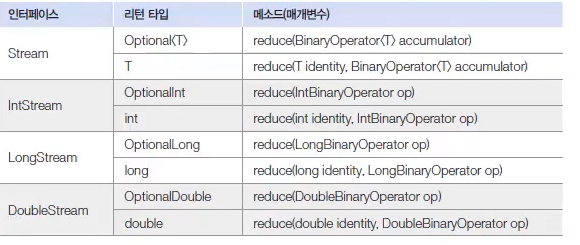
매개값인 BinarayOperator는 함수형 인터페이스이다.
두개의 매개값을 받아 하나의 값을 리턴하는 apply()메소드를 가지고 있다.
reduce()는 스트림에 요소가 엇을 경우 예외가 발생하지만 identify매개 값이 주어지면 이 값을 디폴트 값으로 리턴한다.
reduce(0, (a,b) -> a+b)
public class ReductionExample {
    public static void main(String[] args) {
        // List 컬렉션생성
        List<Student> stList = new ArrayList<>();
        stList.add(new Student("홍길동", 92));
        stList.add(new Student("신용권", 95));
        stList.add(new Student("유미선", 88));

        // 방법1
        int sum1 = stList.stream()
                .mapToInt(student -> student.getScore())
                .sum();

        //방법2
        int sum2 =  stList.stream()
                .mapToInt(student -> student.getScore())
                .reduce(0, (a,b) -> a+b);

        System.out.println("sum1: " + sum1);
        System.out.println("sum2: " + sum2);
    }
}
17.12 요소 수집
스트림은 요소들을 필터링 또는 매핑한 후 요소를을 수집하는 최종처리 메소드인 collect()를 제공한다.
17.12.1 필터링한 요소 수집
Stream의 collect(Collect<T,A,R> collector) 메소드는 필터링된 매핑 요소들을 새로운 컬렉션에 수집하고 리턴한다.
타입파라미터의 T는 요소 A는 누적기 그리고 R은 요소가 저장될 컬렉션이다.
Collector<T,?,List<T>> | toList(); | T를 List에 저장
Collector<T,?,Set<T>> | toSet(); | T를 Set에 저장
Collector<T,?,Map<K, U>> | toMap(Function <T,K> kyeMapper,Function <T,U> valueMapper ) | T를 K와 U로 매핑하고 각각 키값으로 맵에 저장
.collect(Collectors.toList())으로 사용할 수 있다.
자바 16부터는 더 편리하게 요소스트림에서 toList()메소드 사용하면 된다.
->> 어제 프로그래머스 문제 풀다가 toList()했는데 심볼을 찾을 수없다고 했다.
채점시스템이 자바 16버전 이전 버전의 툴을 사용하는 것 같다.
public class CollectExample {
    public static void main(String[] args) {
        // List 컬렉션생성
        List<Student> totalList = new ArrayList<>();
        totalList.add(new Student("홍길동", "남", 92));
        totalList.add(new Student("김수영", "여", 57));
        totalList.add(new Student("김자바", "남", 95));
        totalList.add(new Student("오해영", "여", 93));

        /*
         * //원래 List<Student> maleList = totalList.stream() .filter(s ->
         * s.getSex().equals("남")) .collect(Collectors.toList());
         */

        // 남학생만 묶어 list생성
        List<Student> maleList = totalList.stream()
                .filter(s -> s.getSex().equals("남"))
                .toList();

        maleList.stream()
                .forEach(s -> System.out.println(s.getName()));
        //홍길동 김자바
        System.out.println();

        // 학생 이름을 키 학생 점수를 값으로 갖는 Map
        Map<String, Integer> map = totalList.stream()
                .collect(Collectors.toMap(
                        s -> s.getName(),
                        s -> s.getScore()));

        System.out.println(map); // {김자바=95, 오해영=93, 홍길동=92, 김수영=57}
    }
}
17.12.1 요소 그루핑
collect()메소드는 단순히 요소를 수집하는 기능외에 컬렉션 요소들을 그루핑해서 Map객체를 생성하는 기능도 제공하나.
Collectors.groupingBy() 메소드에서 얻은 Collector를 collect()메소드를 호출할때 제공하면된다.
public class CollectExample {
    public static void main(String[] args) {
        // List 컬렉션생성
        List<Student> totalList = new ArrayList<>();
        totalList.add(new Student("홍길동", "남", 92));
        totalList.add(new Student("김수영", "여", 87));
        totalList.add(new Student("김자바", "남", 95));
        totalList.add(new Student("오해영", "여", 93));

        Map<String, List<Student>> map = totalList.stream()
                .collect(
                        Collectors.groupingBy(s -> s.getSex()));

        List<Student> maleList = map.get("남");
        maleList.stream().forEach(s -> System.out.println(s.getName()));
        //홍길동 김자바
        System.out.println();

        List<Student> femaleList = map.get("여");
        femaleList.stream().forEach(s -> System.out.println(s.getName()));
        //김수영 오해영
    }
}
Collectors.groupingBy()메소드는 그루핑 후 매핑 및 집계(평균, 카운팅 연결, 최대, 최소, 합계)를 수행할 수 있도록
두 번째 매개값인 Collector를 가질 수 있다.
mapping(Function, Collector) | 매핑
averagingDouble(ToDoubleFunction) | 평균값
counting() | 요소 수
maxBy(Comparator) | 최대값
minBy(Comparaotor) | 최소값
reducing(BinarayOperator<T>) | 커스텀 집계값
reducing(T identity, BinarayOperator
public class CollectExample {
    public static void main(String[] args) {
        // List 컬렉션생성
        List<Student> totalList = new ArrayList<>();
        totalList.add(new Student("홍길동", "남", 92));
        totalList.add(new Student("김수영", "여", 87));
        totalList.add(new Student("김자바", "남", 95));
        totalList.add(new Student("오해영", "여", 93));

        Map<String, Double> map = totalList.stream()
                .collect(
                        Collectors.groupingBy(
                                s -> s.getSex(),
                                Collectors.averagingDouble(s -> s.getScore())
                                )
                        );
        System.out.println(map); //{남=93.5, 여=90.0}
    }
}'기초단계 > JAVA' 카테고리의 다른 글
| 2023.03.03 Java 복습 (0) | 2023.03.06 |
|---|---|
| 2023.02.28 -2 Java 복습 (0) | 2023.02.28 |
| 2023.02.27 -2 Java복습 (0) | 2023.02.27 |
| 2023.02.27 Java복습 (0) | 2023.02.27 |
| 2023.02.26 Java복습 (0) | 2023.02.27 |