Spring - AOP
1. AOP란?
AOP는 스프링이아니라 방법론이다. 이것을 구현할때 스프링이 지원을 해준다.
AOP방법론으로 구현하면 어떤 도움을 받을 수 있는지 알아보고자 한다.
일단 스프링과 관계없이 AOP란 무엇인가?
Aspect Oriented Programming = 관점지향형 프로그래밍이다.
우리는 Object Oriented Programming 객체 지향에만 관심이 있었다. 사용자가 원하는 업무기반의 로직에만 관심이 있었다.
사용자의 업무를 분석하고 그에대한 로직만 했다.
그런데 사실 사용자 요규사항 말고 여러 코드들이 더들어가게 되었다. 개발자 관리자가 구현하든 테스트 하든 필요한 것들을 끼워넣엇다.
사용자는 모르는 내용이다. 개발자 운영자 가 필요한 것 이런 내용들을 AOP이다. 관점이 다른 업무라고 보면 좋다. 개발자나 운영자가 필요한 것을 만드는 것이다.
관점지향 프로그래밍은 어찌보면 객체지향보다 큰 범위라고 할 수 있다. 업무들을 분류해서 만든 다는 것이다.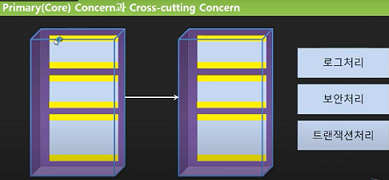
Primary(Core) Concern과 Cross-cutting Concern
관점에 해당되는 주관심사에 있는것을 객체로 만들고 실질업무를 메소드로 만들었다. 객체들이 이용관계에 있으니 화살표료 표시를 햇다.
가끔은 필요로의해서 로그처리(성능테스트 사용자요구권한처리), 보안처리, 트랜잭션처리 등의 로직이 필요하다.
이런거는 사용자가 요구한것이아닌 이것을 수반하려면 필요한 내용이다.
실질적인 업무를 처리하는 것에서 위와 아래를 담당하게 된다.
Cross-cutting ? 위에서 아래로 가는 흐름이 있기때문에 잘라서 바꿀 수 있게 해야하고 이것을 뺏따 넣엇다 해야한다.
그래서 과거에는 이 커팅을 하는 방법을 하기 힘들었다. 소스코드에 직접 했다가 주석을 했다가 하는 방식이었다.
소스가지고 있는 사람만이 이것을 할 수 있는 것이 문제엿다.
쉽게 하고자 해서 나온게 AOP이다. 관점에 해당되는 코드를 마치 꽃은거처럼 진행되게 하는 것이다.
프로그램은 흐름이니 주업무는 따로 만들고 중간에 꼽아넣는 것이다.
먼저 크로스커팅이 하게된후 코어를 불러오게 함으로써 중간에 껴있는 거처럼 되게 만드는 것이다.
이걸 스프링을 이용하면 매우 쉽게 해결 할 수 있게 된다.
2. AOP 자바 코드 이해하기
자바만으로 AOP를 구현해보고자 한다.
권한을 주기 위해 하거나 너무 느린거같아서 시간을 확인하는 작업등을 했었다.
사진참조
업무(내가 링크드리스트 어레이리스트 비교할때 햇던거처럼)적 관점에서 소스코드를 넣는 것이 과거에는 하나 하나 넣고 없애고 했어야햇다.
과연이 AOP를 구현하고 싶다면? 주업무와 크로스커팅을 나눠서 작성한다.
이것이 Proxy클래스이다.
사진참조
윗부분 실행 -> 코어 -> 다음부분실행 하는 방법이 디는 것처럼보인다.
proxy를 spring di로 함으로써 코드 변경과 수정을 할 수 있게 되는 것이다.
3. 순수 자바로 AOP 구현해보기
이전에 작성했엇던 Exam을 활용해보자.
@Override
public int total() {
int result = kor + eng + math + com;
return result;
}
@Override
public float avg() {
float result = total() / 4.0f;
return result;
}
result를 만들어서 바로 생성되는게아니라 계산하고 중간에 넣을 수 있도록 해보자.
@Override
public int total() {
long start = System.currentTimeMillis();
int result = kor + eng + math + com;
try {
Thread.sleep(200);
} catch (InterruptedException e) {
e.printStackTrace();
}
long end = System.currentTimeMillis();
String message = (end - start) + "ms 시간이 걸렸습니다.";
System.out.println(message);
return result;
}
성능을 테스트 해보기 위해 시간을 측정하는 것을 넣었다.(시간이 오래걸리지않으니 스레드슬립넣어줌) 과거에는 직접 이렇게 주업무에 넣어서 작성했어야햇다.
이 곁다리 업무를 여기에 작성하지 않도록 하는 것임
proxy는 가짜 이다. 다르지만 기능이 닮아잇다. 사용자 입장에서는 exam을쓰는 것처럼느껴지지만 proxy가 기능을 할거고
Exam proxy = Proxy.newProxyInstance(loader, interfaces, h)
loader = 실제로 불러올 객체 NewlecExam.class
intefaces = 복수형이니 배열로 가져오기 new Class[] {Exam.class} 여러 인터페이스를 구현하고 있다면 배열에 넣어주면된다.
h는 곁다리 업무이다. 구현할 내용 즉 new InvocationHandler()인터페이스를 구현한 객체가 들어가는 것이다.
별도의 클래스파일을 만들어야하지만 익명 클래스로 직접 적상할수잇다.
package spring.aop;

import java.lang.reflect.InvocationHandler;
import java.lang.reflect.Method;
import java.lang.reflect.Proxy;

import org.springframework.context.ApplicationContext;
import org.springframework.context.support.ClassPathXmlApplicationContext;

import spring.aop.entity.Exam;
import spring.aop.entity.NewlecExam;

public class Program2 {
public static void main(String[] args) {

    ApplicationContext context =
            //new AnnotationConfigApplicationContext(NewlecDIConfig.class);
            new ClassPathXmlApplicationContext("spring/aop/setting.xml");

    Exam exam = new NewlecExam(1, 1, 1, 1);


    Exam proxy = (Exam) Proxy.newProxyInstance(NewlecExam.class.getClassLoader(),
            new Class[] {Exam.class},
            new InvocationHandler() {

                @Override
                public Object invoke(Object proxy, Method method, Object[] args) throws Throwable {
                    long start = System.currentTimeMillis();

                    Object result = method.invoke(exam, args); //(업무객체, 파라미터)

                    long end = System.currentTimeMillis();
                    String message = (end - start) + "ms 시간이 걸렸습니다.";
                    System.out.println(message);
                    return result;
                }
            });

    System.out.printf("total is %d\n", proxy.total());
    System.out.printf("total is %d\n", exam.total());
}
}
곁다리업무를 가지고 온다. 메소드엔 실제 업무객체와 args에는 파라미터이다. 인지가 빠지지 않도록 넣어준다.
invoke는 호출하면 반환하는 값이 모든 형태를 받을 수있도록 Object로 만들엇다. 그래서 Object로 받는다.
NewlecExam.class.getClassLoader()로더를 필요로하니 로더를 넣어주고
object 로 변환해주기 때문에 Exam으로 형변환도 해준다.
곁다리 업무가 필요없으면
System.out.printf("total is %d\n", exam.total());을 하면된다.
System.out.printf("total is %d\n", proxy.total());
System.out.printf("total is %f\n", proxy.avg());
다른 주 업무도 프록시 업무로 할 수 있다.
4. 스프링으로 AOP 구현해보기-AroundAdvice
스프링이 위에서 했던 것을 자유롭게 만들 수 있다.
그런데 곁다리 업무를 주업무 앞에만 넣을 수도 있는데 하기전 검사하는 등 어떤경우에만 뒤로만 넣을 수도잇다.
그래서 스프링은 Before Advice/ After retrunning Advice/ After throwing Advice / Arround Advice
시작하기전 / 이후 / 예외처리 / 앞뒤로 필요한 것 4가지로 구분해서 처리한다.
가장 알맞는 녀석을 꽃아서 사용하면된다. 이번에 구현했던것은 Arround엿으니 이것으로 해보자. 그 후 가각 독해해보고자 한다.
1.xml파일로하기
1.Exam exam = new NewlecExam(1, 1, 1, 1);생성하는코드
2.프록시 생성하는 코드
3.곁다리 업무 하는거 꽃는 코드
<?xml version="1.0" encoding="UTF-8"?>
<beans xmlns="http://www.springframework.org/schema/beans"
    xmlns:xsi="http://www.w3.org/2001/XMLSchema-instance"
    xmlns:p="http://www.springframework.org/schema/p"
    xmlns:util="http://www.springframework.org/schema/util"
    xmlns:context="http://www.springframework.org/schema/context"
    xsi:schemaLocation="http://www.springframework.org/schema/beans http://www.springframework.org/schema/beans/spring-beans.xsd
        http://www.springframework.org/schema/context http://www.springframework.org/schema/context/spring-context-4.3.xsd
        http://www.springframework.org/schema/util http://www.springframework.org/schema/util/spring-util-4.3.xsd">


    <bean id="exam" class="spring.aop.entity.NewlecExam" p:kor="1" p:eng="1" p:math="1" p:com="1" />
    <bean id ="logAroundAdivce" class="spring.aop.advice.LogAroundAdivce"/>
    <bean id="proxy" class="org.springframework.aop.framework.ProxyFactoryBean">
        <!-- <property name ="target" ref="target"/>  name=setTarget인데 그냥 쓰는거임-->
        <property name ="target" ref="exam"/> <!-- exam 변형 -->
        <!--핸들러 넣기interceptorNames로 넣어야한다. 복수형이니 리스트로 넣어야한다.  참조목록이니 참조로 넣어야한다. 아직안만들었지만 logAroundAdive을 이름으로 하고 클래스 나중에 넣기 -->
        <property name = "interceptorNames">
            <list>
                <value>logAroundAdivce</value>
            </list>
        </property>
    </bean>
</beans>
package spring.aop;
import org.springframework.context.ApplicationContext;
import org.springframework.context.support.ClassPathXmlApplicationContext;
import spring.aop.entity.Exam;
public class Program {
public static void main(String[] args) {
ApplicationContext context =
//new AnnotationConfigApplicationContext(NewlecDIConfig.class);
new ClassPathXmlApplicationContext("spring/aop/setting.xml");
//곁다리업무 하기
Exam proxy = (Exam) context.getBean("proxy");
System.out.printf("total is %d\n", proxy.total());
System.out.printf("avg is %f\n", proxy.avg());
//주업무만 출력하기
Exam exam = (Exam) context.getBean("exam");
System.out.printf("total is %d\n", exam.total());
System.out.printf("avg is %f\n", exam.avg());
}}결합되는 관계를 xml로해서 결합관계를 자유롭게 만들어 준것이다.
주업무만 사용하고자 한다면 로직을 바꾸기만 하면된다.
2023.01.15 후기
어제는 오류와 싸우느라 힘들었다. 2022-06이후로 스프링 레거시를 지원하지 않아서 공부하는데 이것저것 설정하는데 오류가 많이 발생했다. 결국 해결하지 못한 오류도 있지만 중요한 오류는 아니고 프로그램은 진행이 되서 다행이다.
스프링과 AOP라는 것을 보게 되었다. AOP라는 것은 생각하지 못했지만 생각해보면 항상 앞뒤로 뭔가 넣는 일을 하는 것을 했던 것 같다.
한곳에 몰아 넣지 않고 나눠 쓰면 효율이 매우 좋은 것 같다.
진짜 시작이 얼마 남지 않았다. 안 좋은 소식이 너무 많다. 너무 무섭다.
'기초단계 > SPRING' 카테고리의 다른 글
| 2023.01.17 Spring (0) | 2023.01.17 |
|---|---|
| 2023.01.16-2 Spring (1) | 2023.01.16 |
| 2023.01.16-1 Spring (0) | 2023.01.16 |
| 2023.01.15-1 Spring (0) | 2023.01.15 |
| 2023.01.13 Spring (0) | 2023.01.13 |