JSP & Servlet
26. Application 객체
결과를 잠깐 저장하는 객체 중 하나
원래는 1번서블릿 요청시 일하고 메모리에서 사라짐. 이런 특성으로 1번이처리햇던결과를 2번이 이어받아 실행하는 것이 불가능함.
그들만의 데이터를 이어받아 저장하는 것이 중요한데 서블릿 Context라고 한다.
흔히 Application을 만들다보면 사용되는 api중 context를 가지고 있는것이 많다.
어떻게보면 책갈피라는 것을 떠올릴수잇늗네 책을 이어갈수잇도록 하나의 상태값을 표시하는 역할을 한다. 컨텍스트가 문맥을 이어갈수잇도록 저장소 역할을 하는 것이다.
상태 저장공간이라고 보면된다.
ServletContext application = request.getServletContext();
이 application에는 두가지 저장 일반적으로 사용되는 컬렉션이라고 생각하면된다.
application.setAttribute("value", v);
맵에서 저장햇듯이 키, 값을 넣어주자.
이렇게하면 두고 꺼내서 쓸수가 있다.
op에 따라서 저장, 계산 등을 할수있다.
x 저장소에 담긴내용 y 지금 사용자가 전달한 밸류값을 y라고 해보자.
값을 담는작업말고 꺼내는 작업
int x = (Integer) application.getAttribute("value");
예제실습
그러나 흰화면 나오고 뒤로돌아가고 흰화면나오고 뒤로돌아가고 밖에 안된다.
사실 이 실습이 appication객체를 이용하는데 적절하지는 않다. 사용방법만 배우고자 한것이다.
@Override
protected void service(HttpServletRequest request, HttpServletResponse response) throws ServletException, IOException {
    response.setCharacterEncoding("UTF-8");
    response.setContentType("text/html; charset=UTF-8");
    PrintWriter out = response.getWriter();

    String v_ = request.getParameter("v");
    String op = request.getParameter("operator");

    int v = 0;

    if(!v_.equals("")) {
        v =Integer.parseInt(v_);
    }
    ServletContext application = request.getServletContext();
    //계산
    if(op.equals("=")) {

        int x = (Integer) application.getAttribute("value");
        int y = v;
        String operator = (String) application.getAttribute("op");;
        int result = 0;

        if(operator.equals("+")) {
            result    = x+y;
        }
        if(operator.equals("-")) {
            result    = x-y;
        }
        response.getWriter().println("결과: " + result);
    } else {
        //값 저장
        application.setAttribute("value", v);
        application.setAttribute("op", op);
    }
27. Session객체로 상태값 저장하기, Application객체와의 차이점
위에서 사용한 코드가 Session을 사용해도 똑같다.
HttpSession Session = request.getSession();으로 만들고 위에서 Session으로만 바꾼다.
application객체는 이것을 사용할때 applicaion전역에서 쓸수잇다.
session객체는 session 범주에서쓸수있다. 현재 접속한 사용자를 위한 공간이다.
사용자별로 공간이 달라질 수있다. 세션마다 현재접속자마다 공간이 달라진다는 뜻이다.
브라우저가 달라지면 다른 사용자로 인식을 하는데 세션이 달라지니 다른 사람이 입력했던 것은 값이 없어진다.
그럼 서버쪽에서는 이 사용자를 어떤식으로 식별하는가? ->다음강
크롬브라우저를 똑같이 하나 더 열엇을때? 같은 세션으로 인식하는가 다른 세션으로 인식하는가? 같은 세션으로 인식한다.
왜 다른 세션이 아닐까?여러 개를 띄워도 하나의 프로세스를 스레드로 받기때문에 프로세스를 공유하기때문에 같은 사용자로 인식하게 된다.
HttpSession session = request.getSession();
    //계산
    if(op.equals("=")) {

        int x = (Integer) session.getAttribute("value");
        int y = v;
        String operator = (String) session.getAttribute("op");;
        int result = 0;

        if(operator.equals("+")) {
            result    = x+y;
        }
        if(operator.equals("-")) {
            result    = x-y;
        }
        response.getWriter().println("결과: " + result);
    } else {
        //값 저장
        session.setAttribute("value", v);
        session.setAttribute("op", op);
    }
28. WAS가 현재사용자(Session)을 구분하는 방식
브라우저 ->요청 -> 서버 다른서블릿에게 전달하고 싶은 내용을 저장하는데 이것을 application이다.
이 것을 저장할 수있는것을 개인별로 저장할수잇는 session공간이 잇다.
서블릿 요청이 왓을때 새로운 사용자가 되고 session이 존재하지 않는다. session은 사용자가 SID를 가지고 있어야한다.
처음에는 SID가 없어서 application만 가능하다. 돌아갈때 SID를 제공하고 session이 제공되게 된다.
다음 또 요청을 하면 SID를 참조해서 session에 값이 저장된다.
SID가 WAS에 의해 발급되고 이것을 이용자가 가지고 있다가 session을 이용하게 되는것이다.
브라우저를 바꾸거나 끄면 다시 초기화된다.
개발자도구의 네트워크를 보면 서버에 요청할때마다 식별자를 가지고 간다.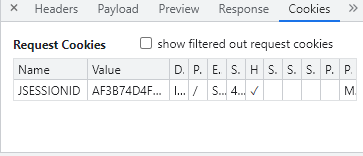
브라우저를 사용하지 않고 간단한 풀로 누군가의 세션아이디를 복사해서 요청하면 같은 사용자로 인식하게 된다.
그래서 웹서버에서는 다양한 방식으로 세션아이디를 제공하기도한다. 다른 조합을 통해서 사용자를 식별하기도 한다.
그러면 웹이라는 특성상 사용자가 요청을 계속할 것이다. 그럼 서버는 걔속 세션을 유지하나 아니면 정리를 할까?
그렇다면 언제 정리하나?
session은 시간이 중요하다. 사용자 요청후 요청이 또 안오면 시간을 두고 삭제한다. 기본시간은 30분이다.
개별적으로 타임아웃을 설정할 수 있다.
Session의 메소드가 있는데 다음과 같다.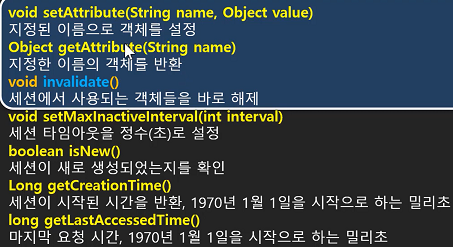
29. Cookie를 이용해 상태값 유지하기
session, application은 데이터의 특성에 따라서 저장하면된다.
그런데 만약 사물함에 무언가를 두고 다닐수도잇지만 이것을 가지고 다니는 사람도 있다.
클라이언트가 가지고 있다가 가지고 올 수 있는데 이값을 쿠키라고 한다.
그렇다면 이렇게 왓다갓다해도 값이 저장이되는가? 된다.
그래서 값을 저장하는 방식이 세가지인데 서버쪽에 저장하는 application과 session, 클라이언트쪽에 저장하는 cookie가 있는 것이다.
이 3가지 저장소를 사용하면 각각의 특징, 장단점이 있다. 이것들을 알고있어야 어디에 둘것인지를 정할 수 있다.
클라이언트가 서버에 데이터를 요청할때 크게 3가지 값이 있다.
브라우저가 알아서 담아주는 Header정보과 데이터 정보이 있다.
사용자 데이터는 getParameter("x), 헤더정보는 getHeader("remote-host")를 통해 가져온다.
그리고 여기에 쿠키도 심어진다. 이 정보는 getCookies();로 가져온다.
다시 보낼때는 addCookie()로 보내주고 클라이언트가 받아서 저장한다.
쿠키를 저장
쿠키는 키와 값으로 나눠진다. c라는 키로 값을 심어서 보낸다.
Cookie cookie = new Cookie("c" String.valueOf(result));
response.addCookie(cookie);
쿠키 읽기
Cookie[] cookies = requeset.getCooikes();
String _c = "";
for문을 돌려서 그 쿠키값에 해당되는 밸류값을 찾아야한다.
if(cookies != null){
for(Cookie cookie : cookies)
if("c".equals(cookie.getName())
_c = cookie.getValue();
사용자에게 값을 위임햇다가 불러올때 읽어준다.
쿠키값으로 보내는 것은 반드시 문자형으로 보내야한다. 그것도 url을 사용할수 있는 형태로 보내야한다.
json등을 사용하면 다양한 것을 문자형을 보낼수잇다.
브라우저 - 설정 -사이트설정에서 쿠키를 허용해줘야한다. 보통은 허용되어잇다.
모든 사이트 데이터 및 권한 보기하면 사이트들이 보냇던 쿠키들을 볼수도잇다.
Cookie[] cookies = request.getCookies();
    //계산
    if(op.equals("=")) {

        int x = 0;
        String operator = null;

        for (Cookie c : cookies) {
            if(c.getName().equals("value")) {
                x = Integer.parseInt(c.getValue());
                break;
            }
        }
        for (Cookie c : cookies) {
            if(c.getName().equals("op")) {
                operator = c.getValue();
                break;
            }
        }

        int y = v;

        int result = 0;

        if(operator.equals("+")) {
            result    = x+y;
        }
        if(operator.equals("-")) {
            result    = x-y;
        }
        response.getWriter().println("결과: " + result);
    } else {
        //값 저장
        Cookie valueCookie = new Cookie("value", String.valueOf(v));
        Cookie opCookie = new Cookie("op", op);
        response.addCookie(valueCookie);
        response.addCookie(opCookie);
        response.sendRedirect("calc2.html");
    }
30. Cookie의 path 옵션
쿠키를 사용할때 2가지를 꼭생각해야한다.
1.서블릿을 여러개 만들건데 서블릿마다 그 값을 저장할게 있어서 쿠키를 저장하려고한다.
클라이언트가 쿠키를 보내는데 서블릿마다 쿠키가 달라야한다. 그래서 쿠키를 보낼때 url을 설정할수있어야한다.
그래서 비효율적으로 여러가지 값이나 이름이 충돌하는 것이 없도록 할 수 있다.
valueCookie.setPath("/");
/한개: 모든 url, /notice: 특정 url에서 요청할 경우 /notice/: 특정디렉토리 하위까지 포함.
개발자도구에서 response header를 보면 설정된 쿠키를 볼 수잇다.
requeset header를 보면 쿠키를 보내는 것을 볼 수잇다.
경로에따라 쿠키를 보낼 수 있다.
31. cookie의 maxAge옵션
쿠키 브라우저가 닫혀도 유효한가? 설정하지 않으면 브라우저가 닫히면 쿠키도 없어진다.
그러나 장점은 브라우저가 닫혀도 기간내에는 유지할 수 있게 된다.
보통 쿠키는 IN-MEMORY에 있다가 기간이있다면 IN-FILE 다른 쿠키파일에 저장되어 존재하게 된다.
valueCookie.setMaxAge(초); 60초를 기준으로 60분이면 60*60 여기에 24시간이면 24*60*60의 연산식으로 보기 쉽게 나타낸다.
여기서 설정하는 것은 만료날짜이다.
32. Application, Session, Cookies의 차이

application
사용범위 : 전역범위에서 사용하는 저장공간
생명주기 : WAS가 시작해서 종료할 때 까지
저장위치 : WAS 서버의 메모리
서버쪽에다 두고 전역적으로 사용할 수 있을 것같다면 여기에 저장
--
Session
사용범위 : 세션 범위에서 사용하는 저장공간
생명주기 : 세션이 시작해서 종료할 때 까지
저장위치 : WAS 서버의 메모리
--
Cookie
사용범위 : Web Browser별 지정한 path 범주 공간
생명주기 : Browser에 전달한 시간부터 만료시간까지
저장위치 : Web Browser의 메모리 또는 파일
서버에 부담을 주지않는 데이터 구조이다. 특정 url에 대해서만 사용할 수 있어서 서버와 관계없이 클라이언트가 데이터를 가질 수잇다.
1.내가 만약 데이터를 저장하려고한다. 그런데 이 값을 오래 저장하고 싶다. -> 쿠키에 저장
이런걸 세션으로 하면 서버자원이 너무 낭비된다.
2.notice와 관련된 데이터를 가지고 있다 이 데이터를 다른 서블릿에서는 사용할일이 없다. -> 특정범위 특정 url에서만 사용하면 쿠키에서 저장해두고 쓰기
33. 서버에서 페이지 전환해주기(redirection)
굉장히 간단하지만 굉장히 많이 사용한다.
calc2에서 post되서 보내면 servlet calc2에서 아무것도 돌려주지않아 백지가 된다.
다시계산을하려면 뒤로돌아가서 다시 요청을 했다. 그러나 서버측에서 백지를 주지않고 원래 페이지를 다시 보여줄 수 있다.
이것을 redirection이라고 한다.
response.sendRedirect("calc2.html");
사용자는 html을 요청한적이 없는데 이것을 다시 요청한것처럼 보인다.
34. 동적인 페이지(서버페이지)의 필요성
보통의 계산기 프로그램을 보면 계산기 눌럿던게 누적이 되면서 더해진다.
사용자가 입력한 내용을 서버에서 페이지를 만들때 끼워넣어야한다.
그런데 html은 정적인 페이지라 저장된 값을 어떻게 보여줄것인가? 그래서 동적인 페이지로 변환해줘야한다.
쿠키를 읽어서 출력해줄수 있나? 서블릿으로 동적으로 만들어주면된다.
순수한 html이 아닌 서블릿으로 만든 출력한 문서를 만들어서 동적으로 보내주기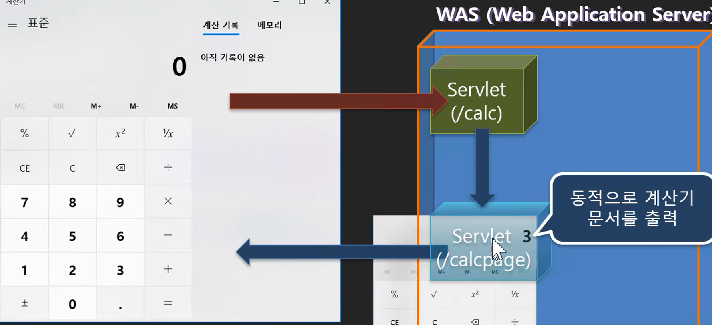
5*4짜리 테이블 생성 calc3.html
값을 서블릿으로 바꿔서 내용이 나오게 하자. 다음강의에서.
<!DOCTYPE html>
<html>
<head>
<meta charset = "UTF-8">
<title>Insert title here</title>
<style>
input{
width:50px;
height:50px;
}
.output{
    hegiht:50px;
    background: #e9e9e9;
    font-size:24px;
    font-weight: bold;
    text-align: right;
    padding:0px 5px;
}
</style>
    <form action = "calc3" method="post">
        <table>
            <tr>
                <td class="output" colspan = "4">0</td>
            </tr>
            <tr>
                <td><input type = "submit" name="operator" value="CE"/></td>
                <td><input type = "submit" name="operator" value="C"/></td>
                <td><input type = "submit" name="operator" value="BS"/></td>
                <td><input type = "submit" name="operator" value="÷"/></td>
            </tr>
            <tr>
                <td><input type = "submit" name="value" value="7"/></td>
                <td><input type = "submit" name="value" value="8"/></td>
                <td><input type = "submit" name="value" value="9"/></td>
                <td><input type = "submit" name="operator" value="X"/></td>
            </tr>
            <tr>
                <td><input type = "submit" name="value" value="4"/></td>
                <td><input type = "submit" name="value" value="5"/></td>
                <td><input type = "submit" name="value" value="6"/></td>
                <td><input type = "submit" name="operator" value="-"/></td>
            </tr>
            <tr>
                <td><input type = "submit" name="value" value="1"/></td>
                <td><input type = "submit" name="value" value="2"/></td>
                <td><input type = "submit" name="value" value="3"/></td>
                <td><input type = "submit" name="value" value="+"/></td>
            </tr>
            <tr>
                <td></td>
                <td><input type = "submit" name="value" value="0"/></td>
                <td><input type = "submit" name="dot" value="."/></td>
                <td><input type = "submit" name="operator" value="="/></td>
            </tr>
        </table>


</head>
<body>

</body>
</html>
35. 처음이자 마지막으로 동적인 페이지 서블릿으로 직접 만들기
다음에는 JSP로 넘어가서 만든다..!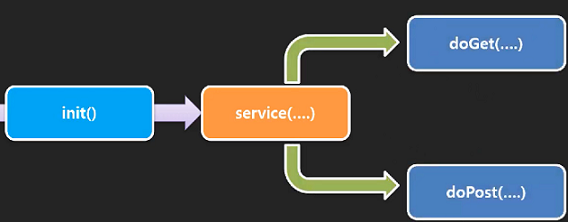
새로운 service()만들건데 doGet()과 doPost()가 나뉘어져잇다.
html은 정적이라 만들어 놓은것을 요청한다.
Calcpage만들기
서블릿에 html페이지를 복사한다. 자바에선 이것들을 구분못해서 오류가 발생한다.
out.write("");이런식으로 모든 html코드에 출력코드를 달아준다.
안에 이스케이프문자 \를 하나 하나 입력해줘야된다. 컨트롤f하면 찾아서 변경가능..
매우 매우 매우 귀찮다!!
36. 계산기 서블릿 완성하기
post된 데이터를 어떻게 처리할 것인가?
쿠키에 저장되는게 연산식이니 그 연산식 자체를 읽어서 구현하자.
눌러서 post시키는 것은 calc3.java에서 처리
사용자 잘하는 값을 가지고 익스프레션을 만들어서 쿠키에 저장하고 리디렉션하면된다.
exp += (value == null)?"":value;
exp += (operator== null)?"":operator;
exp += (dot == null)?"":dot;
세개중 null이 아닌것을 누적해줌.
"="일때는 계산하기
쿠키에서 읽어와서 사용자가 입력한 내용을 덧붙이는 작업을 하고 쿠키로 저장한다.
if(operator != null && operator.equals("=")) {
            ScriptEngine engine = new ScriptEngineManager().getEngineByName("nashorn");
            try {
                engine.eval(exp);
            } catch (ScriptException e) {
                e.printStackTrace();}
날먹부분 자바에서 자바스크립트롤 사용할수있게 해주는 엔진가져옴.
Cannot invoke "javax.script.ScriptEngine.eval(String)" because "engine" is null
그런데 최신 jdk에선 지원안해서 오류남! 그냥 된다고 생각하자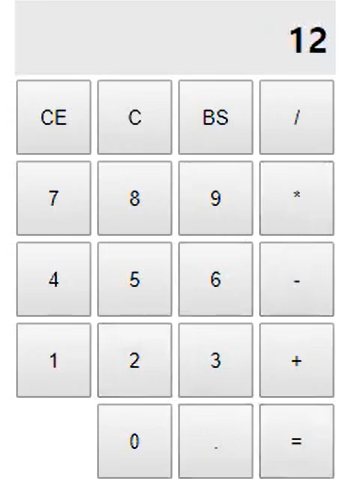
@WebServlet("/calcpage")
public class Calcpage extends HttpServlet{
@Override
protected void service(HttpServletRequest request, HttpServletResponse response) throws ServletException, IOException {
    String exp = "0";
    Cookie[] cookies = request.getCookies();
    if(cookies != null) {
        for (Cookie c : cookies) {
            if(c.getName().equals("exp")) {
                exp = c.getValue();
                break;
            }
        }
    }

    response.setCharacterEncoding("UTF-8");
    response.setContentType("text/html; charset=UTF-8");
    PrintWriter out = response.getWriter();

    out.write("<!DOCTYPE html>");
    out.write("<html>");
    out.write("<head>");
    out.write("        <meta charset = \"UTF-8\">");
    out.write("        <title>Insert title here</title>");
    out.write("<style>");
    out.write("input{");
    out.write("width:50px;");
    out.write("height:50px;");
    out.write("}");
    out.write(".output{");
    out.write("    hegiht:50px;");
    out.write("    background: #e9e9e9;");
    out.write("    font-size:24px;");
    out.write("    font-weight: bold;");
    out.write("    text-align: right;");
    out.write("    padding:0px 5px;");
    out.write("}");
    out.write("    </style>");
    out.write("        <form action = \"calc3\" method=\"post\">");
    out.write("            <table>");
    out.write("                <tr>");
    out.printf("                    <td class=\"output\" colspan = \"4\">%s</td>", exp);
    out.write("                </tr>");
    out.write("                <tr>");
    out.write("                    <td><input type = \"submit\" name=\"operator\" value=\"CE\"/></td>");
    out.write("                    <td><input type = \"submit\" name=\"operator\" value=\"C\"/></td>");
    out.write("                    <td><input type = \"submit\" name=\"operator\" value=\"BS\"/></td>");
    out.write("                    <td><input type = \"submit\" name=\"operator\" value=\"/\"/></td>");
    out.write("                </tr>");
    out.write("                <tr>");
    out.write("                    <td><input type = \"submit\" name=\"value\" value=\"7\"/></td>");
    out.write("                    <td><input type = \"submit\" name=\"value\" value=\"8\"/></td>");
    out.write("                    <td><input type = \"submit\" name=\"value\" value=\"9\"/></td>");
    out.write("                <td><input type = \"submit\" name=\"operator\" value=\"*\"/></td>");
    out.write("                </tr>");
    out.write("                <tr>");
    out.write("                    <td><input type = \"submit\" name=\"value\" value=\"4\"/></td>");
    out.write("                    <td><input type = \"submit\" name=\"value\" value=\"5\"/></td>");
    out.write("                    <td><input type = \"submit\" name=\"value\" value=\"6\"/></td>");
    out.write("                    <td><input type = \"submit\" name=\"operator\" value=\"-\"/></td>");
    out.write("                </tr>");
    out.write("                <tr>");
    out.write("                    <td><input type = \"submit\" name=\"value\" value=\"1\"/></td>");
    out.write("                    <td><input type = \"submit\" name=\"value\" value=\"2\"/></td>");
    out.write("                    <td><input type = \"submit\" name=\"value\" value=\"3\"/></td>");
    out.write("                    <td><input type = \"submit\" name=\"value\" value=\"+\"/></td>");
    out.write("                </tr>");
    out.write("                <tr>");
    out.write("                    <td></td>");
    out.write("                    <td><input type = \"submit\" name=\"value\" value=\"0\"/></td>");
    out.write("                    <td><input type = \"submit\" name=\"dot\" value=\".\"/></td>");
    out.write("                    <td><input type = \"submit\" name=\"operator\" value=\"=\"/></td>");
    out.write("                </tr>");
    out.write("</table>");
    out.write("</head>");
    out.write("<body>");
    out.write("</body>");
    out.write("</html>");
}}
@WebServlet("/calc3")
public class Calc3 extends HttpServlet{
@Override
protected void service(HttpServletRequest request, HttpServletResponse response) throws ServletException, IOException {
Cookie[] cookies = request.getCookies();
String value = request.getParameter("value");
String operator = request.getParameter("operator");
String dot = request.getParameter("dot");
String exp = "";
if(cookies != null) {
for (Cookie c : cookies) {
if(c.getName().equals("exp")) {
exp = c.getValue();
break;
}
}
}
if(operator != null && operator.equals("=")) {
ScriptEngine engine = new ScriptEngineManager().getEngineByName("nashorn");
try {
exp = String.valueOf( engine.eval(exp));
} catch (ScriptException e) {
e.printStackTrace();
}
} else if (operator != null && operator.equals("C")){
exp = "";
} else {
exp += (value == null)?"":value;
exp += (operator== null)?"":operator;
exp += (dot == null)?"":dot;
}
Cookie expCookie = new Cookie("exp", exp);
if (operator != null && operator.equals("C")){
expCookie.setMaxAge(0);
}
response.addCookie(expCookie);
response.sendRedirect("calcpage");
// response.sendRedirect("/calcpage"); 같은 경로이니 경로 굳이 필요없으니 안적어도됨
}}37. 쿠키삭제하기
쿠키를 삭제해야 초기화가 된다. c눌럿을때 쿠키삭제하기!
if (operator != null && operator.equals("C")){
exp = " ";
}
매우 간단하다 그냥 공백을 제공하면된다.
expCookie.setMaxAge(0);을해줘야 바로 없어진다.
38. get과 post에 특화된 서비스 함수
지금까지 서블릿을 구현할때 service함수로 처리했는데 이것들에 특화된것을 해보고자한다.
get요청을해도 service()가 post요청을해도 serviece()가 실행이됬엇다.
이것들을 구분하려면 어떻게 한다?
38.1 service()에서 구분짓기.
if(req.getMethod().equals("GET")) {
} else if (req.getMethod().equals("POST")) {
}
요청이 왔다는 것을 구분하기 위해서 반드시 대문자로 작성해주자.
@Override
protected void service(HttpServletRequest req, HttpServletResponse resp) throws ServletException, IOException {
    if(req.getMethod().equals("GET")) {
        System.out.println("GET 요청이 왔습니다.");
    } else if (req.getMethod().equals("POST")) {
        System.out.println("POST 요청이 왔습니다.");
    }
    //super.service(req, resp);
}
38.2 get요청과 post요청에 특화된 메소드 사용하기.
super.service(req, resp); 오버라이딩된게아닌 부모의 메소드를 사용하면된다.
부모가 가진 service()는 doGet()과 doPost()메소드를 가지고 잇다.
사용자가 요청시 get요청인지 post요청인지 구분해서 각각을 호출한다.
만약 얘들이 오버라이딩이 안되있으면 405 오류가 난다.
특화된 녀석을 만들거나 조건문으로 만들기
doGet, doPost를 하기전에 공통으로 할것이 있으면 service()을 오버라이딩해서 사용
거쳐서 밑에 doGet, doPost이 처리되도록하기
service()을 오버라이딩안되있으면 알아서 doGet, doPost이 처리됨
@Override
protected void doGet(HttpServletRequest req, HttpServletResponse resp) throws ServletException, IOException {
    System.out.println("doGET 메소드가 호출되었습니다.");
}

@Override
protected void doPost(HttpServletRequest req, HttpServletResponse resp) throws ServletException, IOException {
    System.out.println("doPOST 메소드가 호출되었습니다.");
}
39. 계산기 프로그램 하나의 서블릿으로 합치기
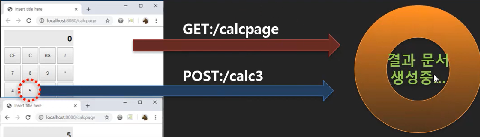
calcpage는 get요청만 되고 calc3는 post만한다. service()만 사용해서 합칠 수가 잇다.
doget에는 calcpage내용을 넣기
dopost에는 calc3를 넣기
바꿀점
out.write("<form method="post">"); 자기 페이지 요청이니 url을 지정할 필요가 없다.
expCookie.setPath("/calculator"); 쿠키설정을 자기만 사용하게 하기
response.sendRedirect("calculator"); 리디릭트되는것을 본인으로 해주기
훨씬더 바람직하다.
2022.12.31 후기
벌써 2023년이다. 한해가 정신없이 지나갔다.
서블릿이 마무리되고 내일부터 JSP를 배우게 될 것 같다.
콘솔창에서만 보다가 웹브라우저를 통해 배우는 것은 나쁘지 않다.
새해에도 중요한 것은 꺽이지 않는 마음
'기초단계 > JSP&Servlet' 카테고리의 다른 글
| 2023.01.04 JSP & Servlet (0) | 2023.01.05 |
|---|---|
| 2023.01.03 JSP & Servlet (1) | 2023.01.03 |
| 2023.01.02 JSP & Servlet (0) | 2023.01.02 |
| 2022.12.30 JSP & Servlet (0) | 2022.12.30 |
| 2022.12.29 JSP & Servlet (0) | 2022.12.30 |